How to Spy on Competitor Facebook Ads: The Complete Guide for Media Buyers (2026)

Share:
Every single Facebook ad that your competitors are running at the moment is publicly visible for just about anyone.
Meta made a deliberate decision to build it that way to be honest, launching an Ad Library that showcases every active ad across Facebook, Instagram, and Messenger, and there is no login required or any kind of special access that you would need.
But, simply knowing that competitor ads are visible and actually managing to extract useful intelligence from them, those are two very different things altogether.
The majority of marketers will open the Ad Library and scroll through a few ads screen-shotting the ones that seem kind of interesting or relevant, and then they just call it competitor research.
And a month later, those very screenshots are usually buried somewhere in a downloads folder and nothing has really changed in regards to how they are building their own campaigns.
This guide here will cover how to properly conduct competitor Facebook ad research, focusing on the specific methods to use, and what type of signals actually matter, and how one can read an ad's performance without actually seeing its backend data and also, how to establish a weekly research habit that compounds over a period of time.
Whether you are a media buyer an performance marketer, or an agency managing ads for several different clients, the underlying process remains pretty much the same .
Is it legal to spy on competitor Facebook ads? Yes, completely. Every method in this guide uses publicly available data that Meta intentionally makes transparent. The Ad Library exists specifically for advertising accountability. You are using tools the platform itself provides.
Why Competitor Facebook Ad Research Actually Matters
The case for doing competitor research is pretty simple: you are all in the same auction as your competition, all going after similar audiences, and you are all fighting for the same eyeballs.
When a competitor has an ad running for, say, 45 days, that ad has made it through the budget process okayed, it has survived creative reviews, and, importantly, it passes the real-world audience feedback test.
No one keeps an ad running just, because they like the way it looks – it is running because it is actually working.
Looking at what already performs well in your specific market offers three main advantages:
It reduces the amount of money you waste on testing different things. Instead of testing, say, 20 different hook variations from scratch, you can figure out the 3-4 hook types that already seem to be working well with the audience you are trying to reach and then test slight changes to those. This saves you a lot of time and money as, well.
It shortens your learning curve. If a competitor has been running ads in your niche for a couple of years, they have definitely already made and paid for the mistakes you are likely about to make. The ads of theirs that are still running they are basically a shortcut to avoid those mistakes.
It highlights openings in the market. When you notice that every competitor is using the same approach let us say, focusing heavily on price in their messaging you will immediately see the chance to use a different angle, for example focusing on outcomes or using customer testimonials a lot.
But none of this is meant to replace testing. It just changes what you end up testing.
Instead of going in without any information, you at least start with some knowledge of what is likely to work.
The 4 Methods for Spying on Competitor Facebook Ads
Method | Cost | Best For | Limitation |
|---|---|---|---|
Meta Ads Library | Free | Quick competitive checks, brand research | No performance data, manual only |
Ad Spy Tool (paid) | Paid | Deep research, longevity filters, team workflow | Subscription cost |
Manual engagement | Free | Sentiment, objections in comments | Time-intensive, no scale |
Landing page analysis | Free/Paid | Understanding full funnel, offer framing | Requires separate tools |
Each method gives you a different layer of insight. Used together, they give you a complete picture of what a competitor is doing and why it is working. Here is how each one works in practice.
Method 1: The Meta Ads Library (Free, Start Here)
The Meta Ads Library at facebook.com/ads/library is the foundation of any competitor research workflow.
It shows every active ad running across Facebook, Instagram, Messenger, and the broader Meta network. No account required. No cost. Updated in real time.
How to use it effectively:
Go to facebook.com/ads/library and select your country. If your competitors target multiple regions, check the key markets separately: ads often differ significantly by geography.
Search by brand name to see every ad a specific competitor is currently running. Note how many active ads they have: a brand running 40 simultaneous ad variations is in aggressive testing mode. A brand running 3-5 is likely scaling proven creative.
Search by keyword to find ads across your category, not just specific brands. This surfaces competitors you might not have considered and shows you the full range of creatives in your niche.
Filter by media type (image, video, carousel) to compare format performance signals across competitors.
What the Ad Library shows you:
The ad creative (image, video, or carousel)
The ad copy and headline
The date the ad started running
Which platforms the ad is running on
For EU-targeted ads: age, gender, and location targeting data
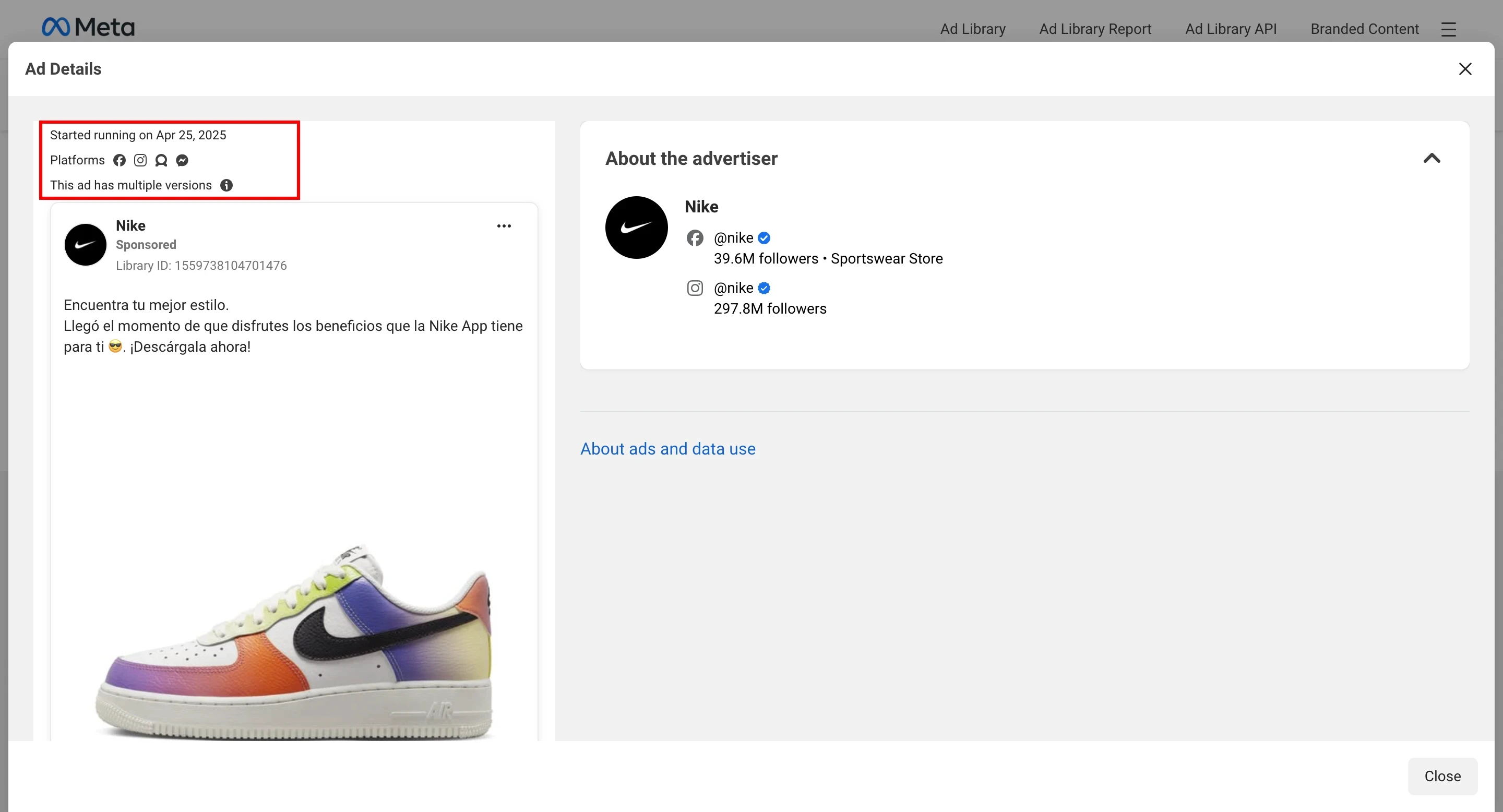
What it does not show you: Performance data, spend estimates, targeting outside the EU, click-through rates, or conversion data. You are seeing the creative and the context, not the results behind it.
Platforms like AdPlexity Social show you EU
Pro tip: Sort your search results by 'Active' status and look for ads that started running more than 30 days ago. Longevity is the strongest performance signal available to you in the Ad Library. An ad that has been running for 6 weeks has almost certainly generated a positive return; otherwise it would have been paused.
Method 2: Reading Ad Longevity as a Performance Signal
This is probably the most valuable method for doing competitor research, but it is also the one people use the least.
You cannot see the real performance numbers for an ad, so how long it lasts becomes your stand-in for that.
The idea is pretty straightforward: it costs money every time an ad runs. Companies are not going to keep throwing money at ads that are not working.
So, if an ad has been running without stopping for a month or two, or even three, that means it has made it past all the budget reviews and it is not worn out its welcome creatively.
The market itself, has basically given it a thumbs up.
Here is how to use this idea:
In the Meta Ads Library, take a look at the ‘Started running’ date for each ad you see. Focus on checking out ads that have been running for over 30 days at least.
Spend extra time on ads that you see have been running for 60 to 90 days. These are not just making a profit; these ads are most likely some of the best, and most efficient performers that the brand has.
If an ad that has been running for a long time suddenly disappears when you check each week, make a note of it. If a competitor stops running one of their best ads, it could mean a few things such as maybe the ad is just worn out, or there might be a problem with the product itself, or maybe that they are changing strategy.
The single most important filter in competitor ad research is time. An ad that launched yesterday tells you nothing. An ad that has been running for 45 days tells you that the hook works, the offer converts, and the audience is responding. Build your research around longevity first.
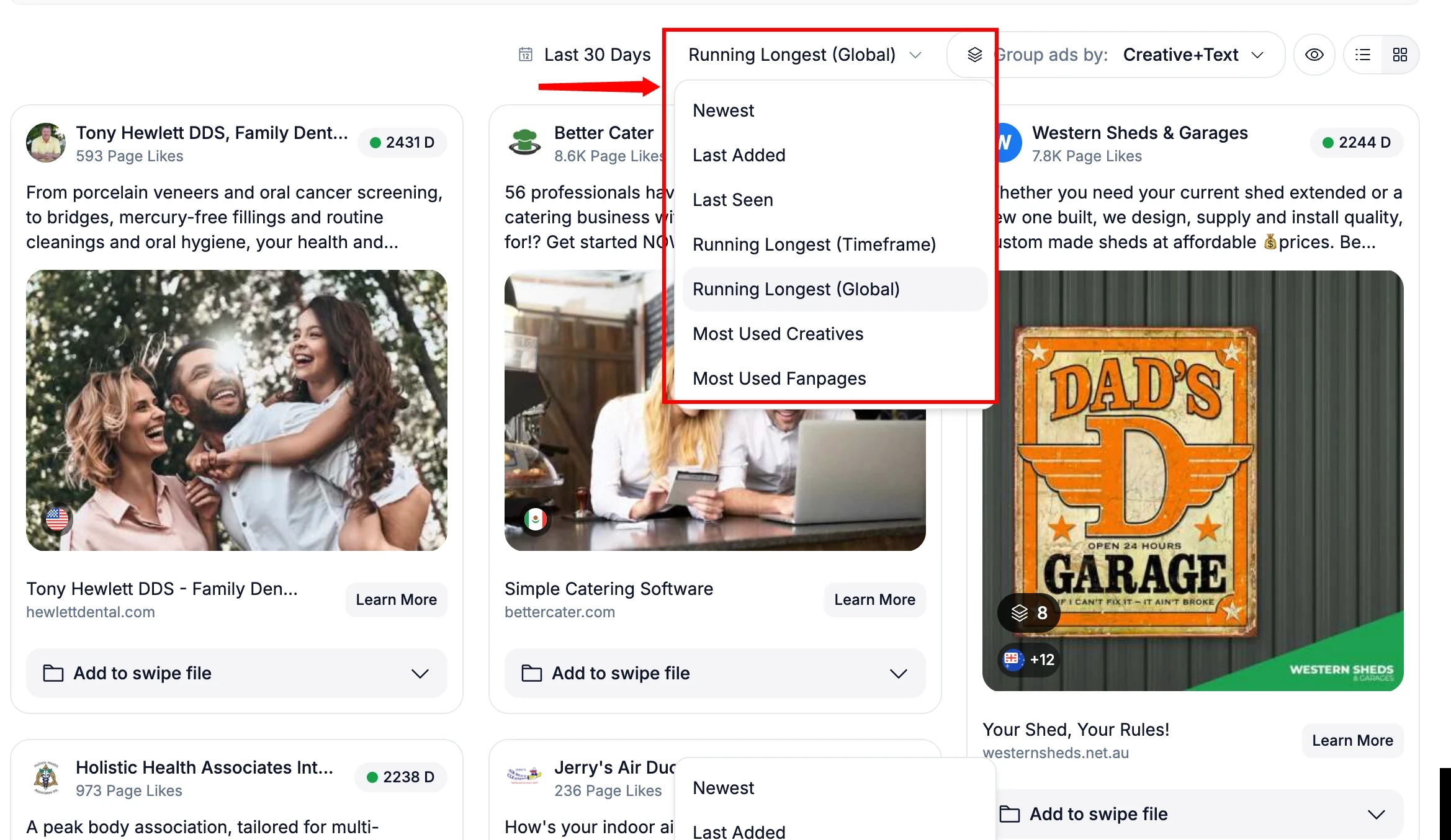
Tools like AdPlexity Social allow you to filter by running longest which is an indicator a ad is performing well in your niche.
Method 3: Analyzing Engagement and Comments
Engagement metrics, like the number of likes, comments and shares, which you can see on Facebook ads, give you information beyond just assessing the ad's creative quality.
But the real valuable source of information is in the comments section.
Comments on competitor ads are basically free market research. People reading and engaging with competitor ads, that is your target audience. What these people do write tells you several valuable things:
First what objections have not been addressed yet. Comments that ask questions like, 'how much will it cost?' or 'will this actually work for X situation?' these comments show gaps in what the ad is communicating. Those are gaps which you, in turn, can then address in your own ads.
What resonates the most is important too. Positive comments that mention a specific part of an ad – maybe its opening, maybe the offer it contains, or a specific statement it makes that confirms how well those elements are working with the audience.
And finally; who is actually buying or intending to buy. The comments often reveal basic information about who the person is things like their demographics, example use cases and the problems they are trying to solve. That is the kind of information no targeting filter is ever going to give you, no.
Pro tip: When you find a competitor ad with high engagement and positive comments, read through the first 20-30 comments in full.
Write down the exact language people use to describe their problem or desired outcome. That language belongs in your next ad brief.
Method 4: Following the Full Funnel to the Landing Page
The ad creative is only half the picture. Where the ad sends people, and what happens on that page, tells you as much about a competitor's strategy as the ad itself.
When you find a competitor ad worth analyzing, click through to the landing page and note:
The headline and subheadline. Does the landing page match the promise in the ad? Mismatches are common and represent conversion leaks you can exploit in your own funnel.
The offer structure. Is the landing page driving a direct sale, a lead capture, a free trial, or a call booking? This tells you where in the funnel they are pushing traffic.
Social proof elements. What testimonials, reviews, or trust signals are they leading with? These are the objections they have identified as the biggest conversion blockers.
The CTA language. 'Get Started Free' vs 'Book a Demo' vs 'Shop Now' are fundamentally different conversion goals. Understanding which CTAs competitors use helps you map the competition.
What to Actually Look For: The Signals That Matter
Knowing how to access competitor ads is step one. Knowing what to look for when you get there is what separates useful research from hours of aimless scrolling.
Signal | What It Means | What to Do With It |
|---|---|---|
Ad running 30+ days | Almost certainly profitable (market validated it) | Study the hook, offer, and visual format in detail |
Multiple ad variations | Competitor is actively testing creatives | Note which variants get more engagement |
Same hook across formats | That hook is working (they are scaling it) | Test a version of that hook angle in your own campaigns |
Ad suddenly disappears | Creative fatigue or strategy shift | Note the gap (could be an opportunity for you) |
Heavy video + UGC mix | They are finding UGC outperforms polished creative | Prioritize UGC-style testing in your next batch |
Pain point hooks dominate | Audience responds to problem-aware messaging | Lead with pain point in your own hook testing |
How to Analyze a Competitor Ad in Under 10 Minutes
When you find an ad worth analyzing deeply (typically one that has been running 30+ days), here is the framework to extract maximum insight quickly.
Step 1: Identify the Hook Type (First 3 Seconds or First Line)
Every high-performing ad opens with one of a small number of hook types. Identifying which one a competitor is using tells you what is resonating with the audience:
Pain point hook: Opens by naming a specific problem. ('Tired of wasting money on ads that do not convert?')
Bold claim hook: Opens with a striking result or promise. ('We generated $400k in 30 days with one ad format.')
Social proof hook: Opens with credibility or numbers. ('Over 10,000 media buyers use this workflow.')
Question hook: Poses a question the audience is already asking. ('Why do your Facebook ads stop working after 2 weeks?')
Curiosity hook: Creates information gap. ('The ad format most media buyers have never tested.')
When you see the same hook type appearing in multiple long-running ads from different competitors, that hook type is working for your audience. Build your next creative tests around it.
Step 2: Map the Offer Structure
What is the competitor actually selling, and how are they framing it? Look for:
Is the primary driver price (discount, free trial, lowest cost) or value (outcome, transformation, capability)?
Is there urgency or scarcity built into the ad?
What is the single main benefit they lead with, and what benefits do they leave out?
Step 3: Note the Visual Format and Style
Is the advertisement a polished brand video, is it a user-generated content style testimonial, a static image, maybe a carousel, or even a screen-recording demo? Actually, the format itself sends a signal. Consider this: if all of your competitors happen to be running user-generated content, and it has been running for months now, that format is probably working well with your shared target audience.
Step 4: Take a Look at the Call To Action and Landing Page Alignment
Does the call to action that is in the advertisement actually match what the landing page then asks the visitor to do after they click?
Strong performers usually have a pretty close alignment between what the advertisement promises and what the landing page ultimately delivers.
And when you happen to find a gap, in some competitor’s funnel, well, you have more than likely found an opportunity that you could probably take advantage of.
The Weekly Competitor Research Workflow (30-40 Minutes)
One-off research sessions produce screenshots, not intelligence. The difference between teams that consistently build winning ads and teams that scramble is a repeatable weekly system. Here is one that works:
Step | Action | What to Look For | Time |
|---|---|---|---|
1 | Scan for new ads | New formats, new messaging, new offers vs last week | 10 min |
2 | Check ad longevity | Filter 30+ days active (these are your priority ads) | 5 min |
3 | Detect paused campaigns | Ads that disappeared (signals fatigue or pivot) | 5 min |
4 | Analyze top 2-3 finds | Hook type, visual style, CTA, offer framing | 10 min |
5 | Create action items | 1-2 specific tests to run based on what you found | 5 min |
Block 30-40 minutes every Monday morning. Do it before you look at campaign dashboards or respond to messages.
Competitive intelligence gathered before you look at your own performance is more objective and more useful.
Team note: If you are at an agency managing multiple clients, run this workflow once per client per week. Keep research organized by client so insights do not bleed across accounts. This is where a dedicated ad spy tool with client-level organization pays for itself.
Free Methods vs. Paid Ad Spy Tools: When to Upgrade
The Meta Ads Library is genuinely powerful for basic competitor research. It is also genuinely limited at scale.
We broke down the full comparison in detail here, but here is the short version of where free stops being enough:
Volume: Researching 5+ competitors across multiple niches manually is a multi-hour process each week. Paid tools automate the scanning and surface the most relevant ads without manual filtering.
Historical data: The Ad Library only shows currently active ads. Paid tools give you historical ad data, including ads that ran and stopped, which is often more valuable than what is running today.
Longevity filtering: The Ad Library has limited sorting by date. Paid tools let you filter specifically by ads that have been running 30, 60, or 90+ days, which is the most important filter in competitor research.
Organization: Saving ads, tagging them by client, organizing into swipe files, and building briefs from your research requires separate tools when you are using the Ad Library. Paid tools integrate this into one workflow.
Team collaboration: The Ad Library is a single-user experience. Agencies need shared workspaces, tagging, and the ability to assign research to specific team members.
For a solo marketer doing occasional research, the free method is enough to get started.
For media buyers, affiliates or lead gen pros running multiple accounts, or agencies managing creative workflows across clients, the manual approach creates more friction than it saves in subscription cost.
AdPlexity Social is built specifically for the performance marketing and agency use case, with deeper filtering. If your team is outgrowing the free method, it is worth a look.
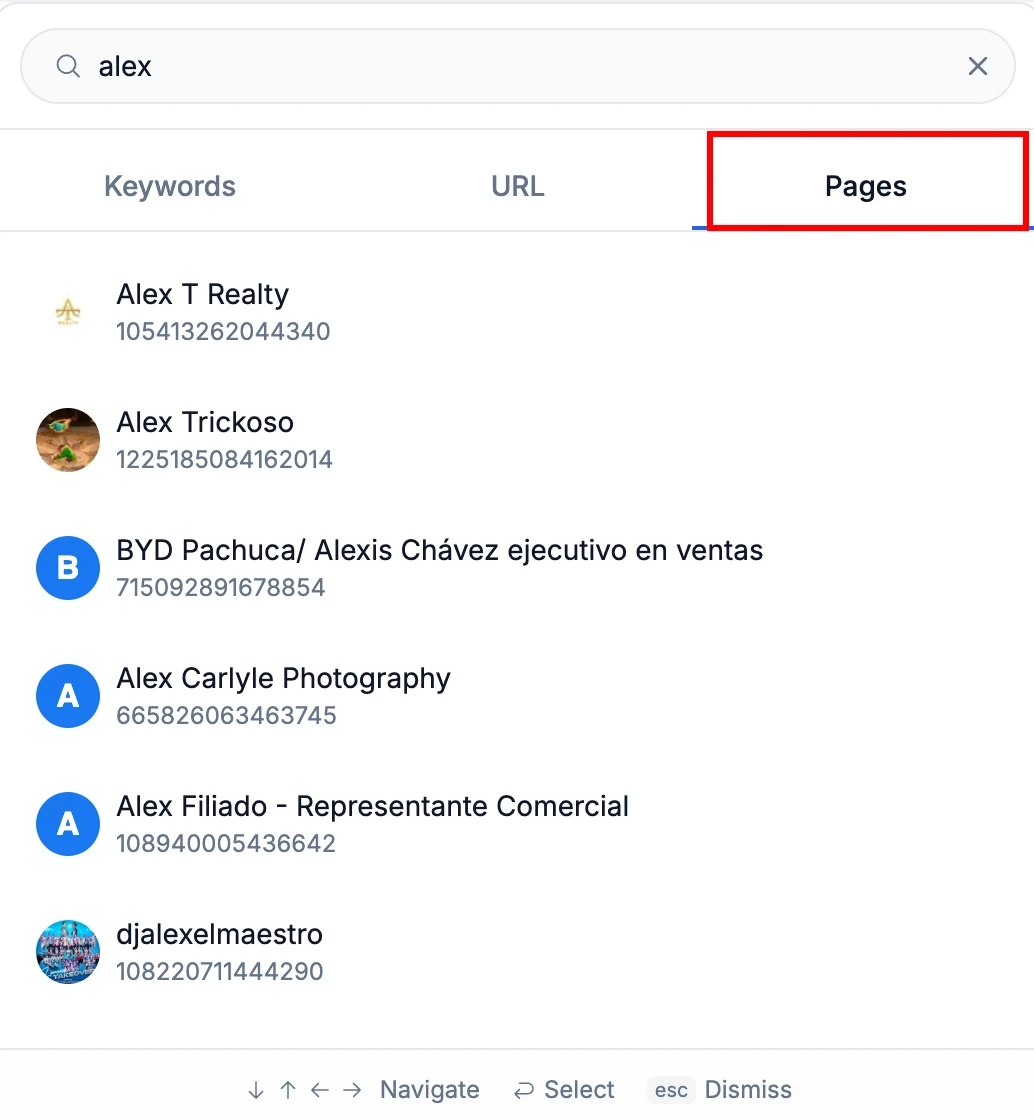
With AdPlexity Social, you can track competitors at two levels.
Search by domain and you see every ad driving traffic to that URL, not just their Facebook page ads, but every campaign pointing to their site across the network.
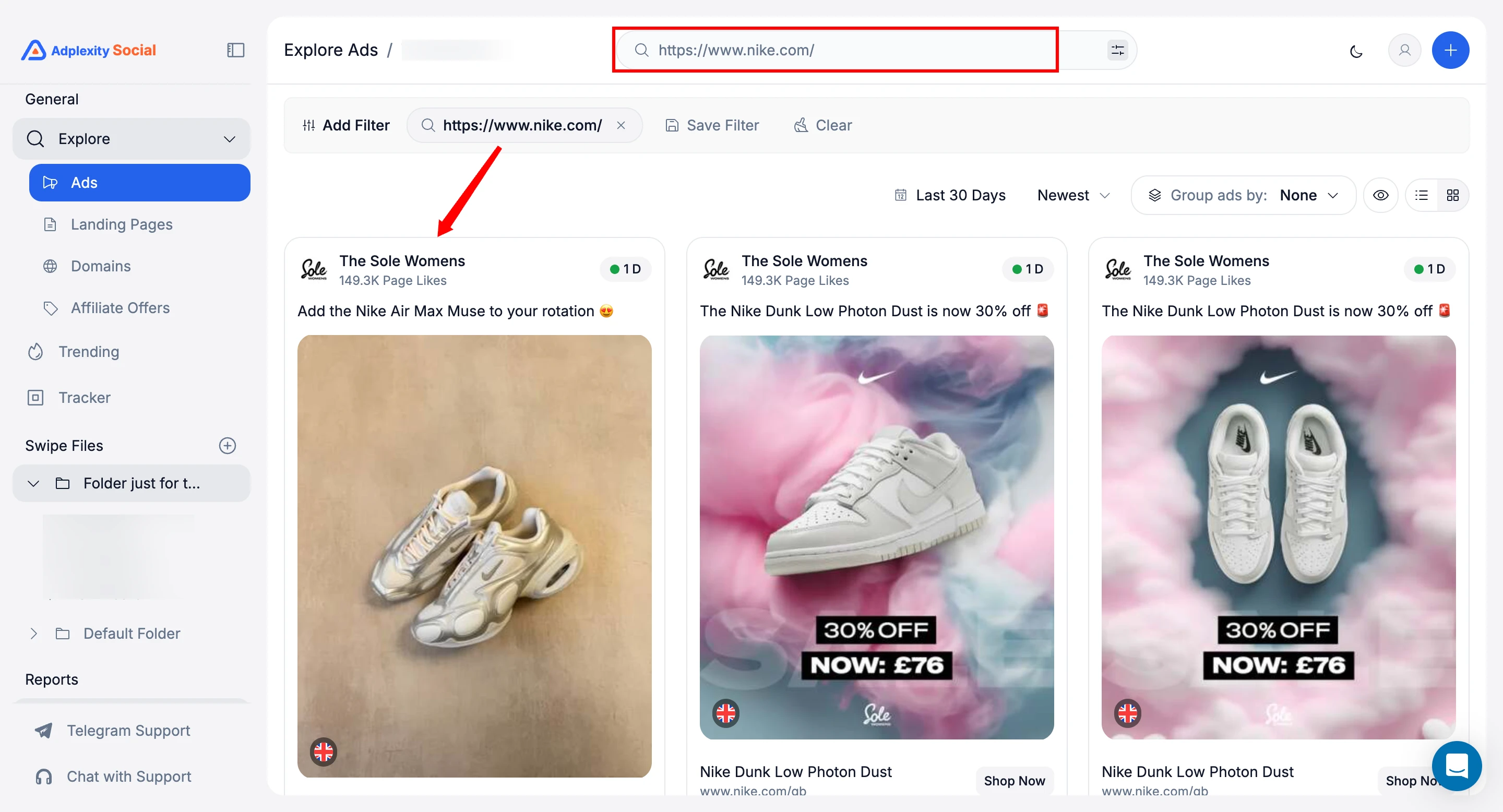
Search by fan page and you get a full view of every creative that page has ever run, including ads that are no longer active.
Found something worth saving? You can bookmark any domain or page directly into boards and organize everything by folder, so your research stays structured and accessible across your team instead of buried in a downloads folder.
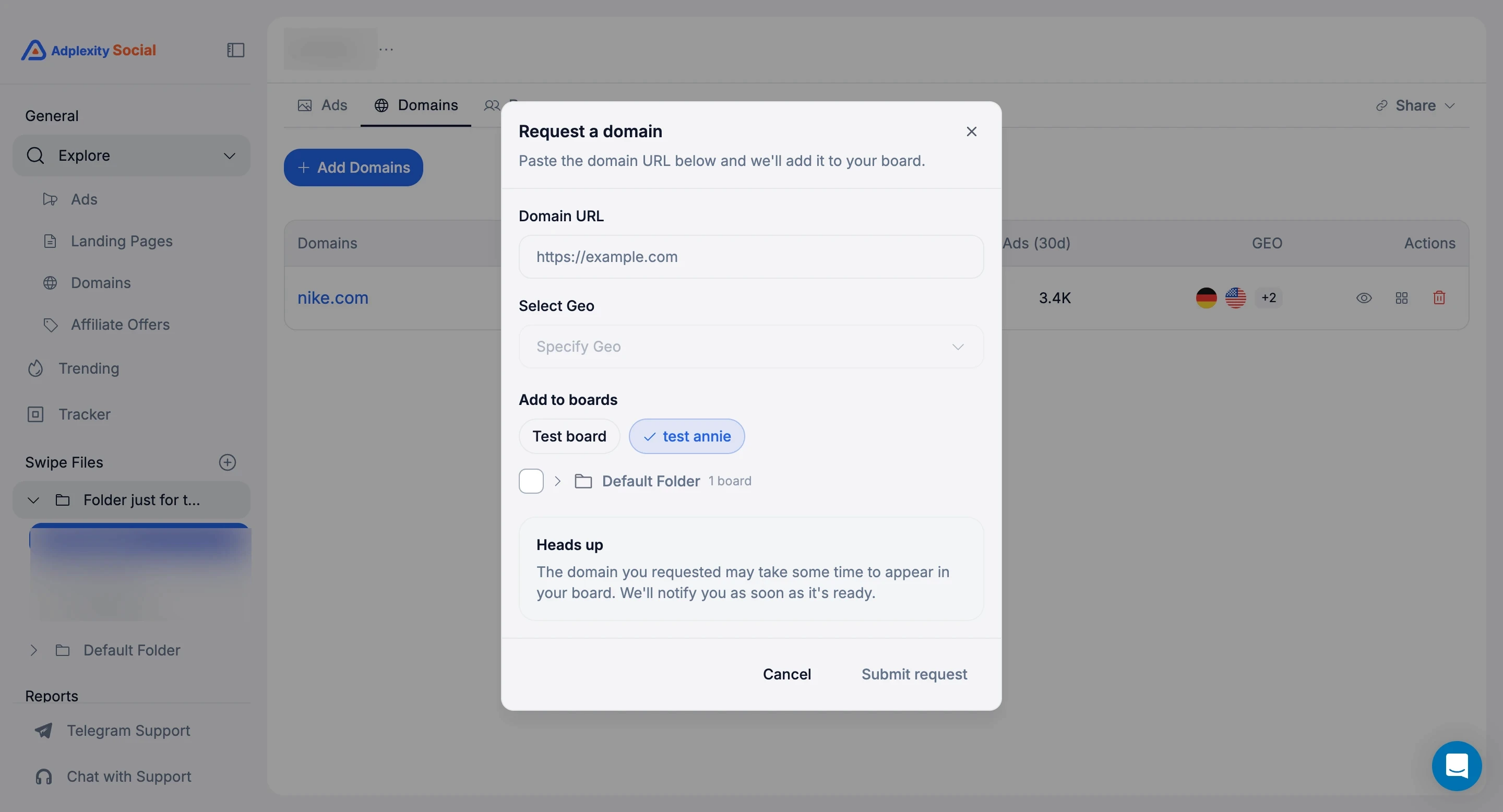
That last one is particularly useful if you are in performance marketing or affiliate: instead of guessing which offers are worth promoting, you can see what other buyers are already spending money on.
The 4 Most Common Mistakes in Competitor Ad Research
Mistake 1: Researching Without a System in place
Random visits to the Ad Library usually produce random screenshots. And without a structured weekly process, plus a place to store and organize what you find, research it does not really compound into useful intelligence.
Make sure you build the habit first, and only then worry regarding the tools needed.
Mistake 2: Copying Ads instead of Learning From Them properly
The goal should never be to replicate a competitor's ad exactly. The real goal is instead to understand why that ad works well, plus what that tells you about your shared audience of consumers.
Copying creative elements too closely is really just a short-term move, often destroys your brand differentiation.
Extracting the core principle (the hook type being used, the offer structure, or the visual format they chose) and applying it using your own brand voice is what a compound advantage looks like long term.
Mistake 3: Only Watching Direct Competitors closely
Your target audience, is exposed to advertisements from every category there is, not just from ones in your specific industry.
Therefore, some of the most useful hook and creative ideas actually come from adjacent markets, especially those where the same audience spends a lot of their time.
A media buyer, for example, who is targeting DTC brand owners should be watching SaaS ads, agency ads, and even education ads too, and not just other ad spy tools, of course.
Mistake 4: Treating Every Single Ad as Worth Analyzing carefully
Actually, not every competitor advertisement deserves your undivided attention.
You should filter ruthlessly, especially for longevity, prior to invest a lot of your valuable time in a detailed in-depth analysis, of course.
An ad that only started running like three days ago could easily be just a test, a mistake that they made, or simply a brand-new creative that has not been properly validated in the real world yet.
So, basically your time is best spent analyzing ads that have survived in the market for 30 days or more.
The Bottom Line
Competitor Facebook ad research is not a one-time activity. It is a weekly discipline.
The teams that build the most consistently winning creative are not necessarily the most creative people in the room.
They are the ones with the best systems for learning from what is already working in their market.
Start with the Meta Ads Library. Filter by longevity. Read the comments.
Follow the funnel to the landing page. Document what you find in a way that your whole team can access and build from.
Do it every week without fail.
When the manual process starts slowing you down (when you are managing multiple clients, researching multiple niches, and need to move faster than scrolling allows), that is when a dedicated ad spy tool earns its subscription cost back in the first week.
Frequently Asked Questions
Is it legal to spy on competitor Facebook ads?
Yes. Every method in this guide uses publicly available data from Meta's Ad Library, which Meta built specifically to provide advertising transparency. You are accessing information the platform intentionally makes public.
Can I see how much a competitor is spending on Facebook ads?
Not precisely through free methods. The Meta Ad Library does not show spend data for commercial ads. For EU-targeted ads, some spend range data is available. Paid ad intelligence platforms provide estimates based on ad volume and longevity, but these are directional, not exact.
How often should I check competitor Facebook ads?
A weekly review of 30-40 minutes covers most active competitors thoroughly. If you are in a fast-moving niche or launching a new campaign, check more frequently in the week leading up to launch. Daily monitoring is overkill for most teams and produces noise, not signal.
What is the best free tool to spy on competitor Facebook ads?
The Meta Ads Library at facebook.com/ads/library is the best free option. It is official, extensive, and updated in real time. For teams that have outgrown the manual process, AdPlexity Social offers deeper filtering, historical data, and workflow tools built in.
How do I find out what Facebook ads my competitors are running right now?
Go to facebook.com/ads/library, select your country and 'All Ads' as the category, then search by your competitor's brand name. You will see every active ad they are currently running across the Meta network.
What should I do with the competitor ads I find?
Organize them into a swipe file categorized by hook type, visual format, and offer structure. Use what you find to brief your creative team, not to copy the ads, but to inform the direction of your next round of testing. The goal is to understand what is resonating with your shared audience and build on that understanding with your own unique angle.
Every single Facebook ad that your competitors are running at the moment is publicly visible for just about anyone.
Meta made a deliberate decision to build it that way to be honest, launching an Ad Library that showcases every active ad across Facebook, Instagram, and Messenger, and there is no login required or any kind of special access that you would need.
But, simply knowing that competitor ads are visible and actually managing to extract useful intelligence from them, those are two very different things altogether.
The majority of marketers will open the Ad Library and scroll through a few ads screen-shotting the ones that seem kind of interesting or relevant, and then they just call it competitor research.
And a month later, those very screenshots are usually buried somewhere in a downloads folder and nothing has really changed in regards to how they are building their own campaigns.
This guide here will cover how to properly conduct competitor Facebook ad research, focusing on the specific methods to use, and what type of signals actually matter, and how one can read an ad's performance without actually seeing its backend data and also, how to establish a weekly research habit that compounds over a period of time.
Whether you are a media buyer an performance marketer, or an agency managing ads for several different clients, the underlying process remains pretty much the same .
Is it legal to spy on competitor Facebook ads? Yes, completely. Every method in this guide uses publicly available data that Meta intentionally makes transparent. The Ad Library exists specifically for advertising accountability. You are using tools the platform itself provides.
Why Competitor Facebook Ad Research Actually Matters
The case for doing competitor research is pretty simple: you are all in the same auction as your competition, all going after similar audiences, and you are all fighting for the same eyeballs.
When a competitor has an ad running for, say, 45 days, that ad has made it through the budget process okayed, it has survived creative reviews, and, importantly, it passes the real-world audience feedback test.
No one keeps an ad running just, because they like the way it looks – it is running because it is actually working.
Looking at what already performs well in your specific market offers three main advantages:
It reduces the amount of money you waste on testing different things. Instead of testing, say, 20 different hook variations from scratch, you can figure out the 3-4 hook types that already seem to be working well with the audience you are trying to reach and then test slight changes to those. This saves you a lot of time and money as, well.
It shortens your learning curve. If a competitor has been running ads in your niche for a couple of years, they have definitely already made and paid for the mistakes you are likely about to make. The ads of theirs that are still running they are basically a shortcut to avoid those mistakes.
It highlights openings in the market. When you notice that every competitor is using the same approach let us say, focusing heavily on price in their messaging you will immediately see the chance to use a different angle, for example focusing on outcomes or using customer testimonials a lot.
But none of this is meant to replace testing. It just changes what you end up testing.
Instead of going in without any information, you at least start with some knowledge of what is likely to work.
The 4 Methods for Spying on Competitor Facebook Ads
Method | Cost | Best For | Limitation |
|---|---|---|---|
Meta Ads Library | Free | Quick competitive checks, brand research | No performance data, manual only |
Ad Spy Tool (paid) | Paid | Deep research, longevity filters, team workflow | Subscription cost |
Manual engagement | Free | Sentiment, objections in comments | Time-intensive, no scale |
Landing page analysis | Free/Paid | Understanding full funnel, offer framing | Requires separate tools |
Each method gives you a different layer of insight. Used together, they give you a complete picture of what a competitor is doing and why it is working. Here is how each one works in practice.
Method 1: The Meta Ads Library (Free, Start Here)
The Meta Ads Library at facebook.com/ads/library is the foundation of any competitor research workflow.
It shows every active ad running across Facebook, Instagram, Messenger, and the broader Meta network. No account required. No cost. Updated in real time.
How to use it effectively:
Go to facebook.com/ads/library and select your country. If your competitors target multiple regions, check the key markets separately: ads often differ significantly by geography.
Search by brand name to see every ad a specific competitor is currently running. Note how many active ads they have: a brand running 40 simultaneous ad variations is in aggressive testing mode. A brand running 3-5 is likely scaling proven creative.
Search by keyword to find ads across your category, not just specific brands. This surfaces competitors you might not have considered and shows you the full range of creatives in your niche.
Filter by media type (image, video, carousel) to compare format performance signals across competitors.
What the Ad Library shows you:
The ad creative (image, video, or carousel)
The ad copy and headline
The date the ad started running
Which platforms the ad is running on
For EU-targeted ads: age, gender, and location targeting data
What it does not show you: Performance data, spend estimates, targeting outside the EU, click-through rates, or conversion data. You are seeing the creative and the context, not the results behind it.
Platforms like AdPlexity Social show you EU
Pro tip: Sort your search results by 'Active' status and look for ads that started running more than 30 days ago. Longevity is the strongest performance signal available to you in the Ad Library. An ad that has been running for 6 weeks has almost certainly generated a positive return; otherwise it would have been paused.
Method 2: Reading Ad Longevity as a Performance Signal
This is probably the most valuable method for doing competitor research, but it is also the one people use the least.
You cannot see the real performance numbers for an ad, so how long it lasts becomes your stand-in for that.
The idea is pretty straightforward: it costs money every time an ad runs. Companies are not going to keep throwing money at ads that are not working.
So, if an ad has been running without stopping for a month or two, or even three, that means it has made it past all the budget reviews and it is not worn out its welcome creatively.
The market itself, has basically given it a thumbs up.
Here is how to use this idea:
In the Meta Ads Library, take a look at the ‘Started running’ date for each ad you see. Focus on checking out ads that have been running for over 30 days at least.
Spend extra time on ads that you see have been running for 60 to 90 days. These are not just making a profit; these ads are most likely some of the best, and most efficient performers that the brand has.
If an ad that has been running for a long time suddenly disappears when you check each week, make a note of it. If a competitor stops running one of their best ads, it could mean a few things such as maybe the ad is just worn out, or there might be a problem with the product itself, or maybe that they are changing strategy.
The single most important filter in competitor ad research is time. An ad that launched yesterday tells you nothing. An ad that has been running for 45 days tells you that the hook works, the offer converts, and the audience is responding. Build your research around longevity first.
Tools like AdPlexity Social allow you to filter by running longest which is an indicator a ad is performing well in your niche.
Method 3: Analyzing Engagement and Comments
Engagement metrics, like the number of likes, comments and shares, which you can see on Facebook ads, give you information beyond just assessing the ad's creative quality.
But the real valuable source of information is in the comments section.
Comments on competitor ads are basically free market research. People reading and engaging with competitor ads, that is your target audience. What these people do write tells you several valuable things:
First what objections have not been addressed yet. Comments that ask questions like, 'how much will it cost?' or 'will this actually work for X situation?' these comments show gaps in what the ad is communicating. Those are gaps which you, in turn, can then address in your own ads.
What resonates the most is important too. Positive comments that mention a specific part of an ad – maybe its opening, maybe the offer it contains, or a specific statement it makes that confirms how well those elements are working with the audience.
And finally; who is actually buying or intending to buy. The comments often reveal basic information about who the person is things like their demographics, example use cases and the problems they are trying to solve. That is the kind of information no targeting filter is ever going to give you, no.
Pro tip: When you find a competitor ad with high engagement and positive comments, read through the first 20-30 comments in full.
Write down the exact language people use to describe their problem or desired outcome. That language belongs in your next ad brief.
Method 4: Following the Full Funnel to the Landing Page
The ad creative is only half the picture. Where the ad sends people, and what happens on that page, tells you as much about a competitor's strategy as the ad itself.
When you find a competitor ad worth analyzing, click through to the landing page and note:
The headline and subheadline. Does the landing page match the promise in the ad? Mismatches are common and represent conversion leaks you can exploit in your own funnel.
The offer structure. Is the landing page driving a direct sale, a lead capture, a free trial, or a call booking? This tells you where in the funnel they are pushing traffic.
Social proof elements. What testimonials, reviews, or trust signals are they leading with? These are the objections they have identified as the biggest conversion blockers.
The CTA language. 'Get Started Free' vs 'Book a Demo' vs 'Shop Now' are fundamentally different conversion goals. Understanding which CTAs competitors use helps you map the competition.
What to Actually Look For: The Signals That Matter
Knowing how to access competitor ads is step one. Knowing what to look for when you get there is what separates useful research from hours of aimless scrolling.
Signal | What It Means | What to Do With It |
|---|---|---|
Ad running 30+ days | Almost certainly profitable (market validated it) | Study the hook, offer, and visual format in detail |
Multiple ad variations | Competitor is actively testing creatives | Note which variants get more engagement |
Same hook across formats | That hook is working (they are scaling it) | Test a version of that hook angle in your own campaigns |
Ad suddenly disappears | Creative fatigue or strategy shift | Note the gap (could be an opportunity for you) |
Heavy video + UGC mix | They are finding UGC outperforms polished creative | Prioritize UGC-style testing in your next batch |
Pain point hooks dominate | Audience responds to problem-aware messaging | Lead with pain point in your own hook testing |
How to Analyze a Competitor Ad in Under 10 Minutes
When you find an ad worth analyzing deeply (typically one that has been running 30+ days), here is the framework to extract maximum insight quickly.
Step 1: Identify the Hook Type (First 3 Seconds or First Line)
Every high-performing ad opens with one of a small number of hook types. Identifying which one a competitor is using tells you what is resonating with the audience:
Pain point hook: Opens by naming a specific problem. ('Tired of wasting money on ads that do not convert?')
Bold claim hook: Opens with a striking result or promise. ('We generated $400k in 30 days with one ad format.')
Social proof hook: Opens with credibility or numbers. ('Over 10,000 media buyers use this workflow.')
Question hook: Poses a question the audience is already asking. ('Why do your Facebook ads stop working after 2 weeks?')
Curiosity hook: Creates information gap. ('The ad format most media buyers have never tested.')
When you see the same hook type appearing in multiple long-running ads from different competitors, that hook type is working for your audience. Build your next creative tests around it.
Step 2: Map the Offer Structure
What is the competitor actually selling, and how are they framing it? Look for:
Is the primary driver price (discount, free trial, lowest cost) or value (outcome, transformation, capability)?
Is there urgency or scarcity built into the ad?
What is the single main benefit they lead with, and what benefits do they leave out?
Step 3: Note the Visual Format and Style
Is the advertisement a polished brand video, is it a user-generated content style testimonial, a static image, maybe a carousel, or even a screen-recording demo? Actually, the format itself sends a signal. Consider this: if all of your competitors happen to be running user-generated content, and it has been running for months now, that format is probably working well with your shared target audience.
Step 4: Take a Look at the Call To Action and Landing Page Alignment
Does the call to action that is in the advertisement actually match what the landing page then asks the visitor to do after they click?
Strong performers usually have a pretty close alignment between what the advertisement promises and what the landing page ultimately delivers.
And when you happen to find a gap, in some competitor’s funnel, well, you have more than likely found an opportunity that you could probably take advantage of.
The Weekly Competitor Research Workflow (30-40 Minutes)
One-off research sessions produce screenshots, not intelligence. The difference between teams that consistently build winning ads and teams that scramble is a repeatable weekly system. Here is one that works:
Step | Action | What to Look For | Time |
|---|---|---|---|
1 | Scan for new ads | New formats, new messaging, new offers vs last week | 10 min |
2 | Check ad longevity | Filter 30+ days active (these are your priority ads) | 5 min |
3 | Detect paused campaigns | Ads that disappeared (signals fatigue or pivot) | 5 min |
4 | Analyze top 2-3 finds | Hook type, visual style, CTA, offer framing | 10 min |
5 | Create action items | 1-2 specific tests to run based on what you found | 5 min |
Block 30-40 minutes every Monday morning. Do it before you look at campaign dashboards or respond to messages.
Competitive intelligence gathered before you look at your own performance is more objective and more useful.
Team note: If you are at an agency managing multiple clients, run this workflow once per client per week. Keep research organized by client so insights do not bleed across accounts. This is where a dedicated ad spy tool with client-level organization pays for itself.
Free Methods vs. Paid Ad Spy Tools: When to Upgrade
The Meta Ads Library is genuinely powerful for basic competitor research. It is also genuinely limited at scale.
We broke down the full comparison in detail here, but here is the short version of where free stops being enough:
Volume: Researching 5+ competitors across multiple niches manually is a multi-hour process each week. Paid tools automate the scanning and surface the most relevant ads without manual filtering.
Historical data: The Ad Library only shows currently active ads. Paid tools give you historical ad data, including ads that ran and stopped, which is often more valuable than what is running today.
Longevity filtering: The Ad Library has limited sorting by date. Paid tools let you filter specifically by ads that have been running 30, 60, or 90+ days, which is the most important filter in competitor research.
Organization: Saving ads, tagging them by client, organizing into swipe files, and building briefs from your research requires separate tools when you are using the Ad Library. Paid tools integrate this into one workflow.
Team collaboration: The Ad Library is a single-user experience. Agencies need shared workspaces, tagging, and the ability to assign research to specific team members.
For a solo marketer doing occasional research, the free method is enough to get started.
For media buyers, affiliates or lead gen pros running multiple accounts, or agencies managing creative workflows across clients, the manual approach creates more friction than it saves in subscription cost.
AdPlexity Social is built specifically for the performance marketing and agency use case, with deeper filtering. If your team is outgrowing the free method, it is worth a look.
With AdPlexity Social, you can track competitors at two levels.
Search by domain and you see every ad driving traffic to that URL, not just their Facebook page ads, but every campaign pointing to their site across the network.
Search by fan page and you get a full view of every creative that page has ever run, including ads that are no longer active.
Found something worth saving? You can bookmark any domain or page directly into boards and organize everything by folder, so your research stays structured and accessible across your team instead of buried in a downloads folder.
That last one is particularly useful if you are in performance marketing or affiliate: instead of guessing which offers are worth promoting, you can see what other buyers are already spending money on.
The 4 Most Common Mistakes in Competitor Ad Research
Mistake 1: Researching Without a System in place
Random visits to the Ad Library usually produce random screenshots. And without a structured weekly process, plus a place to store and organize what you find, research it does not really compound into useful intelligence.
Make sure you build the habit first, and only then worry regarding the tools needed.
Mistake 2: Copying Ads instead of Learning From Them properly
The goal should never be to replicate a competitor's ad exactly. The real goal is instead to understand why that ad works well, plus what that tells you about your shared audience of consumers.
Copying creative elements too closely is really just a short-term move, often destroys your brand differentiation.
Extracting the core principle (the hook type being used, the offer structure, or the visual format they chose) and applying it using your own brand voice is what a compound advantage looks like long term.
Mistake 3: Only Watching Direct Competitors closely
Your target audience, is exposed to advertisements from every category there is, not just from ones in your specific industry.
Therefore, some of the most useful hook and creative ideas actually come from adjacent markets, especially those where the same audience spends a lot of their time.
A media buyer, for example, who is targeting DTC brand owners should be watching SaaS ads, agency ads, and even education ads too, and not just other ad spy tools, of course.
Mistake 4: Treating Every Single Ad as Worth Analyzing carefully
Actually, not every competitor advertisement deserves your undivided attention.
You should filter ruthlessly, especially for longevity, prior to invest a lot of your valuable time in a detailed in-depth analysis, of course.
An ad that only started running like three days ago could easily be just a test, a mistake that they made, or simply a brand-new creative that has not been properly validated in the real world yet.
So, basically your time is best spent analyzing ads that have survived in the market for 30 days or more.
The Bottom Line
Competitor Facebook ad research is not a one-time activity. It is a weekly discipline.
The teams that build the most consistently winning creative are not necessarily the most creative people in the room.
They are the ones with the best systems for learning from what is already working in their market.
Start with the Meta Ads Library. Filter by longevity. Read the comments.
Follow the funnel to the landing page. Document what you find in a way that your whole team can access and build from.
Do it every week without fail.
When the manual process starts slowing you down (when you are managing multiple clients, researching multiple niches, and need to move faster than scrolling allows), that is when a dedicated ad spy tool earns its subscription cost back in the first week.
Frequently Asked Questions
Is it legal to spy on competitor Facebook ads?
Yes. Every method in this guide uses publicly available data from Meta's Ad Library, which Meta built specifically to provide advertising transparency. You are accessing information the platform intentionally makes public.
Can I see how much a competitor is spending on Facebook ads?
Not precisely through free methods. The Meta Ad Library does not show spend data for commercial ads. For EU-targeted ads, some spend range data is available. Paid ad intelligence platforms provide estimates based on ad volume and longevity, but these are directional, not exact.
How often should I check competitor Facebook ads?
A weekly review of 30-40 minutes covers most active competitors thoroughly. If you are in a fast-moving niche or launching a new campaign, check more frequently in the week leading up to launch. Daily monitoring is overkill for most teams and produces noise, not signal.
What is the best free tool to spy on competitor Facebook ads?
The Meta Ads Library at facebook.com/ads/library is the best free option. It is official, extensive, and updated in real time. For teams that have outgrown the manual process, AdPlexity Social offers deeper filtering, historical data, and workflow tools built in.
How do I find out what Facebook ads my competitors are running right now?
Go to facebook.com/ads/library, select your country and 'All Ads' as the category, then search by your competitor's brand name. You will see every active ad they are currently running across the Meta network.
What should I do with the competitor ads I find?
Organize them into a swipe file categorized by hook type, visual format, and offer structure. Use what you find to brief your creative team, not to copy the ads, but to inform the direction of your next round of testing. The goal is to understand what is resonating with your shared audience and build on that understanding with your own unique angle.
Table of Contents
Quickly navigate through the key sections of this article.
Discover Winning Meta Ads
Similar Blogs
Check related blogs
Check related blogs
Check related blogs










Ready to See What’s Really Working on Meta?
Adplexity
Social
© Copyright 2026 All Rights Reserved
Ready to See What’s Really Working on Meta?
Adplexity
Social
© Copyright 2026 All Rights Reserved
Ready to See What’s Really Working on Meta?
Adplexity
Social
© Copyright 2026 All Rights Reserved