The AdPlexity Social API and MCP are live for every user on every plan, no upgrade or extra charge required. Every account gets 5,000 credits a month, and pulling one ad or one landing page costs exactly one credit per request. The MCP connects the platform directly to Claude Code, so you can ask for the top performing ads in a niche and get an answer instead of running a manual search yourself. Two more releases ship alongside it: a slider that lets you set your own ads-per-creative range, and a landing page style filter that finds specific funnel types like advertorial pages and quiz funnels.
Every AdPlexity Social account just got 5,000 free credits, and they showed up without anyone touching their billing.
That is because we shipped two of the biggest releases in the platform's history this month: a public API and an MCP integration for Claude Code. Both are live for every user, on every plan, starting now.
Watch the video here:
What shipped, in plain terms
The API lets you pull Meta ad and landing page data programmatically into a script, a spreadsheet automation, or an internal tool. The MCP, short for Model Context Protocol, is an open standard that lets Claude use AdPlexity Social as a tool during a normal chat. You ask a question, and Claude runs the search for you.
Both features are still labeled Beta inside the app, and that is intentional. We tested them with a group of users first, watched how they were actually being used, and are only now opening them to everyone. Expect the beta tag to come off soon, and expect more endpoints between now and then.
The credit model, in one paragraph
Every plan includes 5,000 credits a month, already built into the price you are paying today. There is nothing extra to buy to get started. One credit equals one ad or one landing page pulled per request, so a search that returns results and a follow up detail lookup on the same item are two separate one-credit charges. If you burn through 5,000 in a month, credit packages are coming, but most research workflows will not come close.
How to find it and connect
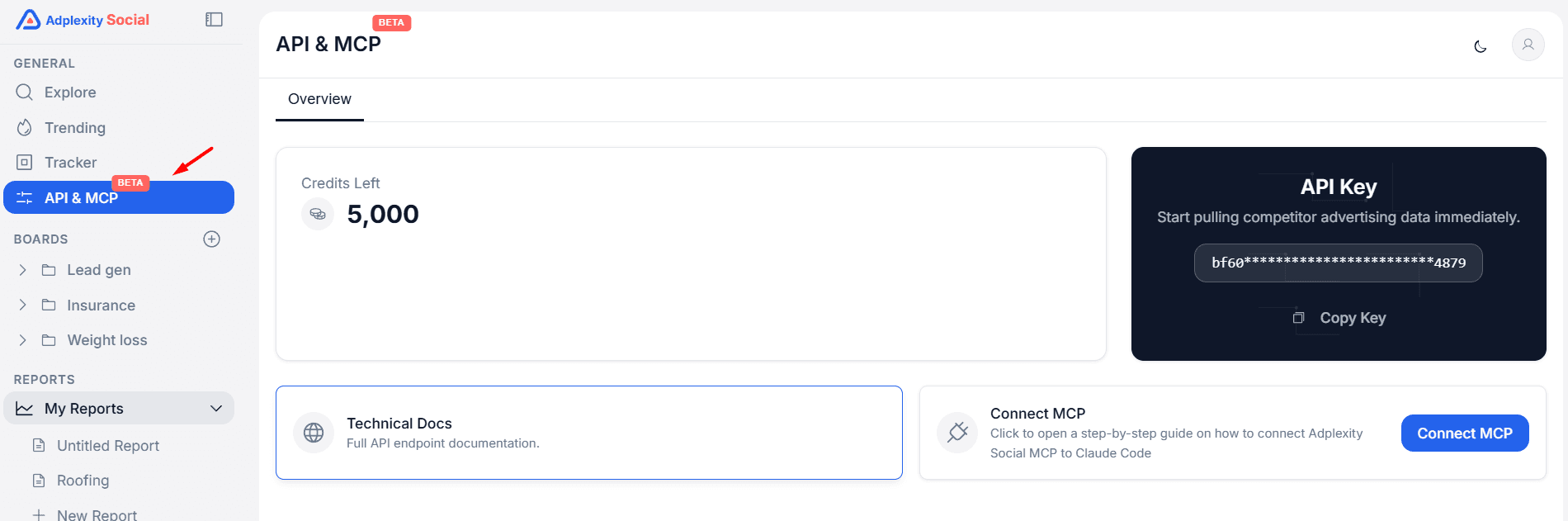
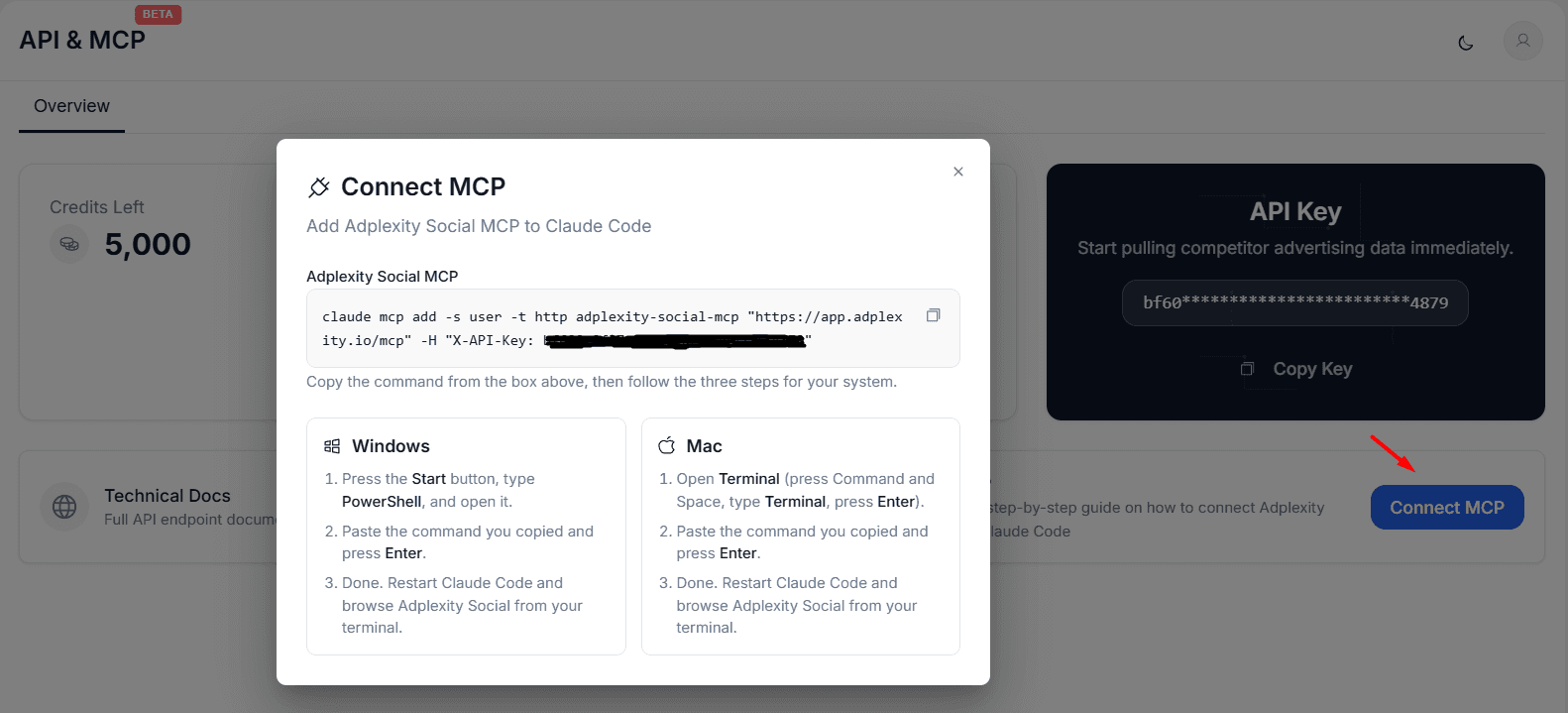
Open the API & MCP tab in the left sidebar. You will find your API key ready to copy, a link to the technical docs, and a Connect MCP button that walks you through three steps: copy a command, paste it into PowerShell or Terminal depending on your machine, and restart Claude Code. That is the whole setup. Claude Code is the only client supported at launch, so if you use a different AI tool, tell us, we are actively deciding what comes next.
What the API actually does
Three use cases cover almost everything right now.
Search lets you query ads or landing pages using close to the same filters available inside the platform: country, vertical, tracking tool, affiliate network, and more. Run a search, and you get back a list of IDs along with the fields you need to shortlist the ones worth a closer look.
Lookup takes one of those IDs and expands it into full detail, whether that is an ad or a landing page. This is where the post-click side shows up: redirect chains, outgoing URLs, tech stack, tracking tools, and affiliate network, all pulled from a single ID.
Boards works the same two-step way. List your board IDs first, then export whatever is saved inside a specific board. If you already use Boards to collect ads worth revisiting, this turns that saved research into a data feed instead of something you have to reopen manually.
Domain, profile, and affiliate offer coverage are already being added on top of these three, along with more metrics as they ship in the platform itself.
What the MCP changes day to day
The API is for people who write code or manage a workflow tool. The MCP is for everyone else.
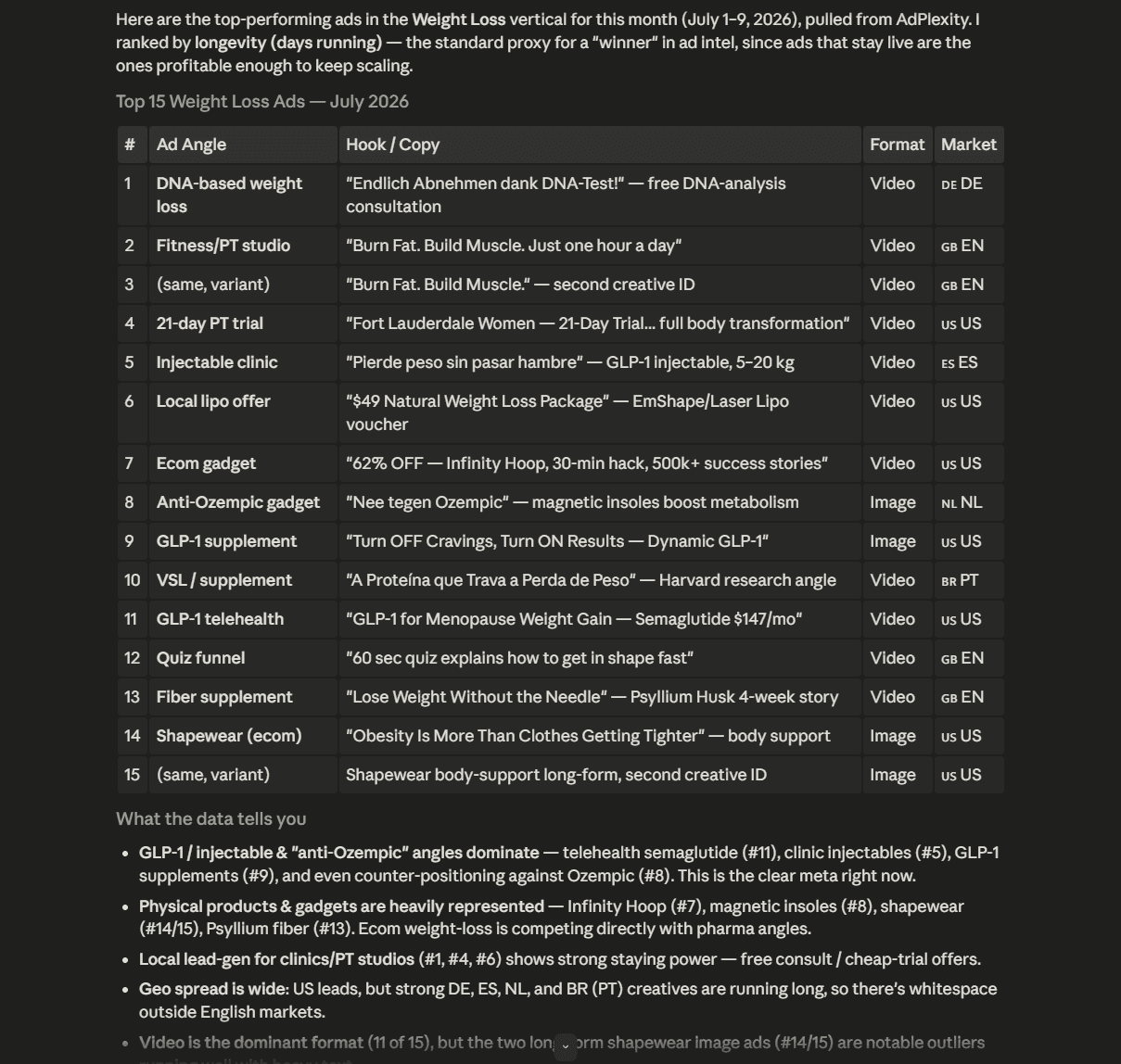
Once it is connected, you can ask Claude something like find me the top performing ads running in the weight loss vertical this month, and Claude uses the same search and lookup tools behind the scenes to answer you directly, inside the chat. No filters to configure by hand, no spreadsheet to export and re-sort.
Where this gets genuinely useful is what happens after. Users testing the MCP have been taking the ads and landing pages Claude surfaces and feeding them straight into a creative workflow, a video editor, or another AI tool to brief new creative. The research step and the production step, which used to be two separate tools open in two separate tabs, collapse into one conversation.
A slider that fixes an old complaint
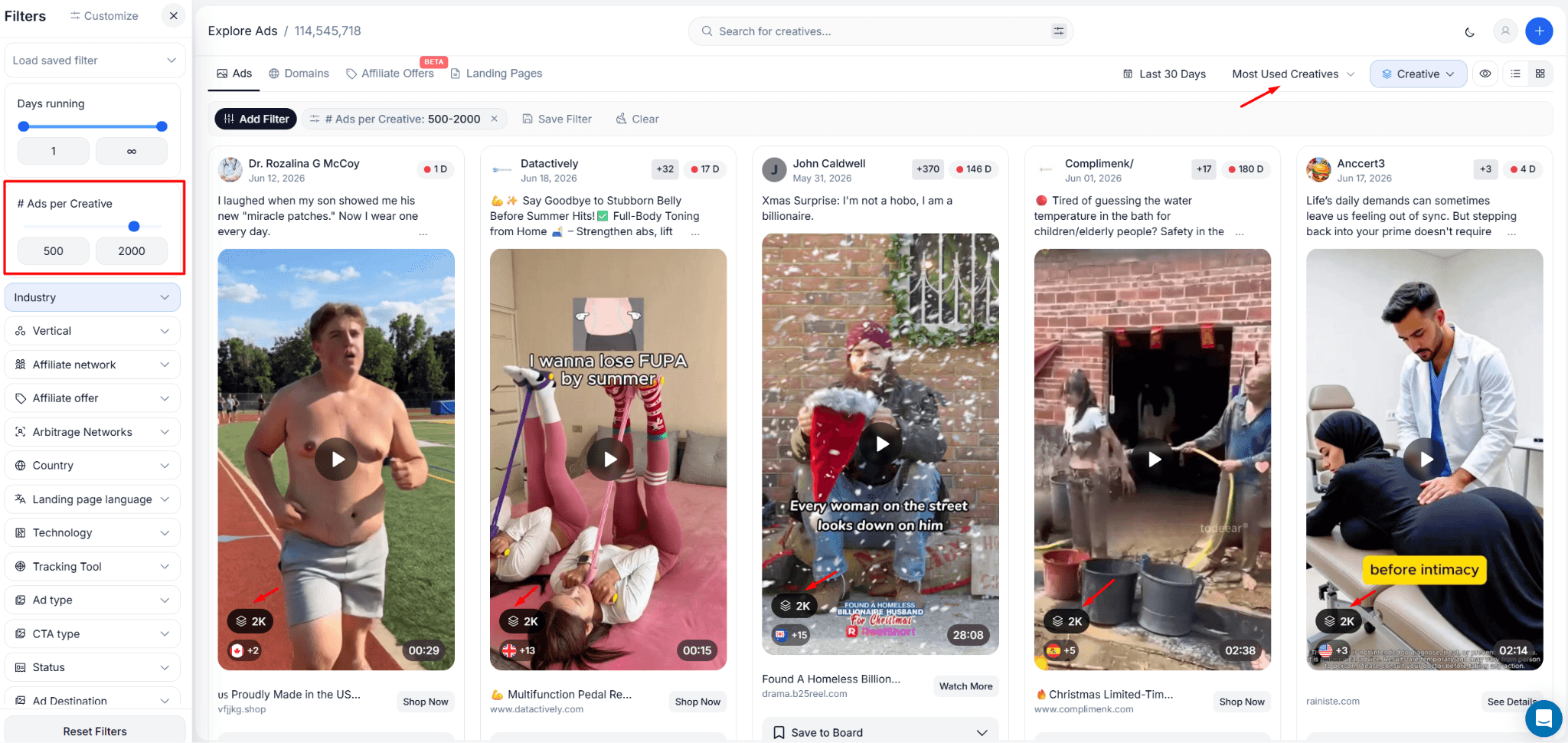
Group ads by creative, sort by most used, and you will always see the same handful of images at the top. That is not a bug. Some creatives really do have close to 100,000 ads running the exact same image, and nothing new is going to knock them off that spot anytime soon, because it is a very heavily used image.
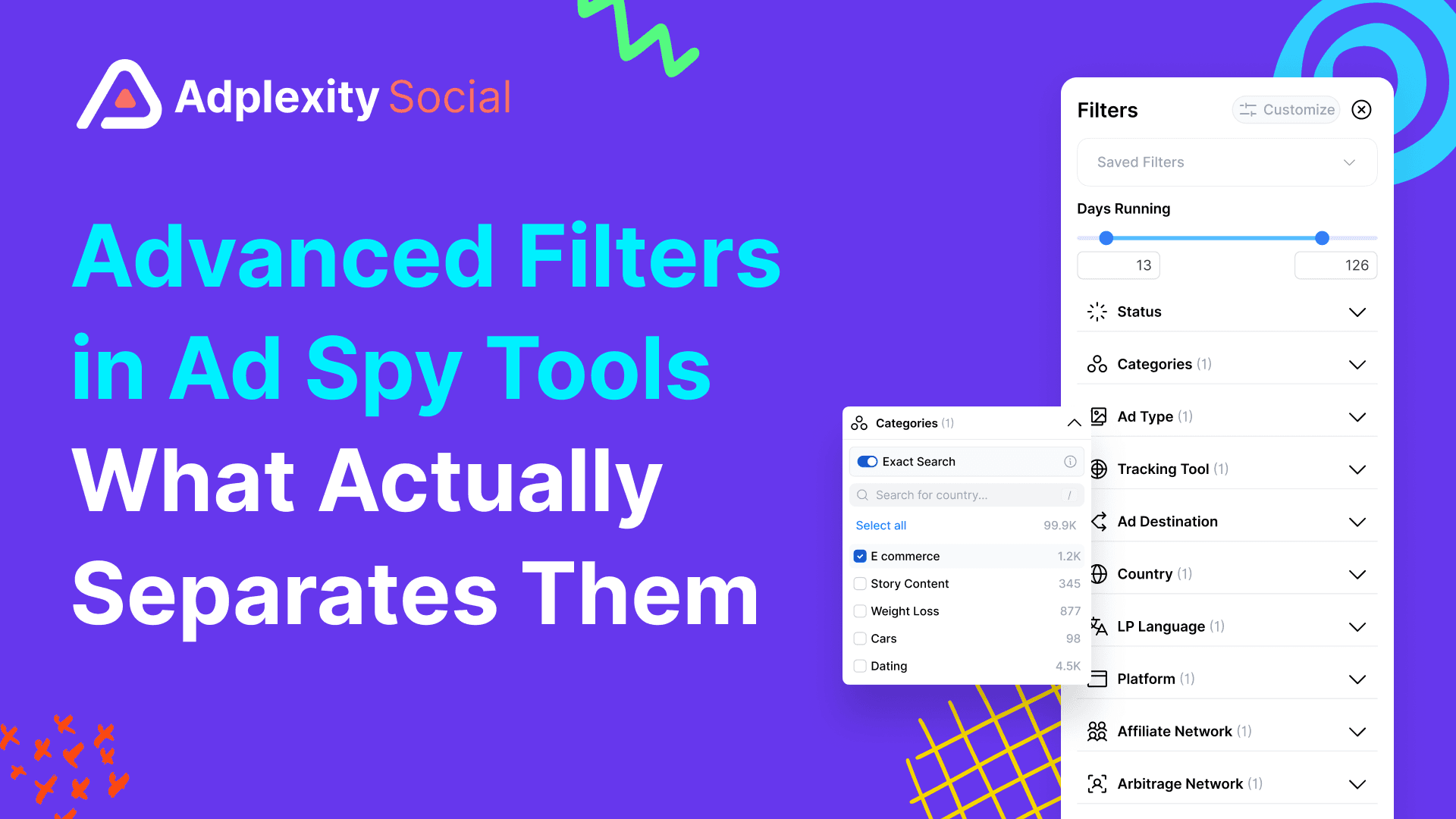
The problem is that those creatives are also the most burnt out. Everyone has seen them. We added a number of ads per creative slider to the filter bar so you can set your own range instead of always seeing the same heaviest hitters. Tell it you want creatives used in 500 to 2,000 ads, for example, and you get a shortlist of ideas that are proven but not yet oversaturated.
Finding the landing page, not just the ad
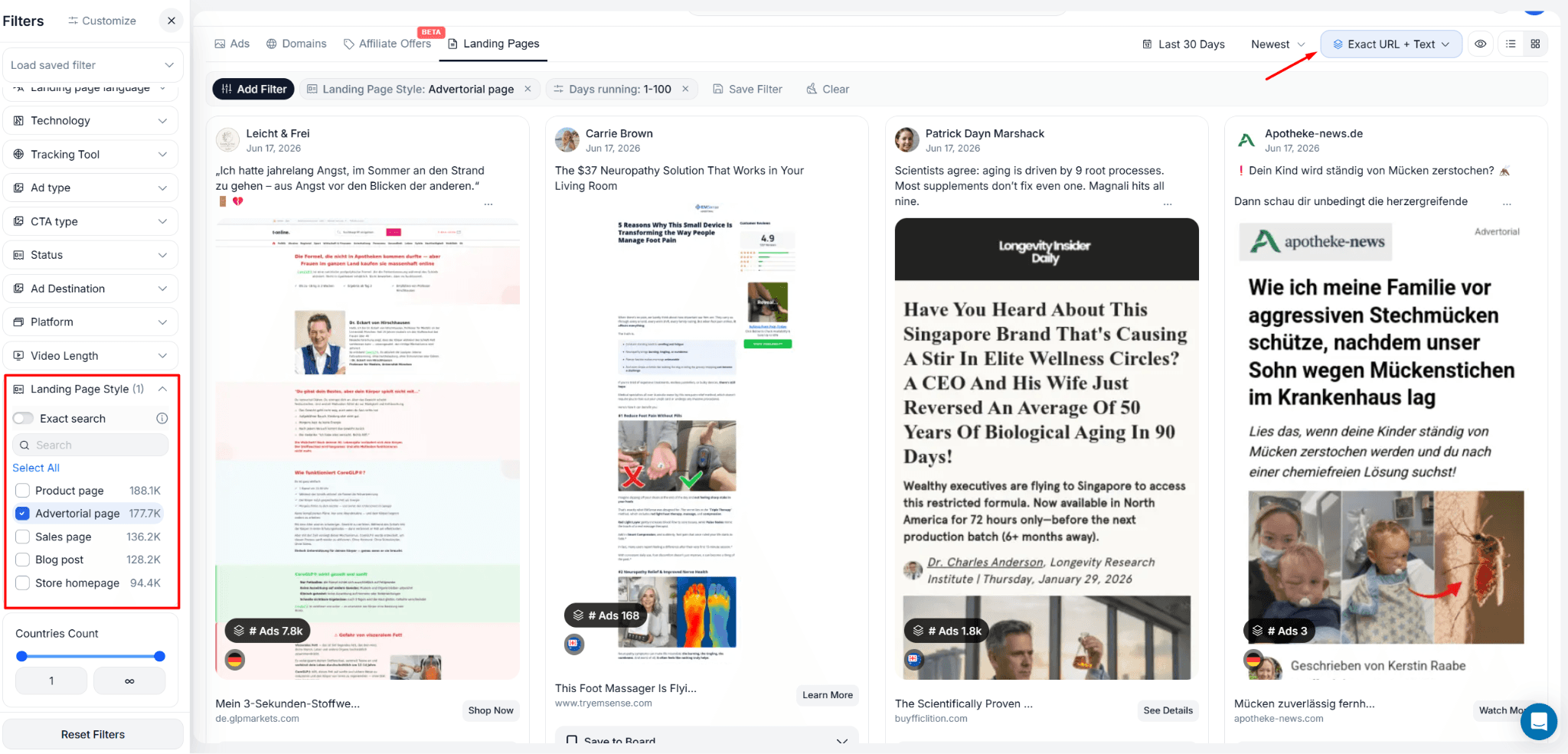
Certain landing page styles show up again and again in performance marketing because they work. The advertorial page, styled like an editorial article instead of a sales pitch, is one of the most consistently effective examples.
You can now filter by landing page style directly. Live styles include:
• Advertorial page
• Product page
• Sales page
• Blog post
• Store homepage
• Quiz funnel
Filtering an ads search by style shows you ads linking to a page built that way. Switching to the new Landing Pages view flips the angle entirely: instead of browsing ads, you browse the pages themselves, grouped by how many ads are pointing to each one.
Combine the style filter with a keyword search, weight loss, for example, and you get a shortlist of advertorial pages built specifically around that niche, ranked by how heavily they are being used. That is a much faster way to find a working funnel structure than scrolling through ads one at a time.
What is next
The API and MCP are the two biggest pieces of this release, and both are still growing. Domain support, profile and affiliate offer coverage, and more metrics are already on the roadmap. The landing page style filter is being refined for accuracy as we go too.
If you try either one and hit something missing or confusing, tell us. Both features came out of beta because real users pushed on them first, and that is still the fastest way to shape what ships next.
Sign up at adplexity.io to get started. Credits are already waiting in your account.
Frequently Asked Questions
What is the AdPlexity Social API?
It is a REST API that lets you pull Meta ad and landing page data programmatically, using search, lookup, and Boards export endpoints, instead of working through the platform interface by hand.
What is MCP and why does it matter?
MCP stands for Model Context Protocol, an open standard that lets an AI assistant like Claude use AdPlexity Social as a tool during a conversation. Instead of running a search yourself, you ask Claude a question and it pulls the data for you.
How many credits do I get, and what do they cost?
Every plan includes 5,000 credits a month at no extra charge. One credit covers one ad or one landing page pulled per request, so a search and a follow up detail lookup on the same item count as two separate charges.
Do I need to know how to code to use this?
Only for the API directly. The MCP is built for exactly the opposite case: if you can type a question into a chat with Claude, you can use AdPlexity Social data without writing a single line of code.
Which AI tools work with the AdPlexity Social MCP?
Claude Code is the only supported client at launch. If you use a different AI assistant or workflow tool, let the team know, additional client support is being evaluated based on demand.
Is the API included in my current plan, or is it a paid add-on?
It is included. There is no separate subscription, the 5,000 monthly credits are already part of the plan you are on.
What does the ads per creative slider actually do?
It lets you set a minimum and maximum duplicate count for creatives instead of always seeing the single most repeated image. Set a range like 500 to 2,000 to find creatives that are proven but have not been oversaturated yet.
What is the landing page style filter?
It lets you filter ads or browse landing pages by the style of page they link to, including advertorial page, product page, sales page, blog post, store homepage, and quiz funnel, so you can find a specific type of funnel instead of scrolling through unrelated results.
Key Takeaways
The AdPlexity Social API and MCP are live for every user on every plan, no upgrade or extra charge required. Every account gets 5,000 credits a month, and pulling one ad or one landing page costs exactly one credit per request. The MCP connects the platform directly to Claude Code, so you can ask for the top performing ads in a niche and get an answer instead of running a manual search yourself. Two more releases ship alongside it: a slider that lets you set your own ads-per-creative range, and a landing page style filter that finds specific funnel types like advertorial pages and quiz funnels.
Every AdPlexity Social account just got 5,000 free credits, and they showed up without anyone touching their billing.
That is because we shipped two of the biggest releases in the platform's history this month: a public API and an MCP integration for Claude Code. Both are live for every user, on every plan, starting now.
Watch the video here:
What shipped, in plain terms
The API lets you pull Meta ad and landing page data programmatically into a script, a spreadsheet automation, or an internal tool. The MCP, short for Model Context Protocol, is an open standard that lets Claude use AdPlexity Social as a tool during a normal chat. You ask a question, and Claude runs the search for you.
Both features are still labeled Beta inside the app, and that is intentional. We tested them with a group of users first, watched how they were actually being used, and are only now opening them to everyone. Expect the beta tag to come off soon, and expect more endpoints between now and then.
The credit model, in one paragraph
Every plan includes 5,000 credits a month, already built into the price you are paying today. There is nothing extra to buy to get started. One credit equals one ad or one landing page pulled per request, so a search that returns results and a follow up detail lookup on the same item are two separate one-credit charges. If you burn through 5,000 in a month, credit packages are coming, but most research workflows will not come close.
How to find it and connect
Open the API & MCP tab in the left sidebar. You will find your API key ready to copy, a link to the technical docs, and a Connect MCP button that walks you through three steps: copy a command, paste it into PowerShell or Terminal depending on your machine, and restart Claude Code. That is the whole setup. Claude Code is the only client supported at launch, so if you use a different AI tool, tell us, we are actively deciding what comes next.
What the API actually does
Three use cases cover almost everything right now.
Search lets you query ads or landing pages using close to the same filters available inside the platform: country, vertical, tracking tool, affiliate network, and more. Run a search, and you get back a list of IDs along with the fields you need to shortlist the ones worth a closer look.
Lookup takes one of those IDs and expands it into full detail, whether that is an ad or a landing page. This is where the post-click side shows up: redirect chains, outgoing URLs, tech stack, tracking tools, and affiliate network, all pulled from a single ID.
Boards works the same two-step way. List your board IDs first, then export whatever is saved inside a specific board. If you already use Boards to collect ads worth revisiting, this turns that saved research into a data feed instead of something you have to reopen manually.
Domain, profile, and affiliate offer coverage are already being added on top of these three, along with more metrics as they ship in the platform itself.
What the MCP changes day to day
The API is for people who write code or manage a workflow tool. The MCP is for everyone else.
Once it is connected, you can ask Claude something like find me the top performing ads running in the weight loss vertical this month, and Claude uses the same search and lookup tools behind the scenes to answer you directly, inside the chat. No filters to configure by hand, no spreadsheet to export and re-sort.
Where this gets genuinely useful is what happens after. Users testing the MCP have been taking the ads and landing pages Claude surfaces and feeding them straight into a creative workflow, a video editor, or another AI tool to brief new creative. The research step and the production step, which used to be two separate tools open in two separate tabs, collapse into one conversation.
A slider that fixes an old complaint
Group ads by creative, sort by most used, and you will always see the same handful of images at the top. That is not a bug. Some creatives really do have close to 100,000 ads running the exact same image, and nothing new is going to knock them off that spot anytime soon, because it is a very heavily used image.
The problem is that those creatives are also the most burnt out. Everyone has seen them. We added a number of ads per creative slider to the filter bar so you can set your own range instead of always seeing the same heaviest hitters. Tell it you want creatives used in 500 to 2,000 ads, for example, and you get a shortlist of ideas that are proven but not yet oversaturated.
Finding the landing page, not just the ad
Certain landing page styles show up again and again in performance marketing because they work. The advertorial page, styled like an editorial article instead of a sales pitch, is one of the most consistently effective examples.
You can now filter by landing page style directly. Live styles include:
• Advertorial page
• Product page
• Sales page
• Blog post
• Store homepage
• Quiz funnel
Filtering an ads search by style shows you ads linking to a page built that way. Switching to the new Landing Pages view flips the angle entirely: instead of browsing ads, you browse the pages themselves, grouped by how many ads are pointing to each one.
Combine the style filter with a keyword search, weight loss, for example, and you get a shortlist of advertorial pages built specifically around that niche, ranked by how heavily they are being used. That is a much faster way to find a working funnel structure than scrolling through ads one at a time.
What is next
The API and MCP are the two biggest pieces of this release, and both are still growing. Domain support, profile and affiliate offer coverage, and more metrics are already on the roadmap. The landing page style filter is being refined for accuracy as we go too.
If you try either one and hit something missing or confusing, tell us. Both features came out of beta because real users pushed on them first, and that is still the fastest way to shape what ships next.
Sign up at adplexity.io to get started. Credits are already waiting in your account.
Frequently Asked Questions
What is the AdPlexity Social API?
It is a REST API that lets you pull Meta ad and landing page data programmatically, using search, lookup, and Boards export endpoints, instead of working through the platform interface by hand.
What is MCP and why does it matter?
MCP stands for Model Context Protocol, an open standard that lets an AI assistant like Claude use AdPlexity Social as a tool during a conversation. Instead of running a search yourself, you ask Claude a question and it pulls the data for you.
How many credits do I get, and what do they cost?
Every plan includes 5,000 credits a month at no extra charge. One credit covers one ad or one landing page pulled per request, so a search and a follow up detail lookup on the same item count as two separate charges.
Do I need to know how to code to use this?
Only for the API directly. The MCP is built for exactly the opposite case: if you can type a question into a chat with Claude, you can use AdPlexity Social data without writing a single line of code.
Which AI tools work with the AdPlexity Social MCP?
Claude Code is the only supported client at launch. If you use a different AI assistant or workflow tool, let the team know, additional client support is being evaluated based on demand.
Is the API included in my current plan, or is it a paid add-on?
It is included. There is no separate subscription, the 5,000 monthly credits are already part of the plan you are on.
What does the ads per creative slider actually do?
It lets you set a minimum and maximum duplicate count for creatives instead of always seeing the single most repeated image. Set a range like 500 to 2,000 to find creatives that are proven but have not been oversaturated yet.
What is the landing page style filter?
It lets you filter ads or browse landing pages by the style of page they link to, including advertorial page, product page, sales page, blog post, store homepage, and quiz funnel, so you can find a specific type of funnel instead of scrolling through unrelated results.
Table of Contents
Quickly navigate through the key sections of this article.