How to Use the Meta Ad Library in 2026: 5 Steps and 10 Fixes

Share:

Five steps to find any advertiser's live ads, a fix for every empty search, and the questions the free library cannot answer.
Five steps to find any advertiser's live ads, a fix for every empty search, and the questions the free library cannot answer.
Type "gymshark" into the Meta Ad Library's search box and ten advertisers come back under that name. Only four of them belong to Gymshark. The other six are lookalike Pages with no followers at all, with names like "Gymshark Sale HQ". Most of what goes wrong in the Meta Ad Library starts right there, with the wrong Page or the wrong kind of search, and then there is a short list of things it will never show you at all.
If you run Meta ads and want to see exactly what a competitor is running, this guide shows you how to search the Meta Ad Library in about 10 minutes, fix the searches that come back empty, and spot what it will never show you. By the end of this guide, you will be able to:
Find any advertiser's live ads, including Pages you did not know they run
Read every label on an ad card
Fix a search that returns zero results, or far too many
Know which questions need a different source entirely
All you need is a browser. No Facebook account, no download, no cost. One naming note before you start: this guide says Meta Ad Library throughout, but plenty of media buyers still call it the Facebook Ad Library. Same tool, either name.
Key takeaways. The Meta Ad Library is free and needs no Facebook account to browse. Set the country, leave the ad category on All ads, then find your advertiser either by picking their Page from the list or by searching an exact phrase in quotes, and filter from there. Most zero-result searches come down to the country, the category, or the active status, since an ordinary ad drops out of the Library the day it stops running unless it also reached the EU or UK. The two labels media buyers mix up most are "This ad has multiple versions," which flags Meta's own assembled combinations, and "N ads use this creative and text," which just flags identical copies on one Page. None of that shows you commercial spend, the path after a click, or whether the same creative is running on other Pages.
Table of Contents
What does the Meta Ad Library show, and for how long?
Step 1: Open the Ad Library and set the country and ad category
Step 2: Search by advertiser, keyword or exact phrase
Step 3: Filter and sort the results
Step 4: Read the ad card and open the ad details
Step 5: Check the Page behind the ad and save the ad link
Why does the Meta Ad Library show no results, or not all of a brand's ads?
Can you search the Meta Ad Library by domain?
How do you access the Meta Ad Library API, and does it cover US ads?
What will the Meta Ad Library not show you?
Frequently Asked Questions
Conclusion
What does the Meta Ad Library show, and for how long?
The Meta Ad Library shows every active ad running across Meta's technologies, and it holds three categories longer: branded content, political and social issue ads, and any ad that reached the European Union or the United Kingdom. Every other ad, the ordinary one that only ran in markets outside the EU and UK, disappears the day it stops. The Library's front page also says a new ad appears within 24 hours of its first impression.
Kind of ad | While it runs | After it stops | Extra detail |
|---|---|---|---|
Ordinary ad, reached only markets outside the EU and UK | Visible | Removed | None kept |
Ad that reached the EU or UK | Visible | Kept 1 year after its last impression there (UK ads only if they ran after July 1, 2025) | Targeting and reach by location, age, gender; the EU version adds advertiser and payer |
Political or social issue ad | Visible | Kept 7 years, active or not | Spend and impression ranges, demographics, disclaimer |
Branded content | Active public posts since August 17, 2023 | Not covered by this retention rule | Creator, brand partner, date |
Browsing the Library needs no login at all. Age-restricted creatives, mainly alcohol and gambling, get hidden from anyone browsing logged out or under the legal age, though only the ones Meta has actually flagged with that restriction, not the whole alcohol category. Meta pulls an ad from the Library only for a serious policy violation or a government request. Most policy-breaking ads just sit there behind a warning or a shield instead of coming down.
The Ad Library is a live window, not an archive. An ordinary ad that never reached the EU or UK drops out the day it stops.
Most ads leave the Library the day they stop, which is the single fact behind most of the troubleshooting later in this guide.
Step 1: Open the Ad Library and set the country and ad category
Start at facebook.com/ads/library. The Page Transparency box that used to sit on a Facebook Page itself, showing whether that Page was running ads, is gone for most users now, so the Library is where this research starts, not the Page.
Two settings at the top of the screen decide what you see, and the search box itself stays locked until you pick an ad category: All ads, Issues, elections or politics, Housing, Employment, or Financial products and services. Country sets the market: pick the country where the ads ran, or leave it on All. This filter works on where an ad reached people, not where the advertiser is based or registered. Meta's own API calls this field ad_reached_countries.
Leave Ad category on All ads for everyday competitor research. Switch it to Issues, elections or politics, or to one of the other special categories, and the Library narrows to only that category and hides every ordinary commercial ad. That is the single most common reason a search that should return results comes back empty.
Quality check: if a brand you know is running ads and the search comes back empty, set the country to All before you touch anything else. A wrong country is the first thing to rule out, and it takes one click to fix.
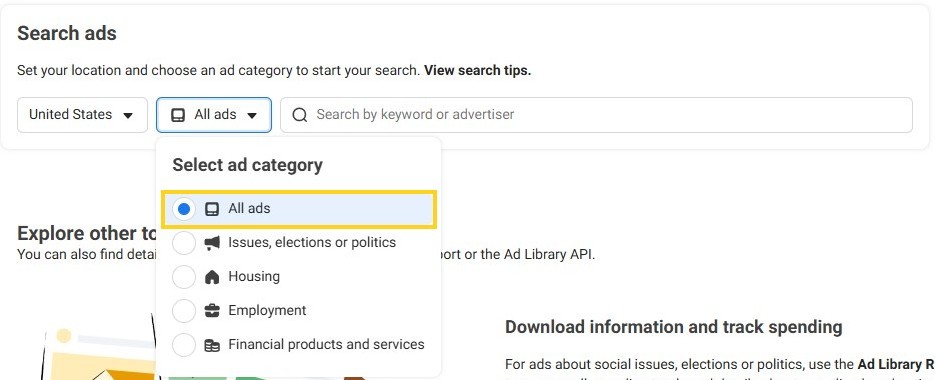
Country means where the ad ran, not where the advertiser is based.
Step 2: Search by advertiser, keyword or exact phrase
The same search box runs three different kinds of search. Which one you get depends on how you use it, not on anything you set beforehand.
Type a brand name and pick it from the Advertisers list in the dropdown, and you get an advertiser search: only that Page's ads. Brands often run more than one real Page, split by region or by product line, and the same dropdown can just as easily list a lookalike using the same name. Typing "gymshark" into the Library's search box lists ten advertisers named Gymshark. Four are the real thing: three Pages simply called "Gymshark" (the main one, a German one and a French one, all verified) plus Gymshark Women. The other six are lookalikes with no followers, with names like "Gymshark Sale HQ" and "Gymshark Discount Zone". Check for the verified badge and a follower count next to each name before you click: skip that, and you research a stranger instead of the brand.
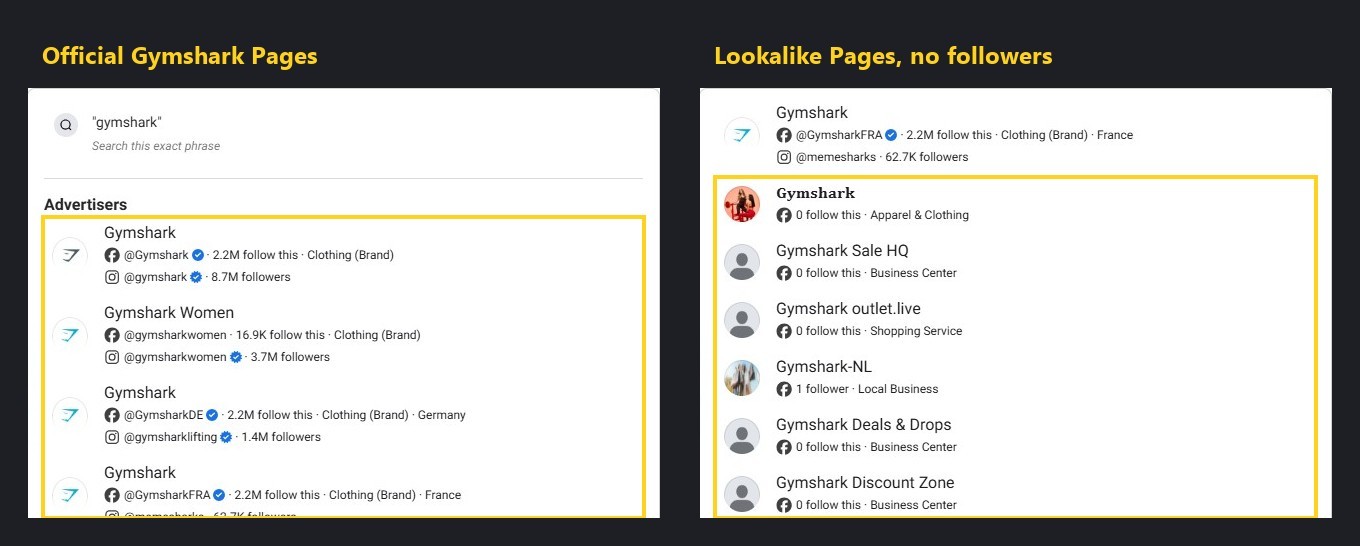
Type a phrase and hit Enter without picking anything from the dropdown, and you get a keyword search instead. It matches the words against both ad text and Page names, so the results mix in advertisers who have nothing to do with the brand you searched, just because the word showed up somewhere in their copy. That is why a keyword search for a well-known brand name can return thousands of results that are mostly noise.
The third option is an exact phrase search. Wrap the term in quotes, or choose "Search this exact phrase" from the dropdown. It matters more than it looks: the same day and country, "gym leggings" as a loose keyword search returns about 3,700 active ads; in quotes, as an exact phrase, about 130. Same words, a different search type.
Domain search is different again. It gets its own section later in this guide.
Quality check: thousands of results for a brand name means you ran a keyword search. Go back and pick the Page from the dropdown instead.
Pressing Enter runs a keyword search, not an advertiser search.
Step 3: Filter and sort the results
Once a search returns results, a Filters button and a Sort by menu sit above the grid, and between them they hold the controls below. Most are self-explanatory. Two of them decide what you can even see in the first place, Active status and Sort by, and both get a closer look below the table.
Filter | Options | Use it to | Watch out |
|---|---|---|---|
Language | The ad's language | Narrow a market that runs ads in more than one language | Skip it if you are not sure which language the ad runs in |
Advertiser | The Page or Pages your search matched | Confirm which Page, or Pages, you are actually looking at | Lists every Page your search term matched, not only the one you meant |
Platform | Facebook, Instagram, Audience Network, Messenger, WhatsApp, Threads | See where an advertiser is actually placing an ad | Leaving all six checked is the default and usually the right call |
Media type | Image, video, and now image-text and video-transcript matching, a keyword written inside an image or spoken inside a video, not just the ad copy | Find ads by what is written or said inside the creative itself | Easy to miss since it is a newer option |
Active status | Active, or Active and inactive | See paused ads | Inactive only restores ads Meta still archives, covered in the next section |
Impressions by date | A delivery date range | Find ads that ran in a specific window | It is a date range for when the ad delivered, not a count of impressions |
Sort by | Impressions: high to low (default), or Most recent, which groups ads under the month they launched (for example "Launched October 2026") | Change the order results come in | The default ranks what Meta delivered the most, not what made the advertiser the most money |
Active status and Sort by deserve a second look. Flip Active status to Active and inactive expecting paused ads to reappear, and for an ordinary US-only ad, they will not. That filter only restores ads Meta still archives after they stop, meaning EU, UK and political ads. The next section covers what that means when a normal search comes back empty.
Sort by defaults to Impressions: high to low, which ranks by how many people Meta delivered the ad to, not by what performed. A high-impression ad has clearly reached a lot of people, and that is a real signal, but the Library cannot show whether any of those impressions turned into a sale or a lead. Read the default sort as a popularity ranking, not a performance one. Most recent, the other option, groups results by the month an ad launched, the better choice when you want to see what a brand just started running rather than what it has run the most overall. For an approach built around what actually converts rather than what simply ran the most, see how to find winning ad creatives in any niche.
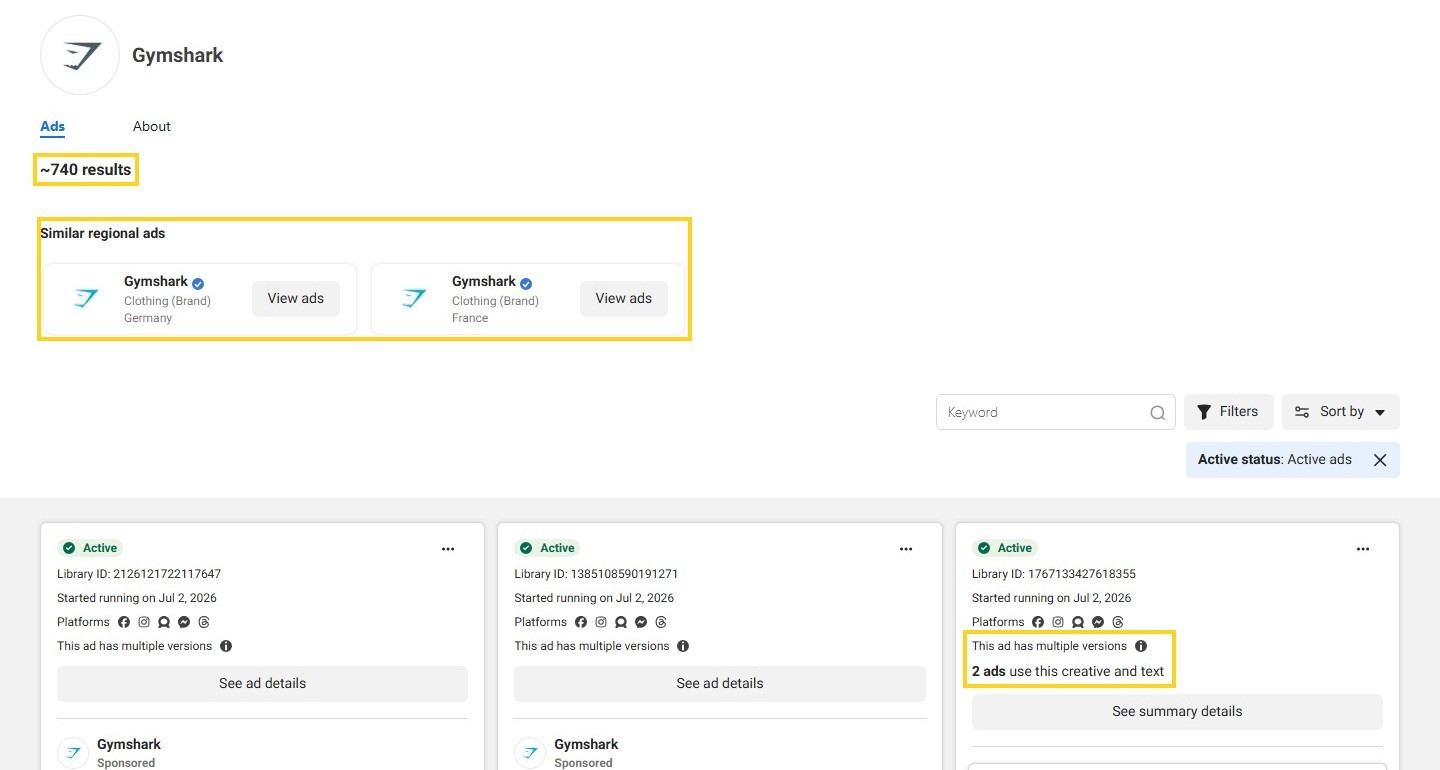
On Gymshark's own Page, a Keyword box searches inside just that Page, and the Library now suggests its German and French Pages under "Similar regional ads."
Step 4: Read the ad card and open the ad details
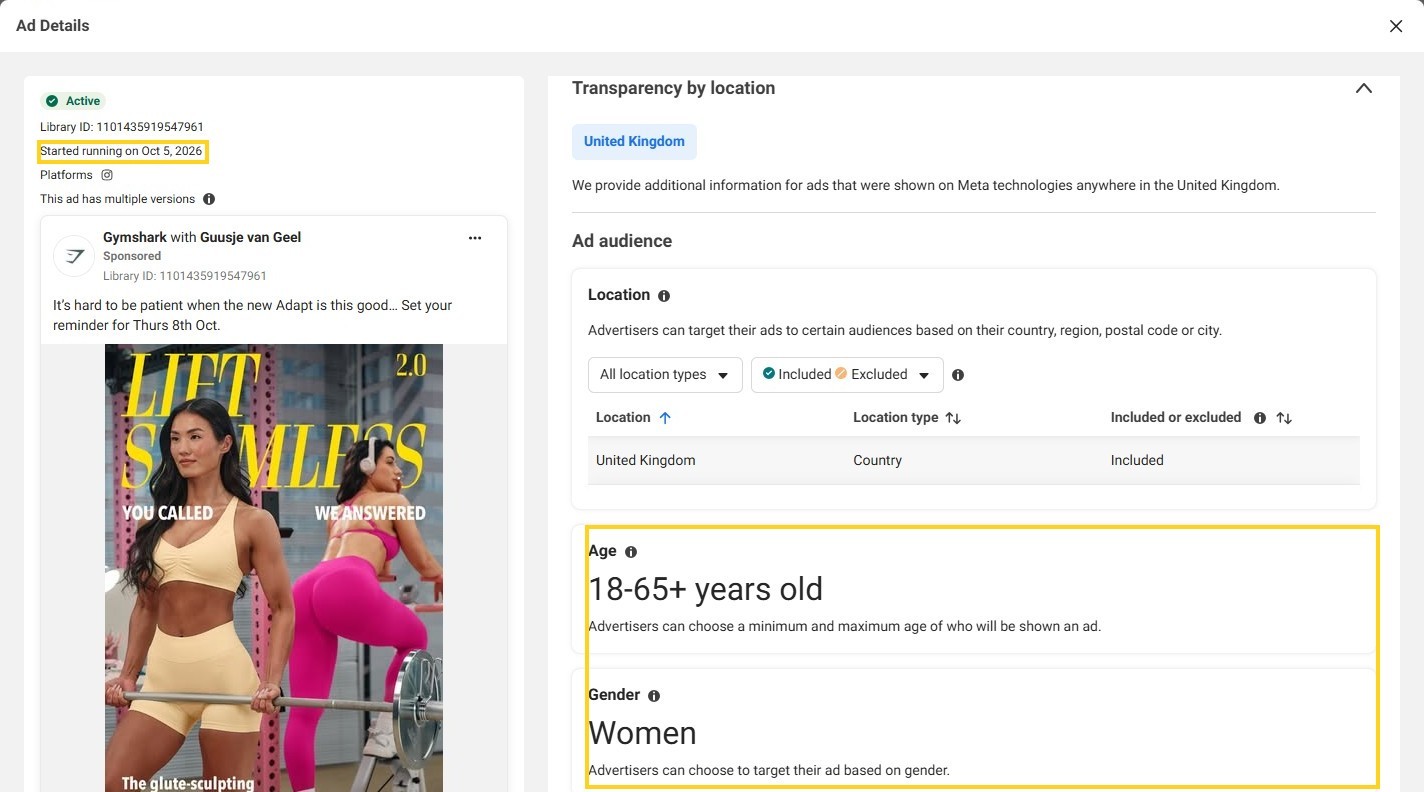
Every ad card, and every ad's own detail page, carries a handful of labels that look self-explanatory and are not quite. Here is what each one actually means, using a real card as the example: a Gymshark partnership ad featuring the creator Guusje van Geel, running in the UK.
Started running on
This date belongs to the ad, not the creative. The ad says "Started running on Oct 5, 2026," but AdPlexity Social has seen that same image in Gymshark's ads since July. Forum reports on BlackHatWorld describe duplicated ads getting a fresh start date on Meta's own accounts, which matches this mechanic: re-upload the same creative and the Library has no way to know it is not brand new.
Inactive ads show the date differently: the card prints a date range instead of a single start date. Some cards, active or inactive, also add a "Total active time" figure next to the date.
Quality check: if the start date on a card is only days old but you have been seeing that exact creative for weeks, you are most likely looking at a fresh copy of an older ad, not a new one.
"N ads use this creative and text"
This line counts identical ads, same image or video and same text, and it only counts copies sitting on the one Page you are looking at. On Gymshark's Page, some cards show "2 ads use this creative and text," and on a newer one it reads "4 ads use this creative and text." That count says nothing about whether the same creative is also running on other Pages. The last section of this guide comes back to exactly that gap.
"This ad has multiple versions"
This is a different mechanic. Meta's own tooltip calls it a dynamic ad: Meta assembles the images, text and placement from a set the advertiser supplied, picking a combination per audience instead of running one fixed creative. That same Gymshark ad carries this label too, and its details page pages through four combinations with a "1 of 4" control at the bottom. It is assembly, not scale: a "multiple versions" ad and an ad with a high "N ads use this creative and text" count can look similar at a glance, but one is Meta mixing pieces for different audiences and the other is the same fixed ad copied many times over.
EU transparency
Because that same ad ran in the UK, its details page adds a panel called "Transparency by location": the audience, women in the United Kingdom aged 18 to 65+, and its reach, about 100 accounts in its first two days, broken down by age. This is the only delivery data the Library gives you for free on an ordinary commercial ad. A US-only ad shows none of this, which is most of what the last section of this guide is about.
Low impression count
Some cards, mostly on newer or smaller campaigns, carry a badge reading "Low impression count," and its tooltip defines that as fewer than 100 impressions, shown on the card as "Impressions: <100". In a logged-out US check, this badge was the only impression figure that appeared anywhere on a commercial ad's card. No ad showed a specific number or a wider range. Some vendor guides describe an impression-range bucket appearing on every ad. That is not what this check found, so treat that kind of claim as something to verify against what you are actually looking at, not as a rule.
The start date belongs to one ad ID, not to the creative.
Step 5: Check the Page behind the ad and save the ad link
Click the Page name on any ad card and you land on that Page's own view inside the Library: every active ad it runs, with a result count up top. Open the About tab next to it every time.
On Gymshark's own Page, that tab reads like a real company file. It was created in 2011 and has changed its name once since. GYMSHARK LTD runs it from the United Kingdom, and the largest group of its Page managers is in the UK too.

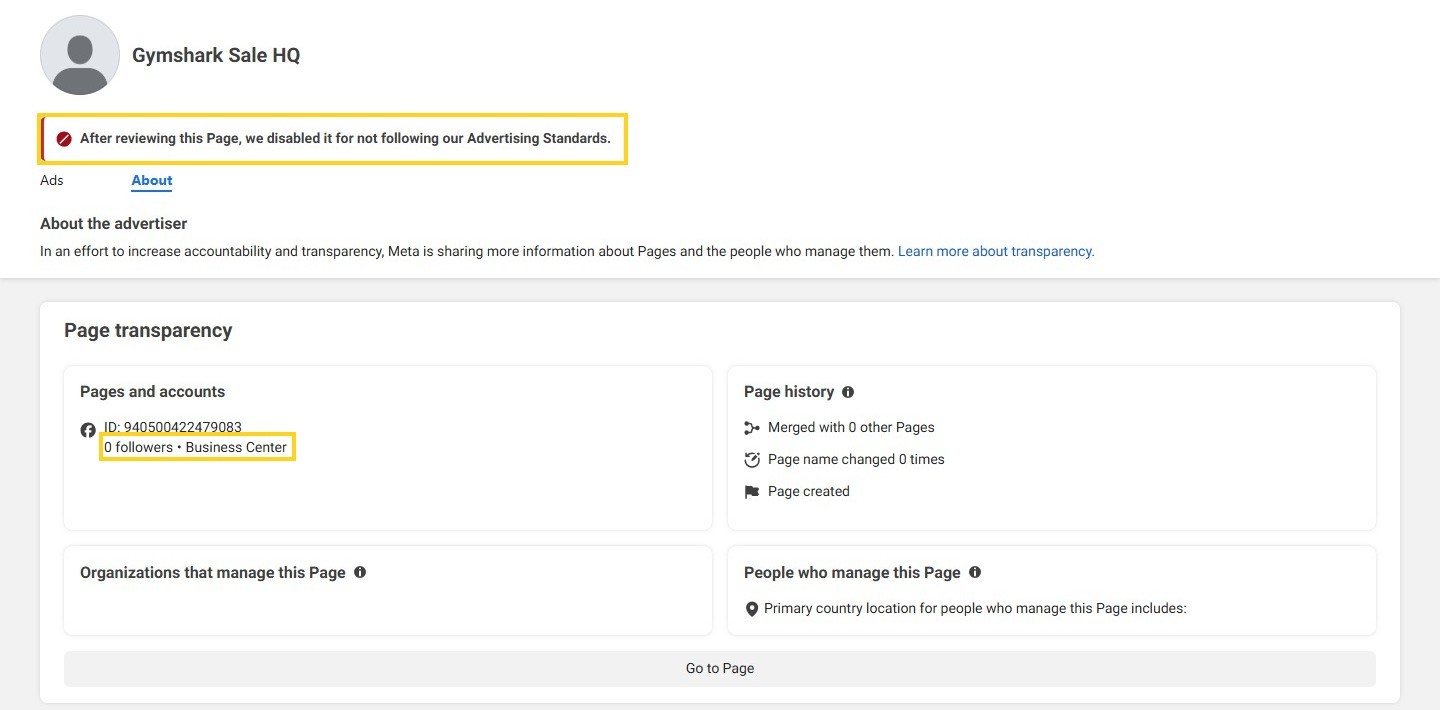
Open the same tab on one of the lookalike Pages from Step 2, Gymshark Sale HQ, and almost none of that is there. It has no followers and no creation date. No organization stands behind it, and no countries are listed for its managers. At the top sits a notice Meta itself posted: "After reviewing this Page, we disabled it for not following our Advertising Standards."
Save the ad the moment you find it. Use "Copy ad link" from the card's options menu. This matters more than it sounds: an ordinary US-only ad's link stops resolving once that ad stops running, and the last section of this guide shows exactly what that looks like.
Copy the ad link the day you find it.
Pro tips
A few habits turn this from a one-off search into a repeatable check. Sort by Most recent instead of the default Impressions sort, and you see what a brand has launched this month instead of what it has run the longest. If a brand also advertises in Europe, switch the country to an EU market and set Active status to Active and inactive. That pulls up a year of its history there, because that is the one case where a paused ad stays visible.
Copy the link the day you find the ad, not the day you plan to write about it. By the time you go back for it, an ordinary US ad can already be gone. AdPlexity Social's own Chrome extension, "AdPlexity Ad Library Saver," adds a save button right on the card inside the Library, so the ad goes straight to a Board the moment you see it instead of sitting in a tab you might lose. Turning this into a weekly habit is the whole game, and how to spy on competitor Facebook ads walks through a fuller weekly workflow built around it.
Why does the Meta Ad Library show no results, or not all of a brand's ads?
Check three settings before you touch anything else, in this order: country, ad category and status. Almost every "the Library is broken" complaint comes down to one of them.
Country first. Pick a country the ad never reached and it will not show, no matter how well known the brand is. Ad category second: leave it on Political or one of the special categories and every ordinary commercial ad disappears, an easy setting to leave on from your last search.
Status third: flipping to Active and inactive feels like it should bring back every paused ad, but it only restores ads Meta keeps archived after they stop, meaning ads that reached the EU or UK, and political ads. An ordinary US-only ad that already stopped running does not come back, whichever status you pick.
Past those three, the causes get narrower. Here are all ten fixes for an empty or incomplete search, in one place.
What you see | Likely cause | Fix |
|---|---|---|
A brand you know returns nothing | The country selected is not one the ad reached | Set country to All, then narrow again |
Only unrelated ads, or far too few | Political or a special category is selected | Set ad category back to All ads |
A brand you know is paused shows nothing, even with Active and inactive on | The ad never reached the EU or UK, and was not political | There is no fix; that is expected, covered below |
Thousands of unrelated results for a brand name | Pressing Enter ran a keyword search, not an advertiser search | Pick the Page from the Advertisers list instead |
Results, but not the ads you were expecting | Wrong Page: a regional, lookalike or fan-run Page with a similar name | Open the Page's About tab and confirm it is the real one |
A brand clearly advertises but its own Page shows little | It runs ads through other Pages, resellers or creators | Search the domain instead, and check for Branded content |
A multi-word search returns almost nothing | The words were searched unordered rather than together | Wrap the phrase in quotes for an exact phrase search |
Fewer results than expected for an active brand | Impressions by date range is still set from an earlier search | Clear or widen the delivery date range |
An alcohol or gambling ad's creative will not display | Age-restricted creatives are hidden from logged-out or underage viewers | Log in with an account old enough for the category |
The page will not load results at all, or loads then goes blank | A blocker, extension, cache or VPN is interfering | Allowlist facebook.com, or try a private window |
That last row is common enough to call out on its own. Ads Uploader names uBlock Origin, AdBlock Plus, Ghostery and Firefox's own tracking protection as extensions that interfere with the Library loading at all, and Graphed reports the same pattern with caching and VPNs.
Two cases have no fix, period. Meta removes an ad from the Library outright only for a serious policy violation or a government request, so a removed ad is simply gone. And "Ad isn't in the Ad Library," the message covered in the last section of this guide, shows for both a brand-new ad that has not received any impressions yet and a stopped ad that never reached the EU or UK. Neither one is coming back.
Check country, category and status before you blame the Library.
Can you search the Meta Ad Library by domain?
Yes, but only as a text match. Paste a domain into the Library search box and it runs the same keyword search as Step 2: it checks that domain against the display link on each ad and against the ad text, and nothing else. It has no way to look at where the click actually lands.
That gap shows up fast on a real domain. Several advertisers send Meta traffic to the same Amtrak trips article on search-topics.com, a search arbitrage page. Search search-topics.com as a loose keyword and the Library splits it into separate words, matching each one anywhere in an ad; that alone hands back about 11,000 active ads. Put the same domain in quotes as an exact phrase and the count drops to about 21, and every one of those ads prints SEARCH-TOPICS.COM as its display link.
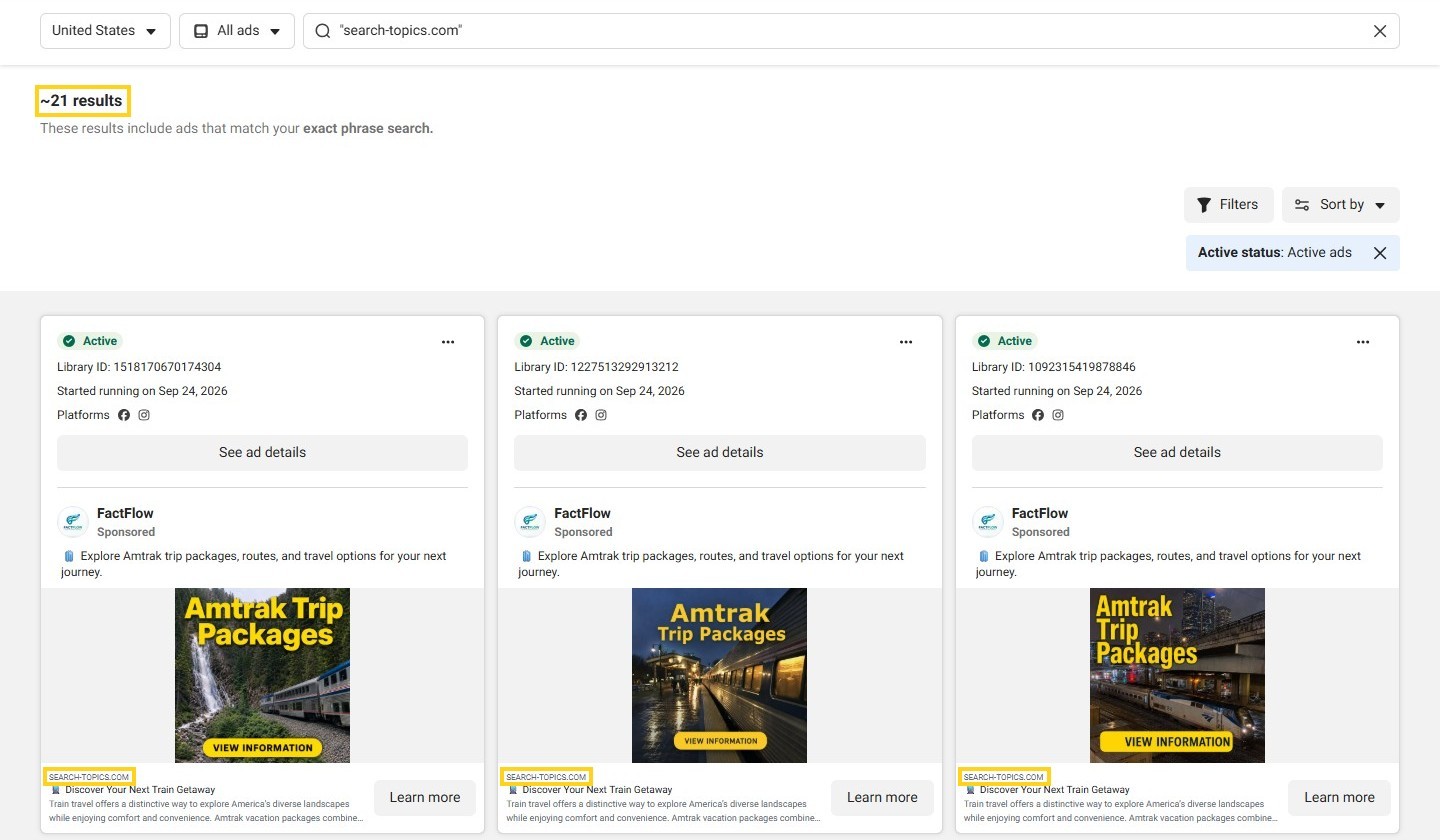
Those 21 are not the whole picture. The Page Nustar Trenz runs its own Amtrak ads that land on that same article, but its display link reads trk.active-begin.com, a tracking domain with no mention of search-topics.com anywhere on the card. The exact-phrase search above will never catch them. Type the root domain alone, active-begin.com, and the Library finds nothing; only the full subdomain, trk.active-begin.com, typed exactly, turns up the ads, so you have to already know the string before the search box can find it.
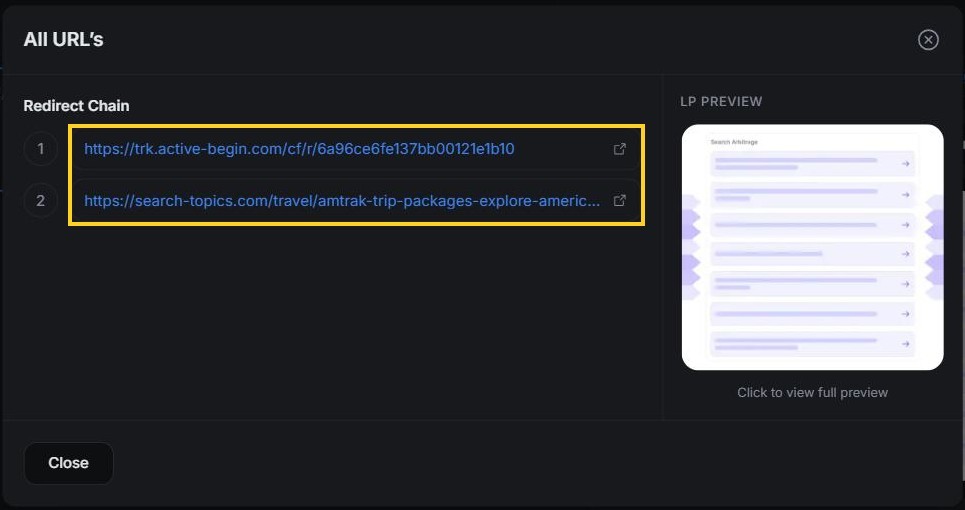
This is the gap AdPlexity Social is built to close from the other direction. Instead of matching text on the ad, it indexes where the click actually lands, so a search by landing page URL or redirect hop finds the ads that reach a domain regardless of what their display link says. More than 100 active US ads land on search-topics.com this way, Nustar Trenz included, and the Landing Pages tab lays out each redirect hop, from trk.active-begin.com to the article itself. The technical fingerprint behind hidden affiliate ads goes deeper into finding ads built this way at scale.
A domain search in the Ad Library matches text, not destinations.
See every ad that sends traffic to a domain, whatever display link it shows. Sign up at adplexity.io.
How do you access the Meta Ad Library API, and does it cover US ads?
Not for an ordinary US-only ad. Meta's API returns political and social issue ads delivered anywhere over the past seven years, plus ads of any type delivered to the UK or the EU within the past year. An ad that only ran in the United States, and was never political, falls outside the API's scope no matter how you write the request.
Getting access takes a few steps, and none of them are instant. Start with a Facebook account, then confirm your identity and location, a step Meta says can take a few days. From there, set up a Meta for Developers account and register an app to get credentials for the ads_archive endpoint. Meta lists no fee for any of this. Once access is live, a search term can run up to 100 characters, an exact phrase match is optional, and a single request can target up to ten Page IDs. The API has no batch download of creatives, only the ad data itself.
Website | API | |
|---|---|---|
Login needed | No, to browse | Yes, plus identity and location confirmation |
Ordinary US-only ads | Yes | No |
Ads that reached the EU or UK | Yes | Yes, past year |
Political ads | Yes | Yes, seven years |
Spend data | Political ads only, as a range | Political ads only, as a range |
Targeting and reach | EU and UK ads only | EU and UK ads only |
Search options | Keyword, exact phrase, advertiser | Search term up to 100 characters, exact phrase optional, up to ten Page IDs |
Creative downloads | One at a time, logged in | Not supported |
AdPlexity Social runs its own API and MCP too, built for a different job: finding and following ads across all of this, US-only included, instead of pulling records bound by Meta's own retention rules.
The API will not return an ordinary US-only ad.
What will the Meta Ad Library not show you?
Everything covered so far is useful, but none of it answers the questions that actually decide whether a competitor's ad is working. The gaps below are not bugs Meta might fix later. They are structural. The Library shows what an advertiser chose to display, not what happened after someone clicked, what the funnel runs on, or what a stopped US-only ad used to look like. Post-click intelligence, reading the landing page, the redirect chain and the destination behind an ad instead of just the ad itself, is what closes those gaps.
What you want to know | What the Ad Library gives you | Where to find it |
|---|---|---|
Spend and results | Nothing, except a range for political ads | The advertiser's own ad account; a stand-in is reading how long a creative ran and how many copies exist |
How many people saw it | EU and UK reach only, the Low impression count badge, and the default sort order | Nowhere, for an ordinary US-only ad |
Where the click lands | The display link only | Landing Pages tab: the page itself, the redirect chain, outgoing URLs |
What runs behind the funnel | Nothing | Detected technologies, tracking tools, affiliate networks |
Copies on other Pages | One Page's count only | Creative header: # Ads and # Pages |
Every ad pointing at a domain | Text matches on the display link and ad copy | Domains tab, URL search |
Stopped ads | Nothing, for a US-only ad | Inactive and deleted ads, across the 16 markets AdPlexity Social tracks |
How long a creative ran | Per-ad start dates only | First Seen, Days Running, the Days running filter |
Landing page text | Not searchable | Landing page keyword search |
Three real examples show what that table means in practice.
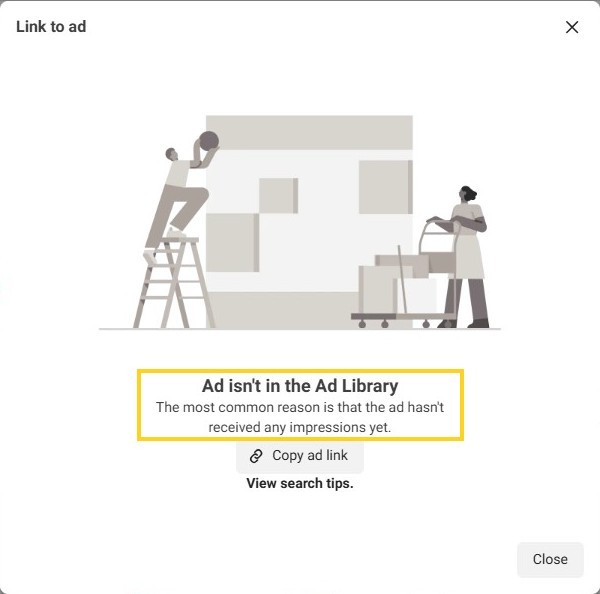
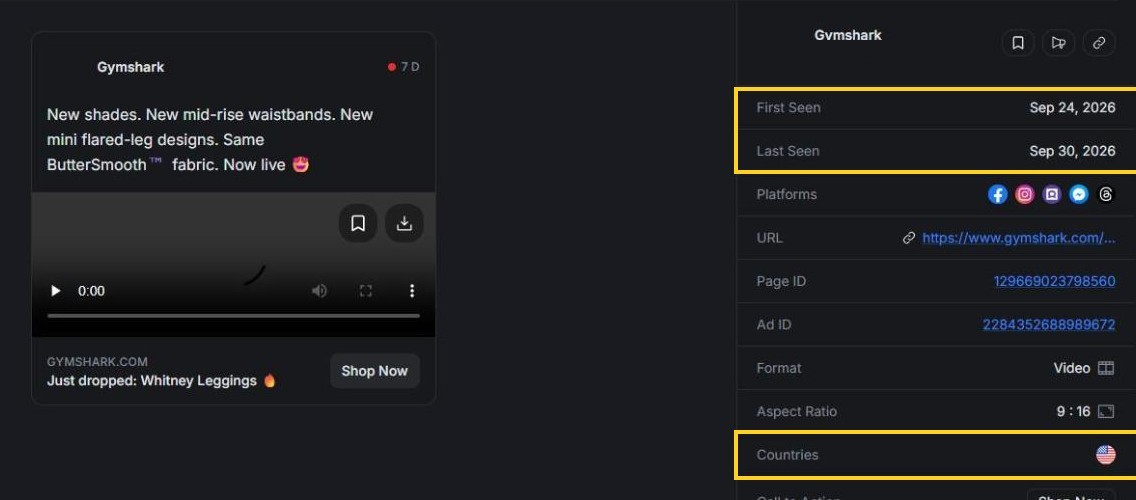
Gymshark's "Just dropped: Whitney Leggings" video shows what actually happens when a US-only ad stops. It ran for about a week in late September, then stopped, and its Ad Library link now opens a dialog instead of an ad: "Ad isn't in the Ad Library. The most common reason is that the ad hasn't received any impressions yet."
The ad had impressions. It simply stopped running, and an ordinary US-only ad leaves the Library the moment that happens, the same retention rule covered earlier in this guide. AdPlexity Social still has the record: the video, the landing page it pointed to, and the first and last day it was seen in the United States.
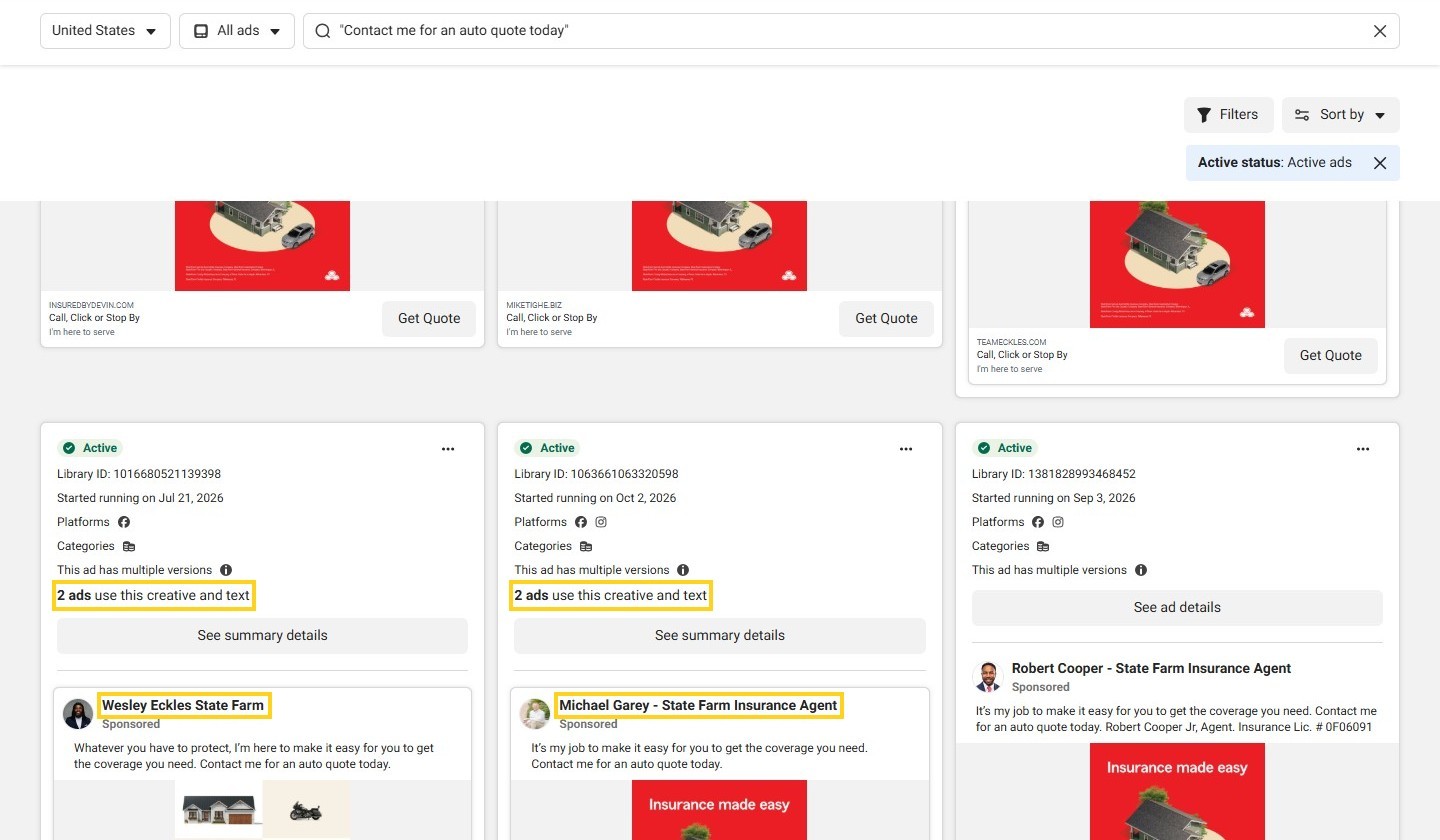
Copies on other Pages hit the same wall from a different angle: the Library only ever counts one Page at a time. Many of State Farm's local agents run the same corporate creatives from their own Pages, each one linking to that agent's own site. Search the exact phrase from one of them, "Contact me for an auto quote today", and the Library returns about 26,000 active ads, card after card from a different agent's Page.
The same "Insurance made easy" creative runs under agent after agent, and every card still says "2 ads use this creative and text". That count stops at the Page, with no way to add the agents up. AdPlexity Social groups the identical creative across every Page that runs it: about 1,300 copies on 956 Pages, a number no single Page's Library view would ever show.

Where the click lands tells the same story as the domain search above. The Library still has nothing to offer about the Nustar Trenz Amtrak ad beyond its display link, while AdPlexity Social's Landing Pages tab already showed the real path, through trk.active-begin.com and on to the search-topics.com article. Reverse-engineer the funnel behind a competitor's ad covers how to read a redirect chain like this one step by step.
The Ad Library shows what the advertiser chose to display. Where the click goes, and what runs behind it, sits outside the Library.
Everything after the click is outside the Ad Library.
Frequently Asked Questions
Is the Meta Ad Library free, and do I need a Facebook account to use it?
The Meta Ad Library is free, and browsing it needs no Facebook account, just a browser. Logging in only matters for two things: downloading a set of search results, since Meta's terms require an account for that, and viewing age-restricted creatives such as alcohol or gambling ads. The API is a separate, heavier process: it needs a Facebook account plus identity and location confirmation, and that can take a few days.
Can you see how much a competitor spends in the Meta Ad Library?
Only for political and social issue ads, and even then only as a spend range, never an exact figure. Ads that reached the EU or UK show reach and targeting by location, age and gender, but not spend. Outside those categories, the Library gives no spend figure, period, and no tool, free or paid, can pull a number Meta does not publish.
Can you see old or inactive ads in the Meta Ad Library?
Only in two cases: an ad that reached the EU or UK stays visible for a year after its last impression there, and a political or social issue ad stays visible for seven years. An ordinary ad running only outside the EU and UK disappears from the Library the day it stops running, with no way to bring it back. Gymshark's own "Whitney Leggings" video ran for about a week in late September and disappeared from the Library the moment it stopped, despite having real impressions behind it. AdPlexity Social keeps inactive and deleted ads across the 16 markets it tracks, which covers exactly the case the free Library drops.
What does "This ad has multiple versions" mean in the Meta Ad Library?
It means Meta assembled that ad dynamically, mixing the advertiser's images, text and placement preferences into a different combination for each audience, paged through with a "1 of N" control. That differs from "N ads use this creative and text," which counts identical copies of one fixed ad running on the same Page. One is Meta mixing pieces; the other is the same ad copied.
What does "Low impression count" mean in the Meta Ad Library?
It is a badge Meta shows on ads with fewer than 100 impressions, displayed on the card as "Impressions: <100." It shows up often on ads that just launched or are still being tested. On its own, it is not a verdict on whether an ad works, just a sign Meta has not delivered it much yet.
Does the Meta Ad Library show Instagram, WhatsApp and Threads ads?
Yes. The Platform filter covers six placements: Facebook, Instagram, Audience Network, Messenger, WhatsApp and Threads. Creator posts carrying a paid partnership label show up separately under Branded content, rather than under any one platform.
Can I download ads from the Meta Ad Library?
Only in limited ways on its own. Meta lets logged-in users download a set of search results, and the API returns ad data one request at a time, with no batch creative download built in. The AdPlexity Ad Library Saver extension adds a Download button to every ad card and lets you tick a set of ads to export together as a .zip.
Do I need a paid tool if the Meta Ad Library is free?
Not for live research on one advertiser in one market; the free Library handles that fine. Where it runs out is stopped-ad history outside the EU, UK and political categories, copies of a creative running on other Pages, what a landing page and its redirect chain actually do, and every ad pointing at one domain. The full comparison of AdPlexity Social and the Facebook Ads Library goes through the gap in more depth.
Conclusion
Five steps cover everything the Meta Ad Library can do for free:
Open the Library and set the right country and ad category
Search by advertiser or exact phrase rather than a loose keyword
Filter and sort with a clear idea of what the default ranking actually means
Read what each label on the ad card really says
Check the Page behind the ad, and save the link the day you find it
Used well, that gets you a long way. Where it runs out, mainly stopped US-only ads, copies across Pages, and anything past the click, is where AdPlexity Social picks up: over 100 million Meta ads indexed, 15 million new ones added every month, across every Meta placement. Sign up at adplexity.io and see it on your own competitors.
Type "gymshark" into the Meta Ad Library's search box and ten advertisers come back under that name. Only four of them belong to Gymshark. The other six are lookalike Pages with no followers at all, with names like "Gymshark Sale HQ". Most of what goes wrong in the Meta Ad Library starts right there, with the wrong Page or the wrong kind of search, and then there is a short list of things it will never show you at all.
If you run Meta ads and want to see exactly what a competitor is running, this guide shows you how to search the Meta Ad Library in about 10 minutes, fix the searches that come back empty, and spot what it will never show you. By the end of this guide, you will be able to:
Find any advertiser's live ads, including Pages you did not know they run
Read every label on an ad card
Fix a search that returns zero results, or far too many
Know which questions need a different source entirely
All you need is a browser. No Facebook account, no download, no cost. One naming note before you start: this guide says Meta Ad Library throughout, but plenty of media buyers still call it the Facebook Ad Library. Same tool, either name.
Key takeaways. The Meta Ad Library is free and needs no Facebook account to browse. Set the country, leave the ad category on All ads, then find your advertiser either by picking their Page from the list or by searching an exact phrase in quotes, and filter from there. Most zero-result searches come down to the country, the category, or the active status, since an ordinary ad drops out of the Library the day it stops running unless it also reached the EU or UK. The two labels media buyers mix up most are "This ad has multiple versions," which flags Meta's own assembled combinations, and "N ads use this creative and text," which just flags identical copies on one Page. None of that shows you commercial spend, the path after a click, or whether the same creative is running on other Pages.
Table of Contents
What does the Meta Ad Library show, and for how long?
Step 1: Open the Ad Library and set the country and ad category
Step 2: Search by advertiser, keyword or exact phrase
Step 3: Filter and sort the results
Step 4: Read the ad card and open the ad details
Step 5: Check the Page behind the ad and save the ad link
Why does the Meta Ad Library show no results, or not all of a brand's ads?
Can you search the Meta Ad Library by domain?
How do you access the Meta Ad Library API, and does it cover US ads?
What will the Meta Ad Library not show you?
Frequently Asked Questions
Conclusion
What does the Meta Ad Library show, and for how long?
The Meta Ad Library shows every active ad running across Meta's technologies, and it holds three categories longer: branded content, political and social issue ads, and any ad that reached the European Union or the United Kingdom. Every other ad, the ordinary one that only ran in markets outside the EU and UK, disappears the day it stops. The Library's front page also says a new ad appears within 24 hours of its first impression.
Kind of ad | While it runs | After it stops | Extra detail |
|---|---|---|---|
Ordinary ad, reached only markets outside the EU and UK | Visible | Removed | None kept |
Ad that reached the EU or UK | Visible | Kept 1 year after its last impression there (UK ads only if they ran after July 1, 2025) | Targeting and reach by location, age, gender; the EU version adds advertiser and payer |
Political or social issue ad | Visible | Kept 7 years, active or not | Spend and impression ranges, demographics, disclaimer |
Branded content | Active public posts since August 17, 2023 | Not covered by this retention rule | Creator, brand partner, date |
Browsing the Library needs no login at all. Age-restricted creatives, mainly alcohol and gambling, get hidden from anyone browsing logged out or under the legal age, though only the ones Meta has actually flagged with that restriction, not the whole alcohol category. Meta pulls an ad from the Library only for a serious policy violation or a government request. Most policy-breaking ads just sit there behind a warning or a shield instead of coming down.
The Ad Library is a live window, not an archive. An ordinary ad that never reached the EU or UK drops out the day it stops.
Most ads leave the Library the day they stop, which is the single fact behind most of the troubleshooting later in this guide.
Step 1: Open the Ad Library and set the country and ad category
Start at facebook.com/ads/library. The Page Transparency box that used to sit on a Facebook Page itself, showing whether that Page was running ads, is gone for most users now, so the Library is where this research starts, not the Page.
Two settings at the top of the screen decide what you see, and the search box itself stays locked until you pick an ad category: All ads, Issues, elections or politics, Housing, Employment, or Financial products and services. Country sets the market: pick the country where the ads ran, or leave it on All. This filter works on where an ad reached people, not where the advertiser is based or registered. Meta's own API calls this field ad_reached_countries.
Leave Ad category on All ads for everyday competitor research. Switch it to Issues, elections or politics, or to one of the other special categories, and the Library narrows to only that category and hides every ordinary commercial ad. That is the single most common reason a search that should return results comes back empty.
Quality check: if a brand you know is running ads and the search comes back empty, set the country to All before you touch anything else. A wrong country is the first thing to rule out, and it takes one click to fix.
Country means where the ad ran, not where the advertiser is based.
Step 2: Search by advertiser, keyword or exact phrase
The same search box runs three different kinds of search. Which one you get depends on how you use it, not on anything you set beforehand.
Type a brand name and pick it from the Advertisers list in the dropdown, and you get an advertiser search: only that Page's ads. Brands often run more than one real Page, split by region or by product line, and the same dropdown can just as easily list a lookalike using the same name. Typing "gymshark" into the Library's search box lists ten advertisers named Gymshark. Four are the real thing: three Pages simply called "Gymshark" (the main one, a German one and a French one, all verified) plus Gymshark Women. The other six are lookalikes with no followers, with names like "Gymshark Sale HQ" and "Gymshark Discount Zone". Check for the verified badge and a follower count next to each name before you click: skip that, and you research a stranger instead of the brand.
Type a phrase and hit Enter without picking anything from the dropdown, and you get a keyword search instead. It matches the words against both ad text and Page names, so the results mix in advertisers who have nothing to do with the brand you searched, just because the word showed up somewhere in their copy. That is why a keyword search for a well-known brand name can return thousands of results that are mostly noise.
The third option is an exact phrase search. Wrap the term in quotes, or choose "Search this exact phrase" from the dropdown. It matters more than it looks: the same day and country, "gym leggings" as a loose keyword search returns about 3,700 active ads; in quotes, as an exact phrase, about 130. Same words, a different search type.
Domain search is different again. It gets its own section later in this guide.
Quality check: thousands of results for a brand name means you ran a keyword search. Go back and pick the Page from the dropdown instead.
Pressing Enter runs a keyword search, not an advertiser search.
Step 3: Filter and sort the results
Once a search returns results, a Filters button and a Sort by menu sit above the grid, and between them they hold the controls below. Most are self-explanatory. Two of them decide what you can even see in the first place, Active status and Sort by, and both get a closer look below the table.
Filter | Options | Use it to | Watch out |
|---|---|---|---|
Language | The ad's language | Narrow a market that runs ads in more than one language | Skip it if you are not sure which language the ad runs in |
Advertiser | The Page or Pages your search matched | Confirm which Page, or Pages, you are actually looking at | Lists every Page your search term matched, not only the one you meant |
Platform | Facebook, Instagram, Audience Network, Messenger, WhatsApp, Threads | See where an advertiser is actually placing an ad | Leaving all six checked is the default and usually the right call |
Media type | Image, video, and now image-text and video-transcript matching, a keyword written inside an image or spoken inside a video, not just the ad copy | Find ads by what is written or said inside the creative itself | Easy to miss since it is a newer option |
Active status | Active, or Active and inactive | See paused ads | Inactive only restores ads Meta still archives, covered in the next section |
Impressions by date | A delivery date range | Find ads that ran in a specific window | It is a date range for when the ad delivered, not a count of impressions |
Sort by | Impressions: high to low (default), or Most recent, which groups ads under the month they launched (for example "Launched October 2026") | Change the order results come in | The default ranks what Meta delivered the most, not what made the advertiser the most money |
Active status and Sort by deserve a second look. Flip Active status to Active and inactive expecting paused ads to reappear, and for an ordinary US-only ad, they will not. That filter only restores ads Meta still archives after they stop, meaning EU, UK and political ads. The next section covers what that means when a normal search comes back empty.
Sort by defaults to Impressions: high to low, which ranks by how many people Meta delivered the ad to, not by what performed. A high-impression ad has clearly reached a lot of people, and that is a real signal, but the Library cannot show whether any of those impressions turned into a sale or a lead. Read the default sort as a popularity ranking, not a performance one. Most recent, the other option, groups results by the month an ad launched, the better choice when you want to see what a brand just started running rather than what it has run the most overall. For an approach built around what actually converts rather than what simply ran the most, see how to find winning ad creatives in any niche.
On Gymshark's own Page, a Keyword box searches inside just that Page, and the Library now suggests its German and French Pages under "Similar regional ads."
Step 4: Read the ad card and open the ad details
Every ad card, and every ad's own detail page, carries a handful of labels that look self-explanatory and are not quite. Here is what each one actually means, using a real card as the example: a Gymshark partnership ad featuring the creator Guusje van Geel, running in the UK.
Started running on
This date belongs to the ad, not the creative. The ad says "Started running on Oct 5, 2026," but AdPlexity Social has seen that same image in Gymshark's ads since July. Forum reports on BlackHatWorld describe duplicated ads getting a fresh start date on Meta's own accounts, which matches this mechanic: re-upload the same creative and the Library has no way to know it is not brand new.
Inactive ads show the date differently: the card prints a date range instead of a single start date. Some cards, active or inactive, also add a "Total active time" figure next to the date.
Quality check: if the start date on a card is only days old but you have been seeing that exact creative for weeks, you are most likely looking at a fresh copy of an older ad, not a new one.
"N ads use this creative and text"
This line counts identical ads, same image or video and same text, and it only counts copies sitting on the one Page you are looking at. On Gymshark's Page, some cards show "2 ads use this creative and text," and on a newer one it reads "4 ads use this creative and text." That count says nothing about whether the same creative is also running on other Pages. The last section of this guide comes back to exactly that gap.
"This ad has multiple versions"
This is a different mechanic. Meta's own tooltip calls it a dynamic ad: Meta assembles the images, text and placement from a set the advertiser supplied, picking a combination per audience instead of running one fixed creative. That same Gymshark ad carries this label too, and its details page pages through four combinations with a "1 of 4" control at the bottom. It is assembly, not scale: a "multiple versions" ad and an ad with a high "N ads use this creative and text" count can look similar at a glance, but one is Meta mixing pieces for different audiences and the other is the same fixed ad copied many times over.
EU transparency
Because that same ad ran in the UK, its details page adds a panel called "Transparency by location": the audience, women in the United Kingdom aged 18 to 65+, and its reach, about 100 accounts in its first two days, broken down by age. This is the only delivery data the Library gives you for free on an ordinary commercial ad. A US-only ad shows none of this, which is most of what the last section of this guide is about.
Low impression count
Some cards, mostly on newer or smaller campaigns, carry a badge reading "Low impression count," and its tooltip defines that as fewer than 100 impressions, shown on the card as "Impressions: <100". In a logged-out US check, this badge was the only impression figure that appeared anywhere on a commercial ad's card. No ad showed a specific number or a wider range. Some vendor guides describe an impression-range bucket appearing on every ad. That is not what this check found, so treat that kind of claim as something to verify against what you are actually looking at, not as a rule.
The start date belongs to one ad ID, not to the creative.
Step 5: Check the Page behind the ad and save the ad link
Click the Page name on any ad card and you land on that Page's own view inside the Library: every active ad it runs, with a result count up top. Open the About tab next to it every time.
On Gymshark's own Page, that tab reads like a real company file. It was created in 2011 and has changed its name once since. GYMSHARK LTD runs it from the United Kingdom, and the largest group of its Page managers is in the UK too.
Open the same tab on one of the lookalike Pages from Step 2, Gymshark Sale HQ, and almost none of that is there. It has no followers and no creation date. No organization stands behind it, and no countries are listed for its managers. At the top sits a notice Meta itself posted: "After reviewing this Page, we disabled it for not following our Advertising Standards."
Save the ad the moment you find it. Use "Copy ad link" from the card's options menu. This matters more than it sounds: an ordinary US-only ad's link stops resolving once that ad stops running, and the last section of this guide shows exactly what that looks like.
Copy the ad link the day you find it.
Pro tips
A few habits turn this from a one-off search into a repeatable check. Sort by Most recent instead of the default Impressions sort, and you see what a brand has launched this month instead of what it has run the longest. If a brand also advertises in Europe, switch the country to an EU market and set Active status to Active and inactive. That pulls up a year of its history there, because that is the one case where a paused ad stays visible.
Copy the link the day you find the ad, not the day you plan to write about it. By the time you go back for it, an ordinary US ad can already be gone. AdPlexity Social's own Chrome extension, "AdPlexity Ad Library Saver," adds a save button right on the card inside the Library, so the ad goes straight to a Board the moment you see it instead of sitting in a tab you might lose. Turning this into a weekly habit is the whole game, and how to spy on competitor Facebook ads walks through a fuller weekly workflow built around it.
Why does the Meta Ad Library show no results, or not all of a brand's ads?
Check three settings before you touch anything else, in this order: country, ad category and status. Almost every "the Library is broken" complaint comes down to one of them.
Country first. Pick a country the ad never reached and it will not show, no matter how well known the brand is. Ad category second: leave it on Political or one of the special categories and every ordinary commercial ad disappears, an easy setting to leave on from your last search.
Status third: flipping to Active and inactive feels like it should bring back every paused ad, but it only restores ads Meta keeps archived after they stop, meaning ads that reached the EU or UK, and political ads. An ordinary US-only ad that already stopped running does not come back, whichever status you pick.
Past those three, the causes get narrower. Here are all ten fixes for an empty or incomplete search, in one place.
What you see | Likely cause | Fix |
|---|---|---|
A brand you know returns nothing | The country selected is not one the ad reached | Set country to All, then narrow again |
Only unrelated ads, or far too few | Political or a special category is selected | Set ad category back to All ads |
A brand you know is paused shows nothing, even with Active and inactive on | The ad never reached the EU or UK, and was not political | There is no fix; that is expected, covered below |
Thousands of unrelated results for a brand name | Pressing Enter ran a keyword search, not an advertiser search | Pick the Page from the Advertisers list instead |
Results, but not the ads you were expecting | Wrong Page: a regional, lookalike or fan-run Page with a similar name | Open the Page's About tab and confirm it is the real one |
A brand clearly advertises but its own Page shows little | It runs ads through other Pages, resellers or creators | Search the domain instead, and check for Branded content |
A multi-word search returns almost nothing | The words were searched unordered rather than together | Wrap the phrase in quotes for an exact phrase search |
Fewer results than expected for an active brand | Impressions by date range is still set from an earlier search | Clear or widen the delivery date range |
An alcohol or gambling ad's creative will not display | Age-restricted creatives are hidden from logged-out or underage viewers | Log in with an account old enough for the category |
The page will not load results at all, or loads then goes blank | A blocker, extension, cache or VPN is interfering | Allowlist facebook.com, or try a private window |
That last row is common enough to call out on its own. Ads Uploader names uBlock Origin, AdBlock Plus, Ghostery and Firefox's own tracking protection as extensions that interfere with the Library loading at all, and Graphed reports the same pattern with caching and VPNs.
Two cases have no fix, period. Meta removes an ad from the Library outright only for a serious policy violation or a government request, so a removed ad is simply gone. And "Ad isn't in the Ad Library," the message covered in the last section of this guide, shows for both a brand-new ad that has not received any impressions yet and a stopped ad that never reached the EU or UK. Neither one is coming back.
Check country, category and status before you blame the Library.
Can you search the Meta Ad Library by domain?
Yes, but only as a text match. Paste a domain into the Library search box and it runs the same keyword search as Step 2: it checks that domain against the display link on each ad and against the ad text, and nothing else. It has no way to look at where the click actually lands.
That gap shows up fast on a real domain. Several advertisers send Meta traffic to the same Amtrak trips article on search-topics.com, a search arbitrage page. Search search-topics.com as a loose keyword and the Library splits it into separate words, matching each one anywhere in an ad; that alone hands back about 11,000 active ads. Put the same domain in quotes as an exact phrase and the count drops to about 21, and every one of those ads prints SEARCH-TOPICS.COM as its display link.
Those 21 are not the whole picture. The Page Nustar Trenz runs its own Amtrak ads that land on that same article, but its display link reads trk.active-begin.com, a tracking domain with no mention of search-topics.com anywhere on the card. The exact-phrase search above will never catch them. Type the root domain alone, active-begin.com, and the Library finds nothing; only the full subdomain, trk.active-begin.com, typed exactly, turns up the ads, so you have to already know the string before the search box can find it.
This is the gap AdPlexity Social is built to close from the other direction. Instead of matching text on the ad, it indexes where the click actually lands, so a search by landing page URL or redirect hop finds the ads that reach a domain regardless of what their display link says. More than 100 active US ads land on search-topics.com this way, Nustar Trenz included, and the Landing Pages tab lays out each redirect hop, from trk.active-begin.com to the article itself. The technical fingerprint behind hidden affiliate ads goes deeper into finding ads built this way at scale.
A domain search in the Ad Library matches text, not destinations.
See every ad that sends traffic to a domain, whatever display link it shows. Sign up at adplexity.io.
How do you access the Meta Ad Library API, and does it cover US ads?
Not for an ordinary US-only ad. Meta's API returns political and social issue ads delivered anywhere over the past seven years, plus ads of any type delivered to the UK or the EU within the past year. An ad that only ran in the United States, and was never political, falls outside the API's scope no matter how you write the request.
Getting access takes a few steps, and none of them are instant. Start with a Facebook account, then confirm your identity and location, a step Meta says can take a few days. From there, set up a Meta for Developers account and register an app to get credentials for the ads_archive endpoint. Meta lists no fee for any of this. Once access is live, a search term can run up to 100 characters, an exact phrase match is optional, and a single request can target up to ten Page IDs. The API has no batch download of creatives, only the ad data itself.
Website | API | |
|---|---|---|
Login needed | No, to browse | Yes, plus identity and location confirmation |
Ordinary US-only ads | Yes | No |
Ads that reached the EU or UK | Yes | Yes, past year |
Political ads | Yes | Yes, seven years |
Spend data | Political ads only, as a range | Political ads only, as a range |
Targeting and reach | EU and UK ads only | EU and UK ads only |
Search options | Keyword, exact phrase, advertiser | Search term up to 100 characters, exact phrase optional, up to ten Page IDs |
Creative downloads | One at a time, logged in | Not supported |
AdPlexity Social runs its own API and MCP too, built for a different job: finding and following ads across all of this, US-only included, instead of pulling records bound by Meta's own retention rules.
The API will not return an ordinary US-only ad.
What will the Meta Ad Library not show you?
Everything covered so far is useful, but none of it answers the questions that actually decide whether a competitor's ad is working. The gaps below are not bugs Meta might fix later. They are structural. The Library shows what an advertiser chose to display, not what happened after someone clicked, what the funnel runs on, or what a stopped US-only ad used to look like. Post-click intelligence, reading the landing page, the redirect chain and the destination behind an ad instead of just the ad itself, is what closes those gaps.
What you want to know | What the Ad Library gives you | Where to find it |
|---|---|---|
Spend and results | Nothing, except a range for political ads | The advertiser's own ad account; a stand-in is reading how long a creative ran and how many copies exist |
How many people saw it | EU and UK reach only, the Low impression count badge, and the default sort order | Nowhere, for an ordinary US-only ad |
Where the click lands | The display link only | Landing Pages tab: the page itself, the redirect chain, outgoing URLs |
What runs behind the funnel | Nothing | Detected technologies, tracking tools, affiliate networks |
Copies on other Pages | One Page's count only | Creative header: # Ads and # Pages |
Every ad pointing at a domain | Text matches on the display link and ad copy | Domains tab, URL search |
Stopped ads | Nothing, for a US-only ad | Inactive and deleted ads, across the 16 markets AdPlexity Social tracks |
How long a creative ran | Per-ad start dates only | First Seen, Days Running, the Days running filter |
Landing page text | Not searchable | Landing page keyword search |
Three real examples show what that table means in practice.
Gymshark's "Just dropped: Whitney Leggings" video shows what actually happens when a US-only ad stops. It ran for about a week in late September, then stopped, and its Ad Library link now opens a dialog instead of an ad: "Ad isn't in the Ad Library. The most common reason is that the ad hasn't received any impressions yet."
The ad had impressions. It simply stopped running, and an ordinary US-only ad leaves the Library the moment that happens, the same retention rule covered earlier in this guide. AdPlexity Social still has the record: the video, the landing page it pointed to, and the first and last day it was seen in the United States.
Copies on other Pages hit the same wall from a different angle: the Library only ever counts one Page at a time. Many of State Farm's local agents run the same corporate creatives from their own Pages, each one linking to that agent's own site. Search the exact phrase from one of them, "Contact me for an auto quote today", and the Library returns about 26,000 active ads, card after card from a different agent's Page.
The same "Insurance made easy" creative runs under agent after agent, and every card still says "2 ads use this creative and text". That count stops at the Page, with no way to add the agents up. AdPlexity Social groups the identical creative across every Page that runs it: about 1,300 copies on 956 Pages, a number no single Page's Library view would ever show.
Where the click lands tells the same story as the domain search above. The Library still has nothing to offer about the Nustar Trenz Amtrak ad beyond its display link, while AdPlexity Social's Landing Pages tab already showed the real path, through trk.active-begin.com and on to the search-topics.com article. Reverse-engineer the funnel behind a competitor's ad covers how to read a redirect chain like this one step by step.
The Ad Library shows what the advertiser chose to display. Where the click goes, and what runs behind it, sits outside the Library.
Everything after the click is outside the Ad Library.
Frequently Asked Questions
Is the Meta Ad Library free, and do I need a Facebook account to use it?
The Meta Ad Library is free, and browsing it needs no Facebook account, just a browser. Logging in only matters for two things: downloading a set of search results, since Meta's terms require an account for that, and viewing age-restricted creatives such as alcohol or gambling ads. The API is a separate, heavier process: it needs a Facebook account plus identity and location confirmation, and that can take a few days.
Can you see how much a competitor spends in the Meta Ad Library?
Only for political and social issue ads, and even then only as a spend range, never an exact figure. Ads that reached the EU or UK show reach and targeting by location, age and gender, but not spend. Outside those categories, the Library gives no spend figure, period, and no tool, free or paid, can pull a number Meta does not publish.
Can you see old or inactive ads in the Meta Ad Library?
Only in two cases: an ad that reached the EU or UK stays visible for a year after its last impression there, and a political or social issue ad stays visible for seven years. An ordinary ad running only outside the EU and UK disappears from the Library the day it stops running, with no way to bring it back. Gymshark's own "Whitney Leggings" video ran for about a week in late September and disappeared from the Library the moment it stopped, despite having real impressions behind it. AdPlexity Social keeps inactive and deleted ads across the 16 markets it tracks, which covers exactly the case the free Library drops.
What does "This ad has multiple versions" mean in the Meta Ad Library?
It means Meta assembled that ad dynamically, mixing the advertiser's images, text and placement preferences into a different combination for each audience, paged through with a "1 of N" control. That differs from "N ads use this creative and text," which counts identical copies of one fixed ad running on the same Page. One is Meta mixing pieces; the other is the same ad copied.
What does "Low impression count" mean in the Meta Ad Library?
It is a badge Meta shows on ads with fewer than 100 impressions, displayed on the card as "Impressions: <100." It shows up often on ads that just launched or are still being tested. On its own, it is not a verdict on whether an ad works, just a sign Meta has not delivered it much yet.
Does the Meta Ad Library show Instagram, WhatsApp and Threads ads?
Yes. The Platform filter covers six placements: Facebook, Instagram, Audience Network, Messenger, WhatsApp and Threads. Creator posts carrying a paid partnership label show up separately under Branded content, rather than under any one platform.
Can I download ads from the Meta Ad Library?
Only in limited ways on its own. Meta lets logged-in users download a set of search results, and the API returns ad data one request at a time, with no batch creative download built in. The AdPlexity Ad Library Saver extension adds a Download button to every ad card and lets you tick a set of ads to export together as a .zip.
Do I need a paid tool if the Meta Ad Library is free?
Not for live research on one advertiser in one market; the free Library handles that fine. Where it runs out is stopped-ad history outside the EU, UK and political categories, copies of a creative running on other Pages, what a landing page and its redirect chain actually do, and every ad pointing at one domain. The full comparison of AdPlexity Social and the Facebook Ads Library goes through the gap in more depth.
Conclusion
Five steps cover everything the Meta Ad Library can do for free:
Open the Library and set the right country and ad category
Search by advertiser or exact phrase rather than a loose keyword
Filter and sort with a clear idea of what the default ranking actually means
Read what each label on the ad card really says
Check the Page behind the ad, and save the link the day you find it
Used well, that gets you a long way. Where it runs out, mainly stopped US-only ads, copies across Pages, and anything past the click, is where AdPlexity Social picks up: over 100 million Meta ads indexed, 15 million new ones added every month, across every Meta placement. Sign up at adplexity.io and see it on your own competitors.
Table of Contents
Quickly navigate through the key sections of this article.
Discover Winning Meta Ads
Similar Blogs
Check related blogs
Check related blogs
Check related blogs











Ready to See What’s Really Working on Meta?
Adplexity
Social
© Copyright 2026 All Rights Reserved
Ready to See What’s Really Working on Meta?
Adplexity
Social
© Copyright 2026 All Rights Reserved
Ready to See What’s Really Working on Meta?
Adplexity
Social
© Copyright 2026 All Rights Reserved