TrustedForm vs Jornaya (2026): What Each Does and How to Spot Them

Share:

Both tools now belong to one company, yet they still leave different proof. Here is how each one works on Meta lead gen funnels, and how to see which one your competitors run.
Both tools now belong to one company, yet they still leave different proof. Here is how each one works on Meta lead gen funnels, and how to see which one your competitors run.
TrustedForm and Jornaya both start the moment the page loads, not at submission. Most comparisons say Jornaya fires on load and TrustedForm on submit, but neither vendor's own documentation backs that up. ActiveProspect's SDK guide says TrustedForm generates a certificate for every page a consumer lands on, and Jornaya's own campaign script guide says its token fills in real time each time the form renders. What differs is the record each one leaves, and who gets to open it. Most comparisons also miss that since January 2026, one company owns both tools.
If you run lead gen on Meta and want to know whether you need TrustedForm or Jornaya, and which one your competitors run, this guide covers both: what each tool records, what TCPA consent requires on a form in 2026, how to check any landing page for either in about two minutes, and how to pull every Meta advertiser running one, by vertical.
Table of Contents
Key Takeaways
What Is the Difference Between TrustedForm and Jornaya?
What Counts as TCPA Consent on a Lead Form?
Do Lead Buyers Require TrustedForm, Jornaya, or Both?
How Do TrustedForm and Jornaya Work With Facebook Lead Ads?
Step 1: Check a Competitor's Landing Page for TrustedForm or Jornaya by Hand
Step 2: Find Every Meta Ad Running TrustedForm or Jornaya With the Technology Filter
Step 3: Narrow by Vertical to See Who Runs Which Tool
Step 4: Open a Funnel and Read the Rest of Its Stack
Step 5: Check the Instant-Form Side of the Same Vertical
Step 6: Save the Funnels Worth Studying to a Board
Pro Tips and Common Mistakes
Frequently Asked Questions
Key takeaways. TrustedForm writes a certificate URL into the form and keeps a session record with a replay of what the consumer saw and did; Jornaya writes a 36-character token that points to a lead event it witnessed. Both scripts start the moment the page renders, not at submission. Both tools have belonged to one company, ActiveProspect, since January 2026, so which one you run usually comes down to your lead buyer's spec, not which vendor you trust more. Neither script can run inside a Meta instant form, since Meta hosts that form itself, so a landing page is the only place either tool actually shows up. In the last 30 days, landing pages behind Meta ads carried a TrustedForm certificate on about 171,000 ads and a Jornaya token on about 85,500 worldwide, with each tool clearing 9,000 ads in the United States alone.
What Is the Difference Between TrustedForm and Jornaya?
Here is the difference you feel first. A TrustedForm certificate is something you can open and review yourself, a session replay plus the consent language the page showed at the time. A Jornaya token does not show you anything on its own. It proves an event happened, and if you want to see what the consumer saw, you request that separately.
Both are consent verification scripts that sit on a lead form and generate proof of what a consumer saw and did. TrustedForm issues a certificate with a session replay attached. Jornaya issues a 36-character token tied to a lead event it witnessed. Since January 2026 one company has owned both, so stop asking which vendor is better. Ask which record your buyer actually wants.
How Does TrustedForm Work?
ActiveProspect's own SDK documentation lays out how TrustedForm works. The script, api.trustedform.com/trustedform.js, sits just before the closing body tag and fires a new certificate on every page a consumer lands on, not just the page where they submit. The certificate's URL is a cert.trustedform.com link, written into a hidden field called xxTrustedFormCertUrl that travels with the lead. What that certificate holds is the whole session: a replay of the interaction plus the consent language the page displayed at the time.
Issuing a certificate costs nothing. Claiming one, opening and reviewing it once a lead comes in, costs money. Retaining one, keeping a permanent copy on file for up to five years through ActiveProspect's Retain product, also costs money. Skip both and the certificate is gone after 90 days.
How Does a Jornaya LeadiD Work?
Jornaya's own campaign script documentation describes a similar setup, built differently. A hidden input with the id leadid_token sits on the form, and Jornaya fills it in real time with a new 36-character token every time the form renders, on every page of a multi-step funnel, not just the last one. The seller stores that token and passes it to the buyer, wherever the buyer's getting-started guide says to put it.
Sellers wrap a TCPA disclosure label around the actual consent language. That is what lets Jornaya hand a copy of that disclosure to a buyer auditing the token later. Jornaya's audit product for this, TCPA Guardian, also offers a Visual Playback of the lead event for mutual clients who request one in writing.
Who Owns TrustedForm and Jornaya in 2026?
As of 2026, one company owns both tools. Verisk announced on January 8, 2026 that it had sold Verisk Marketing Solutions, the business formed from combining Jornaya and Infutor, to ActiveProspect, which already owned TrustedForm. ActiveProspect confirmed the deal the same day.
Each product still runs its own script and its own documentation, so TrustedForm vs Jornaya in 2026 is less a choice between two companies and more a choice between two kinds of record from the same one.
TrustedForm | Jornaya LeadiD | |
|---|---|---|
Owner (2026) | ActiveProspect | ActiveProspect (bought from Verisk, January 2026) |
What the script writes into your form | A certificate URL in xxTrustedFormCertUrl | A 36-character token in leadid_token |
When it starts | When a consumer lands on the page | Each time the form renders |
What the ID points to | A certificate record with a session replay | A lead event Jornaya witnessed |
How the consent text is captured | Recorded with the page inside the certificate | Wrapped in Jornaya's TCPA disclosure label |
What the buyer does with it | Claims or retains it, or runs a Verify check | Audits the token through TCPA Guardian, or requests Visual Playback |
How long the record lasts | Deleted after 90 days unless retained; Retain keeps it up to five years | Not stated in Jornaya's implementation guide; ask the vendor directly |
Facebook instant forms | A documented route through LeadConduit | No current vendor documentation |
How to spot it in page source | A trustedform.com script and an xxTrustedFormCertUrl field | A lidstatic.com script and a leadid_token field |
What Counts as TCPA Consent on a Lead Form?
Check three things before you trust a consent checkbox. The language should name the specific seller who gets to call, tie that authorization to that specific number, and tell the visitor that agreeing is not a condition of buying anything. The FCC's telemarketing rule requires prior express written consent before a business calls or texts a consumer using an autodialer or an artificial or prerecorded voice, and texts count the same as calls. That consent needs a written agreement with a signature, and an electronic signature counts wherever federal or state law recognizes one, which is how a checkbox or a submit button carries legal weight.
One part of this moved and then moved back. In December 2023 the FCC adopted a one-to-one consent rule meant to close what it called the lead generator loophole, one consent shared across dozens of sellers from a single comparison site. The Eleventh Circuit vacated that rule on January 24, 2025, three days before it took effect, and the FCC's earlier text came back into force on August 29, 2025.
Then, on February 25, 2026, the Fifth Circuit held in Bradford v. Sovereign Pest Control that the TCPA itself requires only prior express consent, oral or written, a holding that currently binds Texas, Louisiana, and Mississippi only. The FCC's written-consent rule still stands everywhere else, and most lead buyers' specs still ask for a certificate or a token regardless. Neither one fixes a weak disclosure, and ActiveProspect says as much itself: a certificate documents consent; it does not guarantee compliance, admissibility, or a particular legal outcome. None of this is legal advice. Talk to a TCPA attorney about your own funnels.
Do Lead Buyers Require TrustedForm, Jornaya, or Both?
Check your buyer's spec before you install anything. Neither vendor decides which tool you run; your lead buyer does. Jornaya's own implementation guide tells sellers to check their buyer's getting-started guide for where the LeadiD token belongs in the post. That is the whole story in one line: buyers name a spec, sellers build to it.
Filter AdPlexity Social to car insurance, add TrustedForm, and sort by Top Creative. Jornaya turns up on the landing page behind every one of the first 60 results. On the strongest creatives in the vertical, the two tools run together, not as alternatives. That fits sellers building to more than one buyer spec at once.
If you... | Run... |
|---|---|
Sell to a buyer whose spec names TrustedForm | TrustedForm on the page |
Sell to a buyer whose spec names Jornaya | The Jornaya LeadiD script on the page |
Sell to several buyers with different specs | Both scripts on the same page |
Run Meta instant forms | TrustedForm's Facebook route through LeadConduit, plus Meta's own custom disclaimer |
Buy leads from other sellers | Require the certificate URL or the LeadiD in the post, and check it before anyone gets called |
If you hold sellers to the one-to-one standard by contract regardless of the FCC rule, ActiveProspect still sells a one-to-one consent check inside TrustedForm Verify.
How Do TrustedForm and Jornaya Work With Facebook Lead Ads?
On Meta, the funnel type comes first. Before you find out which tool is running, you need to know if one can run at all.
An instant form lives inside Meta, not on the advertiser's own page, so there is no page for a script to sit on. The consent language goes into Meta's own custom disclaimer instead: open Privacy inside the Instant Form builder, choose + Add Custom Disclaimer, then + Add new consent for the checkbox. You cannot add a disclaimer to a form that is already live in an ad, so duplicating the form is the only way. And Meta only keeps a lead downloadable for 90 days after submission, so if you need the record past that window, it has to live somewhere else.
TrustedForm has a documented route for instant forms. LeadConduit picks up the lead through Meta's integration and certifies it, and the certificate carries an interactive replay plus Facebook metadata: lead ID, form ID, page ID, ad set, and campaign. ActiveProspect calls TrustedForm the only TCPA compliance solution built specifically for Facebook Lead Ads. Jornaya announced its own version in 2017, TCPA Guardian for Facebook lead ads, but no current vendor page says it is still around.
Landing pages work the opposite way. The script runs inside the page itself, so anyone who opens it can see it, and so can anything that crawls landing pages at scale. That is exactly where Step 1 comes in.
Instant form | Landing page | |
|---|---|---|
Where the consent text lives | Meta's own custom disclaimer | Wherever the page itself puts it |
How the lead gets certified | Through an integration such as LeadConduit | The script fires directly inside the page |
What an outsider can see | Nothing: the form and its data sit inside Meta | The page source, and anything the page loads |
What a landing page crawler can detect | Nothing | The consent script and its field |
Step 1: Check a Competitor's Landing Page for TrustedForm or Jornaya by Hand
Every consent tool leaves a footprint in the page source. Here is how you read it by hand, before Step 2 does it across every Meta ad at once.
Click through from the ad to its live landing page, to whichever step holds the form. Accept any cookie banner first. Jornaya's own guidance is to load its script only after cookie consent, so the token can be absent because you have not accepted yet.
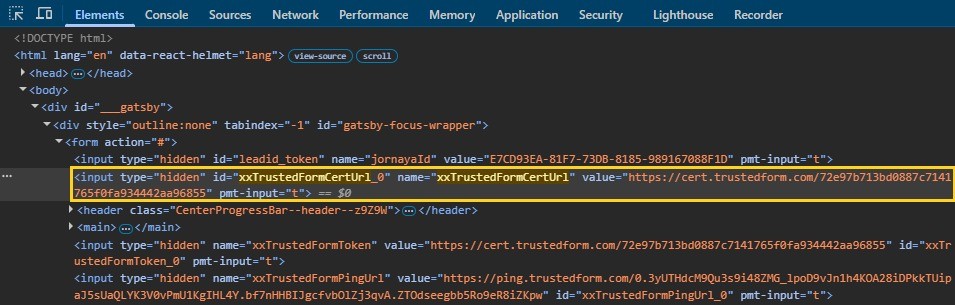
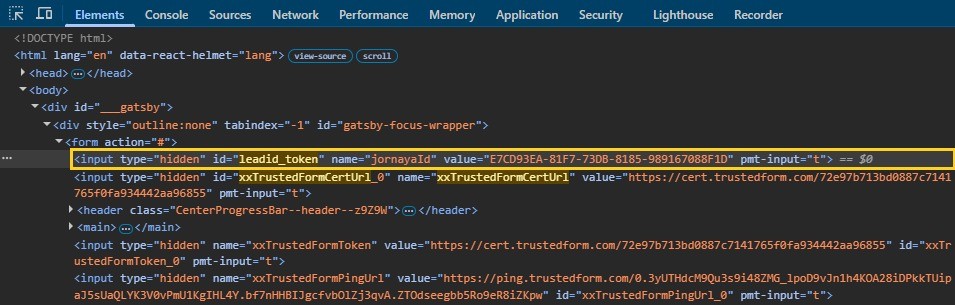
Open DevTools (F12, or right-click and Inspect), go to the Elements panel, and press Ctrl+F. Search xxTrustedFormCertUrl: a filled value starting https://cert.trustedform.com/ means TrustedForm is live. Search leadid_token: a filled 36-character value means Jornaya is live. Filter the Network panel on "trustedform" or "lidstatic" to confirm either one.
Both screenshots come from autopolicyguru.com, the quote form behind AutoShield Pro's car insurance ad. Both fields were already filled in the moment the page loaded: the TrustedForm certificate URL inside xxTrustedFormCertUrl and Jornaya's 36-character token inside leadid_token, with no cookie banner to accept first.
On a multi-step quiz, check the step with the phone field. Earlier steps often run neither script. A form inside an iframe needs its own check, since both vendors require their script to run in the same window as the form. Check the consent text by the submit button too: one company named usually means the lead is exclusive, a list of companies or a "marketing partners" link usually means it is shared or sold.
Quality check: do not call a page clean until you have checked the last step of the funnel and inside any iframe, exactly where a quick look misses them.
This is the first half of a deeper walkthrough on reverse-engineering a competitor's landing page funnel. You now know which tool, if either, runs on this page.
Step 2: Find Every Meta Ad Running TrustedForm or Jornaya With the Technology Filter
Checking landing pages one at a time does not scale. AdPlexity Social runs that same check across the Meta ads it records, all at once, visiting the page behind each ad and logging its technology, the post-click intelligence layer most spy tools skip.
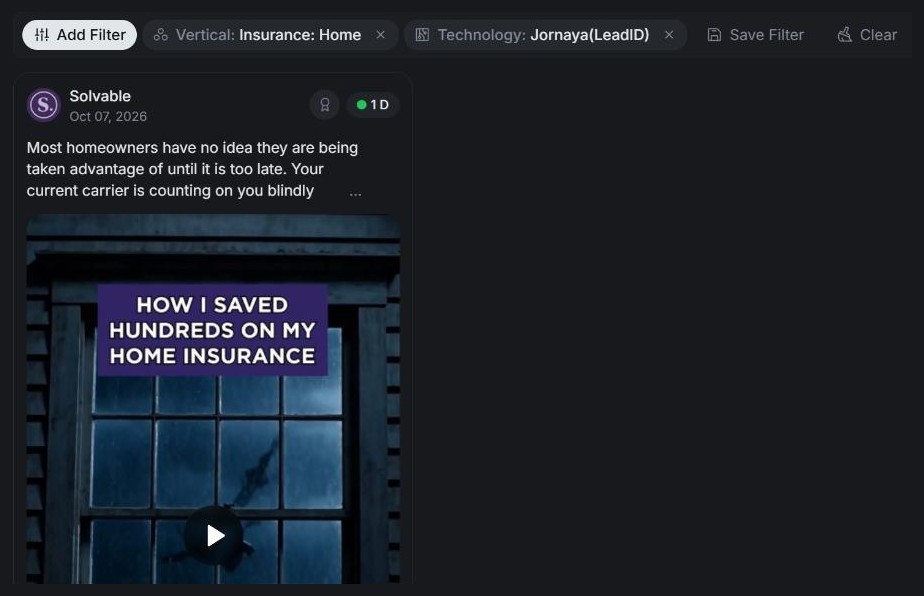
Open Explore, the Ads tab, Add Filter, Technology, and tick TrustedForm. Run it, then search again with Jornaya(LeadID) ticked instead. Set Country to United States and the date range to the last 30 days on both, as two separate searches so the counts stay comparable.
Quality check: if a search returns far fewer ads than expected, check that the Ad Destination filter is not set to Lead Form, which has no page to read (more in Step 5).
Sign up at adplexity.io and run these searches on your own vertical.
TrustedForm is the more common tag. That filter currently shows about 171,000 ads with a TrustedForm certificate on the landing page and about 85,500 with a Jornaya token, worldwide, in the last 30 days. In the United States alone, each tool ran on more than 9,000 of those ads. Both counts are ads with the technology detected on the landing page, not advertisers and not new ads.
Step 3: Narrow by Vertical to See Who Runs Which Tool
Click Add Filter again and pick Vertical. Select one specific line at a time, not a parent category, for example Insurance: Car or Roofing.
Vertical | Ads with TrustedForm | Ads with Jornaya(LeadID) |
|---|---|---|
Insurance: Car | 5,000 or more | 5,000 or more |
Roofing | 5,000 or more | 5,000 or more |
Bathroom Remodel | 5,000 or more | 5,000 or more |
Insurance: Home | 1,000 to 4,999 | 5,000 or more |
Debt Relief | 5,000 or more | 1,000 to 4,999 |
Legal Aid: Injury Claims | 5,000 or more | 1,000 to 4,999 |
Solar | 1,000 to 4,999 | 100 to 999 |
Insurance: Health | 1,000 to 4,999 | 100 to 999 |
These are bands, not exact totals. We checked each vertical against set thresholds instead of counting every ad, same US and last 30 days scope as Step 2. A range is the honest answer here.
TrustedForm and Jornaya land in the same range in car insurance, and in roofing and bathroom remodel too; for those two verticals, see how roofing and remodel lead gen runs on Meta. Home insurance is the one vertical here where Jornaya pulls ahead. TrustedForm pulls ahead everywhere else the bands differ: debt relief, injury claims, solar, and health insurance. Debt relief gets its own breakdown in debt relief funnels on Meta, including how to split lead gen from pay per call there. Why one tool leads in a given vertical is a question for your own buyer's spec, not something the counts explain.
Step 4: Open a Funnel and Read the Rest of Its Stack
Open any ad. Its Creative Details panel lists every technology detected behind it, under Technology, and the Landing Pages tab holds the landing page itself, with a preview and its redirect chain.
AutoShield Pro is the Page behind a car insurance ad headlined "Your car didn't change. Your rate shouldn't either." Sorted by Top Creative, the ad sits near the top of the car insurance vertical. Open it and the Creative Details panel lists TrustedForm and Jornaya(LeadID) under Technology, while the Landing Pages tab shows the quote form itself, on autopolicyguru.com.
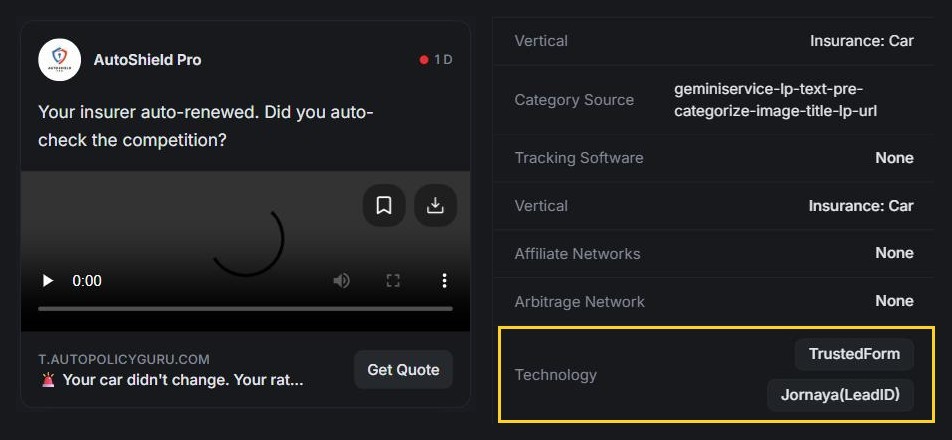
It is the same form checked by hand in Step 1, so the app and the hand check agree: one seller runs both consent tools on one form. The example is shown for funnel structure only, not as a judgment on the business.
A consent tool next to call-tracking technology such as Ringba, Retreaver, or Trackdrive marks a funnel that also sends calls, worth knowing before you separate pure pay per call funnels from hybrid form-and-call funnels. Both consent tools on one page usually mark a seller certifying leads against more than one buyer spec. A page builder such as ClickFunnels, LeadPages, or LanderLab tells you how the page was built, separate from whichever consent tool runs on it.
Step 5: Check the Instant-Form Side of the Same Vertical
The Technology filter only reads landing pages. An advertiser running Meta instant forms exclusively never shows up under TrustedForm or Jornaya, not because they skip consent tools, but because there is no page for AdPlexity Social to read. Check those advertisers with a different search: keep the vertical, remove the Technology filter, and set the Ad Destination filter to Lead Form instead of Landing Page. In car insurance, that split is lopsided: in the United States, more than 9,000 ads in the last 30 days went to a landing page and fewer than 1,000 to an instant form.

Run the Technology filter with Lead Form selected for either tool, and the result is zero, in the same window that returns tens of thousands of results under Landing Page. That zero is expected, not a broken search: switch back to Landing Page with nothing else changed, and a result returns immediately, confirming the filter works. Instant forms have no page for it to detect anything on.
Step 6: Save the Funnels Worth Studying to a Board
Save any funnel worth watching from the results grid or the ad detail view: click Save to Board for the ad, and Save Domain for its domain, so you track the page as well as the ad. Re-run the Step 2 search each month and drop new matches into the same Board to see whether a competitor's setup changes over time.
You now have a short list of live competitor funnels, organized by which consent tool they run and which vertical they are in.
Pro Tips and Common Mistakes
A script on the page proves a consent tool is running, nothing more. It does not prove a buyer claimed that TrustedForm certificate or audited that Jornaya token, since both are separate, paid steps that happen after the script fires.
Do not copy a competitor's consent disclosure text. It names the specific buyers that funnel sells to, not yours.
Check every step of a multi-step funnel, including after any cookie banner and inside iframes. A quick look misses the tools sitting exactly there.
Zero TrustedForm or Jornaya results under the Lead Form filter is expected, not a gap in AdPlexity Social's data. It means the advertiser is using Meta's own instant form, not a landing page.
Frequently Asked Questions
Is TrustedForm or Jornaya required by law?
No law names either product specifically. What the law requires is consent, prior express written consent for certain autodialed or prerecorded calls under the TCPA, and TrustedForm and Jornaya exist to document that it happened. Many lead buyers require one anyway, not because the FCC demands it, but because their own purchase contracts do.
How long does a TrustedForm certificate last?
An unclaimed or unretained certificate gets deleted after 90 days. Issuing one is free. Retain, ActiveProspect's paid storage tier, keeps a copy on file for up to five years, which matters if a buyer or a regulator asks to see it long after the lead was sold.
What does a Jornaya LeadiD look like?
It is a 36-character identifier that Jornaya writes into a hidden field called leadid_token every time the form renders. The seller passes that token along with the lead, and the buyer can hand it back to Jornaya to audit what it recorded, including a Visual Playback on written request.
Does a TrustedForm certificate protect you from a TCPA lawsuit?
Not by itself. ActiveProspect, the company that owns TrustedForm, says directly that a certificate documents what a consumer saw and did on a form. It does not guarantee compliance, admissibility, or any particular legal outcome. It is evidence you can point to, not a shield.
What happened to the FCC's one-to-one consent rule?
The Eleventh Circuit vacated the one-to-one consent rule on January 24, 2025, three days before it took effect, and the FCC's earlier text came back into force on August 29, 2025. The FCC had adopted the rule in December 2023 to close what it called the lead generator loophole, one consent shared across many sellers.
Does the TCPA still require written consent in 2026?
The FCC's own rule still calls for prior express written consent on certain autodialed or prerecorded calls. But in February 2026, the Fifth Circuit ruled in Bradford v. Sovereign Pest Control that the statute itself only requires prior express consent, oral or written, a holding that currently binds Texas, Louisiana, and Mississippi.
Can you see which lead buyers a competitor sells to?
Sometimes. The consent disclosure text next to the submit button can name the buyer directly, list several companies, or include a marketing-partners link if the lead is shared. AdPlexity Social shows the page, its redirect chain, and its detected technology, not the buyer's contract, so pair that with how to find the top performing lead gen ads in a vertical.
Does AdPlexity Social detect TrustedForm on Facebook instant forms?
No. Detection works by reading the landing page a script sits on, and a Meta instant form never opens a page at all, since Meta hosts and submits it directly. To see instant-form ads instead, set the Ad Destination filter to Lead Form, as covered in Step 5.
Conclusion
Same owner, different proof. TrustedForm and Jornaya have both sat inside ActiveProspect since January 2026, but a certificate and a token still record two different things, and your buyer's spec decides which one you need.
To recap: check one page by hand, pull every Meta ad running either technology with the Technology filter, narrow by vertical, open one funnel and read its full stack, check the instant-form side separately, and save what you find to a Board and recheck it monthly. Sign up at adplexity.io and run the Technology filter on your own vertical.
TrustedForm and Jornaya both start the moment the page loads, not at submission. Most comparisons say Jornaya fires on load and TrustedForm on submit, but neither vendor's own documentation backs that up. ActiveProspect's SDK guide says TrustedForm generates a certificate for every page a consumer lands on, and Jornaya's own campaign script guide says its token fills in real time each time the form renders. What differs is the record each one leaves, and who gets to open it. Most comparisons also miss that since January 2026, one company owns both tools.
If you run lead gen on Meta and want to know whether you need TrustedForm or Jornaya, and which one your competitors run, this guide covers both: what each tool records, what TCPA consent requires on a form in 2026, how to check any landing page for either in about two minutes, and how to pull every Meta advertiser running one, by vertical.
Table of Contents
Key Takeaways
What Is the Difference Between TrustedForm and Jornaya?
What Counts as TCPA Consent on a Lead Form?
Do Lead Buyers Require TrustedForm, Jornaya, or Both?
How Do TrustedForm and Jornaya Work With Facebook Lead Ads?
Step 1: Check a Competitor's Landing Page for TrustedForm or Jornaya by Hand
Step 2: Find Every Meta Ad Running TrustedForm or Jornaya With the Technology Filter
Step 3: Narrow by Vertical to See Who Runs Which Tool
Step 4: Open a Funnel and Read the Rest of Its Stack
Step 5: Check the Instant-Form Side of the Same Vertical
Step 6: Save the Funnels Worth Studying to a Board
Pro Tips and Common Mistakes
Frequently Asked Questions
Key takeaways. TrustedForm writes a certificate URL into the form and keeps a session record with a replay of what the consumer saw and did; Jornaya writes a 36-character token that points to a lead event it witnessed. Both scripts start the moment the page renders, not at submission. Both tools have belonged to one company, ActiveProspect, since January 2026, so which one you run usually comes down to your lead buyer's spec, not which vendor you trust more. Neither script can run inside a Meta instant form, since Meta hosts that form itself, so a landing page is the only place either tool actually shows up. In the last 30 days, landing pages behind Meta ads carried a TrustedForm certificate on about 171,000 ads and a Jornaya token on about 85,500 worldwide, with each tool clearing 9,000 ads in the United States alone.
What Is the Difference Between TrustedForm and Jornaya?
Here is the difference you feel first. A TrustedForm certificate is something you can open and review yourself, a session replay plus the consent language the page showed at the time. A Jornaya token does not show you anything on its own. It proves an event happened, and if you want to see what the consumer saw, you request that separately.
Both are consent verification scripts that sit on a lead form and generate proof of what a consumer saw and did. TrustedForm issues a certificate with a session replay attached. Jornaya issues a 36-character token tied to a lead event it witnessed. Since January 2026 one company has owned both, so stop asking which vendor is better. Ask which record your buyer actually wants.
How Does TrustedForm Work?
ActiveProspect's own SDK documentation lays out how TrustedForm works. The script, api.trustedform.com/trustedform.js, sits just before the closing body tag and fires a new certificate on every page a consumer lands on, not just the page where they submit. The certificate's URL is a cert.trustedform.com link, written into a hidden field called xxTrustedFormCertUrl that travels with the lead. What that certificate holds is the whole session: a replay of the interaction plus the consent language the page displayed at the time.
Issuing a certificate costs nothing. Claiming one, opening and reviewing it once a lead comes in, costs money. Retaining one, keeping a permanent copy on file for up to five years through ActiveProspect's Retain product, also costs money. Skip both and the certificate is gone after 90 days.
How Does a Jornaya LeadiD Work?
Jornaya's own campaign script documentation describes a similar setup, built differently. A hidden input with the id leadid_token sits on the form, and Jornaya fills it in real time with a new 36-character token every time the form renders, on every page of a multi-step funnel, not just the last one. The seller stores that token and passes it to the buyer, wherever the buyer's getting-started guide says to put it.
Sellers wrap a TCPA disclosure label around the actual consent language. That is what lets Jornaya hand a copy of that disclosure to a buyer auditing the token later. Jornaya's audit product for this, TCPA Guardian, also offers a Visual Playback of the lead event for mutual clients who request one in writing.
Who Owns TrustedForm and Jornaya in 2026?
As of 2026, one company owns both tools. Verisk announced on January 8, 2026 that it had sold Verisk Marketing Solutions, the business formed from combining Jornaya and Infutor, to ActiveProspect, which already owned TrustedForm. ActiveProspect confirmed the deal the same day.
Each product still runs its own script and its own documentation, so TrustedForm vs Jornaya in 2026 is less a choice between two companies and more a choice between two kinds of record from the same one.
TrustedForm | Jornaya LeadiD | |
|---|---|---|
Owner (2026) | ActiveProspect | ActiveProspect (bought from Verisk, January 2026) |
What the script writes into your form | A certificate URL in xxTrustedFormCertUrl | A 36-character token in leadid_token |
When it starts | When a consumer lands on the page | Each time the form renders |
What the ID points to | A certificate record with a session replay | A lead event Jornaya witnessed |
How the consent text is captured | Recorded with the page inside the certificate | Wrapped in Jornaya's TCPA disclosure label |
What the buyer does with it | Claims or retains it, or runs a Verify check | Audits the token through TCPA Guardian, or requests Visual Playback |
How long the record lasts | Deleted after 90 days unless retained; Retain keeps it up to five years | Not stated in Jornaya's implementation guide; ask the vendor directly |
Facebook instant forms | A documented route through LeadConduit | No current vendor documentation |
How to spot it in page source | A trustedform.com script and an xxTrustedFormCertUrl field | A lidstatic.com script and a leadid_token field |
What Counts as TCPA Consent on a Lead Form?
Check three things before you trust a consent checkbox. The language should name the specific seller who gets to call, tie that authorization to that specific number, and tell the visitor that agreeing is not a condition of buying anything. The FCC's telemarketing rule requires prior express written consent before a business calls or texts a consumer using an autodialer or an artificial or prerecorded voice, and texts count the same as calls. That consent needs a written agreement with a signature, and an electronic signature counts wherever federal or state law recognizes one, which is how a checkbox or a submit button carries legal weight.
One part of this moved and then moved back. In December 2023 the FCC adopted a one-to-one consent rule meant to close what it called the lead generator loophole, one consent shared across dozens of sellers from a single comparison site. The Eleventh Circuit vacated that rule on January 24, 2025, three days before it took effect, and the FCC's earlier text came back into force on August 29, 2025.
Then, on February 25, 2026, the Fifth Circuit held in Bradford v. Sovereign Pest Control that the TCPA itself requires only prior express consent, oral or written, a holding that currently binds Texas, Louisiana, and Mississippi only. The FCC's written-consent rule still stands everywhere else, and most lead buyers' specs still ask for a certificate or a token regardless. Neither one fixes a weak disclosure, and ActiveProspect says as much itself: a certificate documents consent; it does not guarantee compliance, admissibility, or a particular legal outcome. None of this is legal advice. Talk to a TCPA attorney about your own funnels.
Do Lead Buyers Require TrustedForm, Jornaya, or Both?
Check your buyer's spec before you install anything. Neither vendor decides which tool you run; your lead buyer does. Jornaya's own implementation guide tells sellers to check their buyer's getting-started guide for where the LeadiD token belongs in the post. That is the whole story in one line: buyers name a spec, sellers build to it.
Filter AdPlexity Social to car insurance, add TrustedForm, and sort by Top Creative. Jornaya turns up on the landing page behind every one of the first 60 results. On the strongest creatives in the vertical, the two tools run together, not as alternatives. That fits sellers building to more than one buyer spec at once.
If you... | Run... |
|---|---|
Sell to a buyer whose spec names TrustedForm | TrustedForm on the page |
Sell to a buyer whose spec names Jornaya | The Jornaya LeadiD script on the page |
Sell to several buyers with different specs | Both scripts on the same page |
Run Meta instant forms | TrustedForm's Facebook route through LeadConduit, plus Meta's own custom disclaimer |
Buy leads from other sellers | Require the certificate URL or the LeadiD in the post, and check it before anyone gets called |
If you hold sellers to the one-to-one standard by contract regardless of the FCC rule, ActiveProspect still sells a one-to-one consent check inside TrustedForm Verify.
How Do TrustedForm and Jornaya Work With Facebook Lead Ads?
On Meta, the funnel type comes first. Before you find out which tool is running, you need to know if one can run at all.
An instant form lives inside Meta, not on the advertiser's own page, so there is no page for a script to sit on. The consent language goes into Meta's own custom disclaimer instead: open Privacy inside the Instant Form builder, choose + Add Custom Disclaimer, then + Add new consent for the checkbox. You cannot add a disclaimer to a form that is already live in an ad, so duplicating the form is the only way. And Meta only keeps a lead downloadable for 90 days after submission, so if you need the record past that window, it has to live somewhere else.
TrustedForm has a documented route for instant forms. LeadConduit picks up the lead through Meta's integration and certifies it, and the certificate carries an interactive replay plus Facebook metadata: lead ID, form ID, page ID, ad set, and campaign. ActiveProspect calls TrustedForm the only TCPA compliance solution built specifically for Facebook Lead Ads. Jornaya announced its own version in 2017, TCPA Guardian for Facebook lead ads, but no current vendor page says it is still around.
Landing pages work the opposite way. The script runs inside the page itself, so anyone who opens it can see it, and so can anything that crawls landing pages at scale. That is exactly where Step 1 comes in.
Instant form | Landing page | |
|---|---|---|
Where the consent text lives | Meta's own custom disclaimer | Wherever the page itself puts it |
How the lead gets certified | Through an integration such as LeadConduit | The script fires directly inside the page |
What an outsider can see | Nothing: the form and its data sit inside Meta | The page source, and anything the page loads |
What a landing page crawler can detect | Nothing | The consent script and its field |
Step 1: Check a Competitor's Landing Page for TrustedForm or Jornaya by Hand
Every consent tool leaves a footprint in the page source. Here is how you read it by hand, before Step 2 does it across every Meta ad at once.
Click through from the ad to its live landing page, to whichever step holds the form. Accept any cookie banner first. Jornaya's own guidance is to load its script only after cookie consent, so the token can be absent because you have not accepted yet.
Open DevTools (F12, or right-click and Inspect), go to the Elements panel, and press Ctrl+F. Search xxTrustedFormCertUrl: a filled value starting https://cert.trustedform.com/ means TrustedForm is live. Search leadid_token: a filled 36-character value means Jornaya is live. Filter the Network panel on "trustedform" or "lidstatic" to confirm either one.
Both screenshots come from autopolicyguru.com, the quote form behind AutoShield Pro's car insurance ad. Both fields were already filled in the moment the page loaded: the TrustedForm certificate URL inside xxTrustedFormCertUrl and Jornaya's 36-character token inside leadid_token, with no cookie banner to accept first.
On a multi-step quiz, check the step with the phone field. Earlier steps often run neither script. A form inside an iframe needs its own check, since both vendors require their script to run in the same window as the form. Check the consent text by the submit button too: one company named usually means the lead is exclusive, a list of companies or a "marketing partners" link usually means it is shared or sold.
Quality check: do not call a page clean until you have checked the last step of the funnel and inside any iframe, exactly where a quick look misses them.
This is the first half of a deeper walkthrough on reverse-engineering a competitor's landing page funnel. You now know which tool, if either, runs on this page.
Step 2: Find Every Meta Ad Running TrustedForm or Jornaya With the Technology Filter
Checking landing pages one at a time does not scale. AdPlexity Social runs that same check across the Meta ads it records, all at once, visiting the page behind each ad and logging its technology, the post-click intelligence layer most spy tools skip.
Open Explore, the Ads tab, Add Filter, Technology, and tick TrustedForm. Run it, then search again with Jornaya(LeadID) ticked instead. Set Country to United States and the date range to the last 30 days on both, as two separate searches so the counts stay comparable.
Quality check: if a search returns far fewer ads than expected, check that the Ad Destination filter is not set to Lead Form, which has no page to read (more in Step 5).
Sign up at adplexity.io and run these searches on your own vertical.
TrustedForm is the more common tag. That filter currently shows about 171,000 ads with a TrustedForm certificate on the landing page and about 85,500 with a Jornaya token, worldwide, in the last 30 days. In the United States alone, each tool ran on more than 9,000 of those ads. Both counts are ads with the technology detected on the landing page, not advertisers and not new ads.
Step 3: Narrow by Vertical to See Who Runs Which Tool
Click Add Filter again and pick Vertical. Select one specific line at a time, not a parent category, for example Insurance: Car or Roofing.
Vertical | Ads with TrustedForm | Ads with Jornaya(LeadID) |
|---|---|---|
Insurance: Car | 5,000 or more | 5,000 or more |
Roofing | 5,000 or more | 5,000 or more |
Bathroom Remodel | 5,000 or more | 5,000 or more |
Insurance: Home | 1,000 to 4,999 | 5,000 or more |
Debt Relief | 5,000 or more | 1,000 to 4,999 |
Legal Aid: Injury Claims | 5,000 or more | 1,000 to 4,999 |
Solar | 1,000 to 4,999 | 100 to 999 |
Insurance: Health | 1,000 to 4,999 | 100 to 999 |
These are bands, not exact totals. We checked each vertical against set thresholds instead of counting every ad, same US and last 30 days scope as Step 2. A range is the honest answer here.
TrustedForm and Jornaya land in the same range in car insurance, and in roofing and bathroom remodel too; for those two verticals, see how roofing and remodel lead gen runs on Meta. Home insurance is the one vertical here where Jornaya pulls ahead. TrustedForm pulls ahead everywhere else the bands differ: debt relief, injury claims, solar, and health insurance. Debt relief gets its own breakdown in debt relief funnels on Meta, including how to split lead gen from pay per call there. Why one tool leads in a given vertical is a question for your own buyer's spec, not something the counts explain.
Step 4: Open a Funnel and Read the Rest of Its Stack
Open any ad. Its Creative Details panel lists every technology detected behind it, under Technology, and the Landing Pages tab holds the landing page itself, with a preview and its redirect chain.
AutoShield Pro is the Page behind a car insurance ad headlined "Your car didn't change. Your rate shouldn't either." Sorted by Top Creative, the ad sits near the top of the car insurance vertical. Open it and the Creative Details panel lists TrustedForm and Jornaya(LeadID) under Technology, while the Landing Pages tab shows the quote form itself, on autopolicyguru.com.
It is the same form checked by hand in Step 1, so the app and the hand check agree: one seller runs both consent tools on one form. The example is shown for funnel structure only, not as a judgment on the business.
A consent tool next to call-tracking technology such as Ringba, Retreaver, or Trackdrive marks a funnel that also sends calls, worth knowing before you separate pure pay per call funnels from hybrid form-and-call funnels. Both consent tools on one page usually mark a seller certifying leads against more than one buyer spec. A page builder such as ClickFunnels, LeadPages, or LanderLab tells you how the page was built, separate from whichever consent tool runs on it.
Step 5: Check the Instant-Form Side of the Same Vertical
The Technology filter only reads landing pages. An advertiser running Meta instant forms exclusively never shows up under TrustedForm or Jornaya, not because they skip consent tools, but because there is no page for AdPlexity Social to read. Check those advertisers with a different search: keep the vertical, remove the Technology filter, and set the Ad Destination filter to Lead Form instead of Landing Page. In car insurance, that split is lopsided: in the United States, more than 9,000 ads in the last 30 days went to a landing page and fewer than 1,000 to an instant form.
Run the Technology filter with Lead Form selected for either tool, and the result is zero, in the same window that returns tens of thousands of results under Landing Page. That zero is expected, not a broken search: switch back to Landing Page with nothing else changed, and a result returns immediately, confirming the filter works. Instant forms have no page for it to detect anything on.
Step 6: Save the Funnels Worth Studying to a Board
Save any funnel worth watching from the results grid or the ad detail view: click Save to Board for the ad, and Save Domain for its domain, so you track the page as well as the ad. Re-run the Step 2 search each month and drop new matches into the same Board to see whether a competitor's setup changes over time.
You now have a short list of live competitor funnels, organized by which consent tool they run and which vertical they are in.
Pro Tips and Common Mistakes
A script on the page proves a consent tool is running, nothing more. It does not prove a buyer claimed that TrustedForm certificate or audited that Jornaya token, since both are separate, paid steps that happen after the script fires.
Do not copy a competitor's consent disclosure text. It names the specific buyers that funnel sells to, not yours.
Check every step of a multi-step funnel, including after any cookie banner and inside iframes. A quick look misses the tools sitting exactly there.
Zero TrustedForm or Jornaya results under the Lead Form filter is expected, not a gap in AdPlexity Social's data. It means the advertiser is using Meta's own instant form, not a landing page.
Frequently Asked Questions
Is TrustedForm or Jornaya required by law?
No law names either product specifically. What the law requires is consent, prior express written consent for certain autodialed or prerecorded calls under the TCPA, and TrustedForm and Jornaya exist to document that it happened. Many lead buyers require one anyway, not because the FCC demands it, but because their own purchase contracts do.
How long does a TrustedForm certificate last?
An unclaimed or unretained certificate gets deleted after 90 days. Issuing one is free. Retain, ActiveProspect's paid storage tier, keeps a copy on file for up to five years, which matters if a buyer or a regulator asks to see it long after the lead was sold.
What does a Jornaya LeadiD look like?
It is a 36-character identifier that Jornaya writes into a hidden field called leadid_token every time the form renders. The seller passes that token along with the lead, and the buyer can hand it back to Jornaya to audit what it recorded, including a Visual Playback on written request.
Does a TrustedForm certificate protect you from a TCPA lawsuit?
Not by itself. ActiveProspect, the company that owns TrustedForm, says directly that a certificate documents what a consumer saw and did on a form. It does not guarantee compliance, admissibility, or any particular legal outcome. It is evidence you can point to, not a shield.
What happened to the FCC's one-to-one consent rule?
The Eleventh Circuit vacated the one-to-one consent rule on January 24, 2025, three days before it took effect, and the FCC's earlier text came back into force on August 29, 2025. The FCC had adopted the rule in December 2023 to close what it called the lead generator loophole, one consent shared across many sellers.
Does the TCPA still require written consent in 2026?
The FCC's own rule still calls for prior express written consent on certain autodialed or prerecorded calls. But in February 2026, the Fifth Circuit ruled in Bradford v. Sovereign Pest Control that the statute itself only requires prior express consent, oral or written, a holding that currently binds Texas, Louisiana, and Mississippi.
Can you see which lead buyers a competitor sells to?
Sometimes. The consent disclosure text next to the submit button can name the buyer directly, list several companies, or include a marketing-partners link if the lead is shared. AdPlexity Social shows the page, its redirect chain, and its detected technology, not the buyer's contract, so pair that with how to find the top performing lead gen ads in a vertical.
Does AdPlexity Social detect TrustedForm on Facebook instant forms?
No. Detection works by reading the landing page a script sits on, and a Meta instant form never opens a page at all, since Meta hosts and submits it directly. To see instant-form ads instead, set the Ad Destination filter to Lead Form, as covered in Step 5.
Conclusion
Same owner, different proof. TrustedForm and Jornaya have both sat inside ActiveProspect since January 2026, but a certificate and a token still record two different things, and your buyer's spec decides which one you need.
To recap: check one page by hand, pull every Meta ad running either technology with the Technology filter, narrow by vertical, open one funnel and read its full stack, check the instant-form side separately, and save what you find to a Board and recheck it monthly. Sign up at adplexity.io and run the Technology filter on your own vertical.
Table of Contents
Quickly navigate through the key sections of this article.
Discover Winning Meta Ads
Similar Blogs
Check related blogs
Check related blogs
Check related blogs




































Ready to See What’s Really Working on Meta?
Adplexity
Social
© Copyright 2026 All Rights Reserved
Ready to See What’s Really Working on Meta?
Adplexity
Social
© Copyright 2026 All Rights Reserved
Ready to See What’s Really Working on Meta?
Adplexity
Social
© Copyright 2026 All Rights Reserved