How to Find Shopify Stores Running Facebook Ads (2026)

Share:

A Meta pixel only proves a store set up tracking once. Live ads, new ads this month and months of runtime prove it is paying for Facebook ads today.
A Meta pixel only proves a store set up tracking once. Live ads, new ads this month and months of runtime prove it is paying for Facebook ads today.
Table of Contents
Does a Meta pixel mean a Shopify store is running Facebook ads?
Step 1: Find stores with live Facebook ads in the Meta Ad Library
Step 2: Check if the website is built on Shopify
Step 3: Filter every Meta ad down to Shopify stores
Step 4: Rank the stores by live ads, not lifetime ads
Step 5: See how long the store has been running Facebook ads
Step 6: Follow the click to see what the store sells and who runs it
How do you tell a real spender from a store that only has a pixel?
Which tools find Shopify stores running Facebook ads?
Mistakes that make a store look like a bigger spender than it is
Frequently Asked Questions
Conclusion
Key takeaways. Prime Pet Zone and Dog Friendly Co. are Shopify pet stores, and both carry the Meta pixel. Only one is running Facebook ads, and the pixel will not tell you which. Prime Pet Zone has no active ads in the Meta Ad Library, and AdPlexity Social last saw it advertising in mid-August. Dog Friendly Co. has 143 ads recorded as live, the oldest running since February. A pixel stays installed after the ads stop. So count the live ads, watch for new ones, and check how long the oldest has stayed live.
If you sell to Shopify stores or compete with them, and want a list of stores that are actually paying for Facebook ads right now, this guide shows you how to build one in about 20 minutes.
By the end, you will be able to:
Find stores from their live ads, not their tracking code: a pixel stays installed long after a budget stops.
Confirm a store runs on Shopify: in about 30 seconds, before you go any further.
Rank stores by what they run now: not by everything they have ever run.
Tell a real spender from a store with a leftover pixel: three checks, not a guess.
You only need a browser for the first two steps.
For case studies of what the biggest Shopify stores look like, see seven little-known Shopify stores scaling millions of ads. This guide is about finding them.
Does a Meta pixel mean a Shopify store is running Facebook ads?
No. A Meta pixel and the Conversions API only show that a store set up tracking at some point. Neither one proves an ad is live, or that one ever ran. The only public proof a Shopify store is paying for Facebook ads right now is the ads themselves: how many are live, whether new ones keep showing up, and how long they stay up.
On Shopify, the pixel and the Conversions API come from the same setting. In the Facebook & Instagram sales channel, the merchant picks a data sharing level: Standard uses the Meta pixel, and Enhanced and Maximum add the Conversions API on top of it. Both stay installed long after the last ad stops, because turning off tracking is a separate decision nobody bothers making. One pet store covered later in this guide still fires its pixel on page load almost two months after the last ad AdPlexity Social saw for it.
Store databases that estimate ad spend from a website's traffic are reading their own model, not a public record of what that store pays Meta. Treat any "ad spend" or "scaling" label a prospecting tool puts on a store as that vendor's own estimate, checkable only against itself.
Signal | What it proves | What it cannot prove |
|---|---|---|
A Meta pixel on the store | Someone installed Meta tracking at some point | That any ad is live, or ever ran |
A Conversions API flag in a store database | A higher data sharing level was selected | Spend or live ads |
A traffic or revenue estimate from a store tool | The vendor's model rates the store as busy | Where the traffic comes from or what it costs |
One live ad in the Ad Library | The store is advertising today | How much, or whether it is more than a test |
Many live ads across several Pages | A budget spread across ads right now | Profit |
New ads added in the last 30 days | The store is still investing | That the new ads work |
Ads kept live for months | The store keeps choosing to pay | Its margin |
The last three rows are the ones the steps further down actually measure.
A pixel stays installed long after the last ad stops. Treat it as a lead, never as proof of spend.
A pixel proves tracking. Live ads prove spend.
Step 1: Find stores with live Facebook ads in the Meta Ad Library
Open facebook.com/ads/library, choose your country, and set the ad category to "All ads." Search for the product the way a shopper would say it, not a brand name: for this guide, "dog harness." Keep active ads only. Each ad card names the Facebook Page that ran it, and the ad's own link shows the store's domain. Open the Page's transparency section, or click through from the card, to see everything else that Page is running right now.
One store often advertises from more than one Page, so you can also search its domain directly, for example yourstore.com, to catch ads run by its other Pages. This is a text match, though, so an ad routed through a redirect or an unfamiliar subdomain can slip past.
The Library will not tell you what platform sits behind a store, and it only counts the one Page you are viewing. It also loses a store's history, because a commercial ad disappears the moment it stops running. Ads delivered in the EU or the UK are the exception: they stay visible for a year after they stop. So it tells you whether a store is live today, not how big its footprint is or how long it has been running. That is enough for checking one store, or for scanning a niche by hand a Page at a time, but it will not rank a whole niche for you. The next few steps fix these limits one at a time.
Quality check: If the first screen of results is all household names, search a narrower product phrase. Small Shopify stores advertise products, not categories.

Search the product, not the brand.
Step 2: Check if the website is built on Shopify
Confirming a store runs on Shopify takes about 30 seconds, once you know which tells actually prove it. A URL shaped like /products/ or /collections/ only hints at Shopify: other ecommerce platforms use the same paths. A vendor hostname sitting in the page source is proof, because nothing but a Shopify-hosted store serves a page from it.
Check | How to do it | What it proves |
|---|---|---|
Add /admin to the store's address | Type yourstore.com/admin in the browser | Proof, a Shopify login page means Shopify |
View the page source | Search it for cdn.shopify.com or Shopify.theme | Proof |
Look for a myshopify.com address | Search the page source | Proof |
/products/ and /collections/ in the URLs | Read the store's own URLs | Hint only, other platforms use similar paths |
A "Powered by Shopify" footer | Scroll to the bottom of the page | Hint only, many stores remove it |
A detector extension | Install Wappalyzer or BuiltWith | Reads the same tells, fastest |
Quality check: If no hard tell shows up, do not count the store as Shopify, whatever its URLs look like.
Dog Friendly Co. shows two hard tells. Searching its page source for "myshopify.com" finds the store's own Shopify address, dogfriendlyco.myshopify.com, and adding /admin to its address sends you to a Shopify login page. Either one is proof on its own, so the store counts as Shopify.
Checking one store by hand works fine. It scales badly once you are looking at a whole niche of them, and the Shopify filter below fixes that.
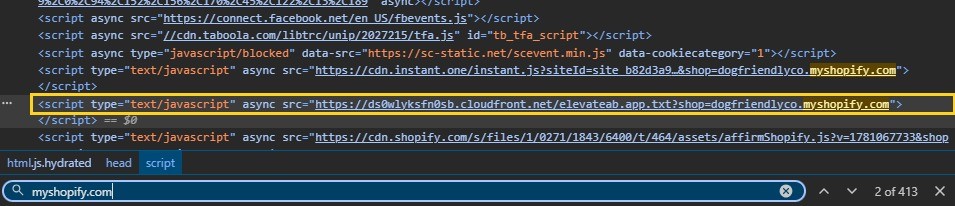
Hostnames are proof. URL paths are only a hint.
Step 3: Filter every Meta ad down to Shopify stores
Checking a whole niche in the Ad Library one store at a time, by hand, does not hold up. AdPlexity Social flips the order: instead of starting from a list of stores, it starts from the ads. It visits the landing pages behind every Meta ad it indexes and records what each page is built with, so Shopify becomes a filter you apply, not a guess you make store by store. The search reads the landing page as well as the ad copy, so a store whose ad text never mentions the product by name still turns up.
Open Explore, go to the Ads tab, and type the product keyword, here "dog harness," to search the ad or its landing page. Open Add Filter, choose Technology, and tick Shopify. Set the date range to Last 30 Days, and add Country: United States. Then switch to the Domains tab. Instead of one row per ad, every row becomes one store domain, holding the ads from every Page that advertises it.
In the 30 days to October 8, 2026, AdPlexity Social recorded about 3.1 million Meta ads landing on a page with Shopify detected, across all Meta placements and the 16 markets it tracks. That makes Shopify the most-detected platform in its technology breakdown for that window, ahead of PWA, Google Play, LeadConnectorHQ and VTurb.
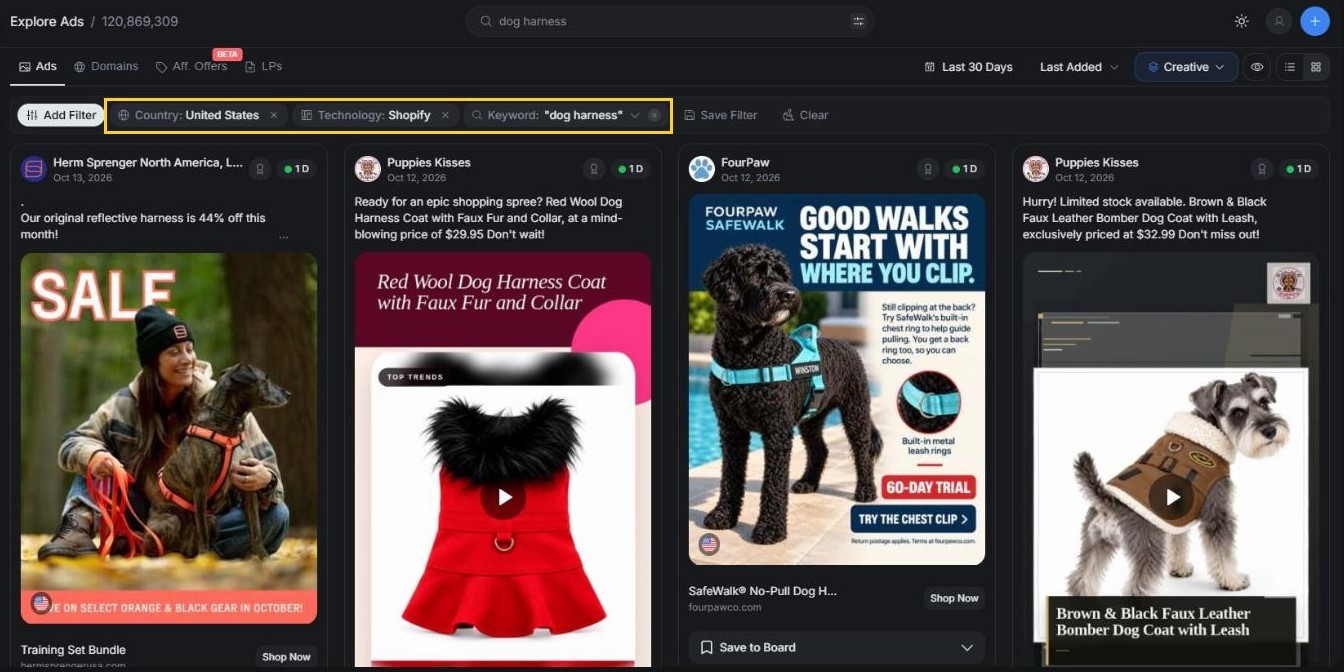
Count stores by domain, not by Page.
See every Meta ad AdPlexity Social has recorded landing on a Shopify store, grouped by store. Sign up at adplexity.io. AdPlexity Social has indexed more than 100 million Meta ads, with more than 15 million new ones added every month.
Step 4: Rank the stores by live ads, not lifetime ads
Get the numbers in the Domains view straight before you rank anything, because mixing them up will wreck your ranking. Ads (search) counts only the ads matching your current search inside the selected time frame, so it works for comparing stores within one niche. Ads (total) is bigger: AdPlexity Social's own tooltip calls it "all ads in our database, regardless of search criteria or timeframe," and it shows two numbers, active first, inactive after. Read it as the fullest picture AdPlexity Social has recorded for that domain, not the store's literal lifetime count.
Start with Active, the live footprint right now. Then read New Ads (30d), which counts new ads matching your search in the window, with the percentage change against the equal period before it. Those new ads show whether the store is still investing, and the percentage shows which way that is moving. Finish with Countries to see whether the store is expanding.
Sorted by active ads, the same dog harness search puts Dog Friendly Co. first, with 113 of its ads recorded as live (read on October 13, 2026). Its new ads rose 550% against the previous 30 days, so it is still adding ads on top of the biggest live count in the search. Ruff Rover is second with 39 live, and its new ads rose about 19%, a much slower climb. Further down, FourPaw is fifth with 9 live, and its new ads fell 84% against the previous 30 days. BarkingMeows no longer makes the top rows: 5 of its 15 recorded ads are live, and its newest ad is from June. Compare only inside one niche, because ad volume depends on the vertical and the product: there is no universal "big spender" number that holds for a gadget store and a dog harness brand alike.
Quality check: If a store has a big total, a small active count and falling new ads, it is a past spender. Move it down the list, however big the total looks.
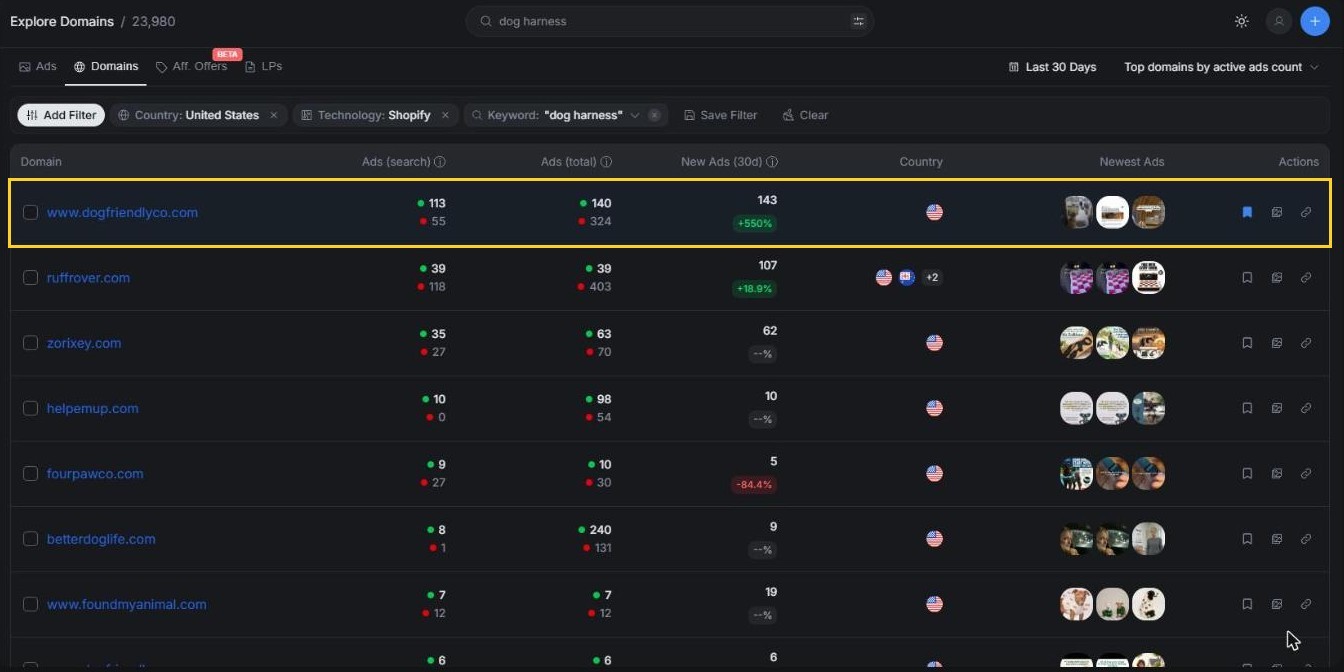
Rank by what is live, not by what was ever run.
Step 5: See how long the store has been running Facebook ads
Search the store's domain in AdPlexity Social, sort by Running Longest, open the ad at the top and read its First seen date. For Dog Friendly Co., the oldest ad still running is a harness ad shown in Australia, first seen on February 24, 2026. It was still running on October 11, almost eight months later, and one ad kept live that long is a store choosing to keep paying. In the United States, the oldest ad still running is a dog bed ad that started on May 14, 2026.
Domain Details puts the whole history on one screen: First Seen, Last Seen, Days Running, active and total ads, the number of Pages running its ads and an Ads Activity Over Time chart. For Dog Friendly Co. it reaches back to May 24, 2025, and the activity chart climbs steeply from August 2026. A Creatives tab lists the creatives behind those ads, and a store spread across several creatives reads as a testing budget, not one lucky ad. Any single creative's own numbers come from that creative's header in Explore, never from this tab.
To tell whether one specific ad is actually profitable, you need a different kind of check, and that belongs in its own guide. This one stays at the level of the whole store.
Quality check: If every ad started in the last few weeks, call it too early and check again in 7 days.
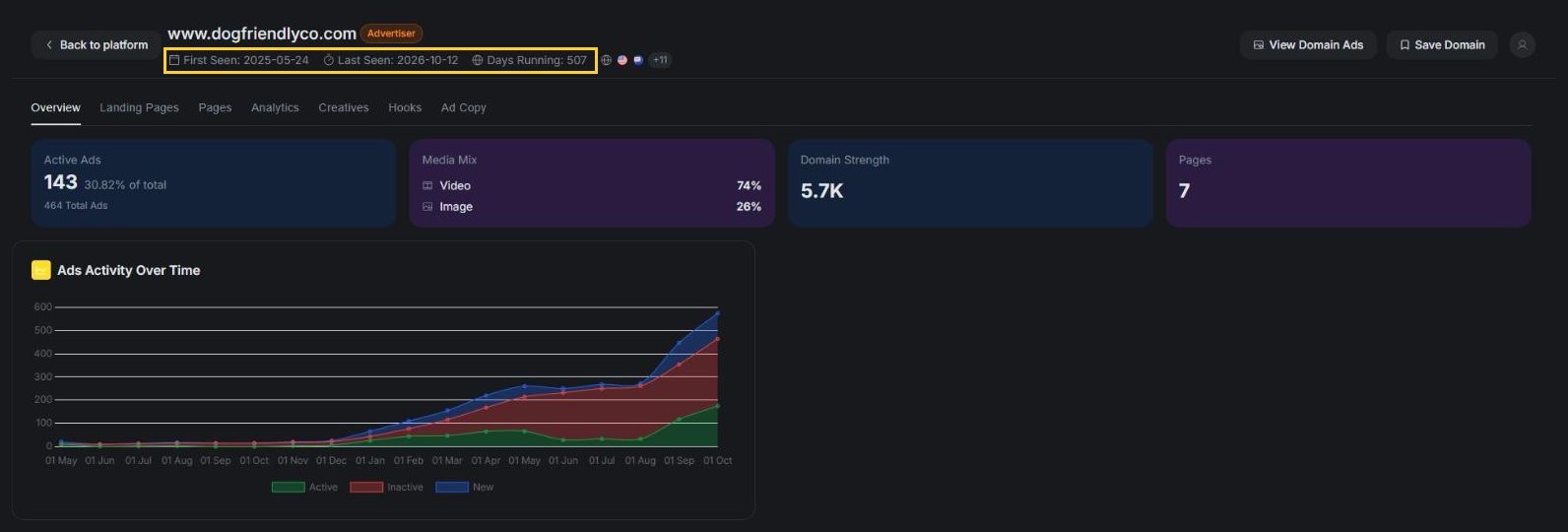
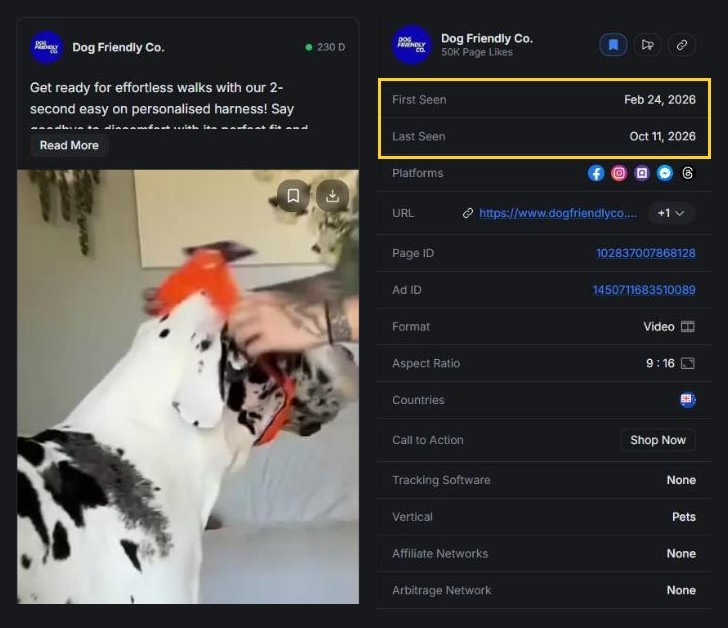
A store that keeps ads live for months is choosing to keep paying.
Step 6: Follow the click to see what the store sells and who runs it
What the store sells
Nearly every landing page AdPlexity Social recorded for Dog Friendly Co. in the last 30 days is a presell article, not a product page. Of its 76 landing page records, 74 sit under /pages/, and none points straight at a /products/ page. Those 74 are spread across 18 different listicle-style presell pages, built to warm a visitor up before the product. The other 2 point at the dog harness collection. One of them is where the oldest live ad from Step 5 leads: it links to the store's US collection and sends an Australian visitor on to the .com.au storefront in one redirect, with no tracker in between. For how to read a redirect chain like that, see reverse-engineer the funnel behind a store's ads.

Who runs the ads
Dog Friendly Co. runs nearly all of its ads from its own Page. Domain Details lists 7 Pages sending ads to the store, but the store's own Page holds 423 of the ads AdPlexity Social has recorded for it. That points to a brand buying its own traffic, not a network scattering one product across Pages that share nothing but the product.
The other Pages are small: review-style ones such as Dog Product Reviews, and one named after a person. They are extra doors into the store, though. Dog Product Reviews runs ads for an article ranking six popular dog harnesses, and every one of the article's 9 buy links goes to www.dogfriendlyco.com, none to the other five brands it ranks. To find doors like that, trust the click, not the Page name.
Signal | Usually a brand | Usually a store network |
|---|---|---|
Pages running the ads | One or a few, named like the store | Many, with names unrelated to the store |
Products advertised | Its own line, several products | One or a few trending products |
Product page URLs | Clean handles | Numbered copies of the same page |
The same product elsewhere | Not found | On other storefront domains |
The storefront itself | Own photos, a clear about page | Long shipping times, supplier photos, a generic about page |
One signal alone proves nothing, so look for two or three lining up before you call it a pattern. On these signals Dog Friendly Co. still reads as a brand: its own Page carries nearly all the ads, it runs its own presell pages and regional storefronts, and a few small review-style Pages add extra doors in.
The pages behind the ads show who really runs the store.
How do you tell a real spender from a store that only has a pixel?
Profile | What you see | What it means | What to do |
|---|---|---|---|
Pixel only | The pixel fires, the Library shows no live ads, none seen in the last 30 days | Tracking left in place; ads paused, finished or never started | Skip it for now, check again next month |
Light spender | One to a few live ads, no new ads this month, often months old | A small evergreen or retargeting budget | Low priority |
Too early to call | Every ad started in the last few weeks, no earlier history | A product test or a new launch | Check again in 7 days |
Scaling spender | Many live ads, new ads up on the previous period, oldest live ad months old | A real budget that is still growing | Study it now; for agencies, the strongest prospect |
Fading spender | Big total, few live ads, new ads falling | A past spender winding down | Learn from its history, do not copy it now |
Store network | The same product on many storefronts, ads from many unrelated Page names, numbered copies of product pages | A product scaled through many stores, not a brand | Study the product and creative, not the storefront |
Four of these six profiles show up among the stores in this guide. Dog Friendly Co. is the scaling spender: AdPlexity Social has 143 of its ads recorded as live, and its new ads in the dog harness search rose 550% against the month before. FourPaw was too early to call in late September, when every ad AdPlexity Social had recorded for it was under two months old, so the move was to check again. On October 13 its new ads in the same search had fallen 84% against the month before, and that second look turned a guess into a read. BarkingMeows, the light spender, has 5 of its 15 recorded ads live, and the newest one is from June.
Prime Pet Zone is the pixel-only case: its storefront fires the Meta pixel on every page load, but its Page has nothing active in the Ad Library. The last ad AdPlexity Social saw for it ran in mid-August.
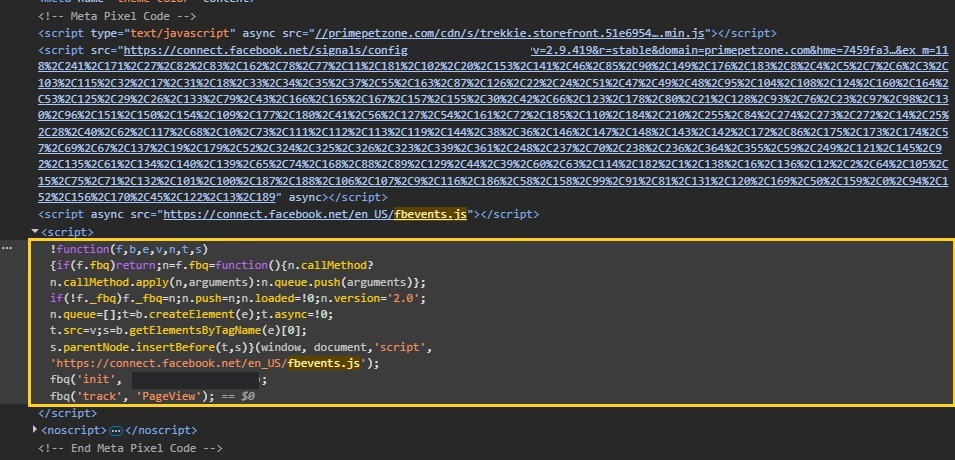
A real spender has ads live today, new ads this month and ads that have stayed live for months. A pixel alone is none of those.
Save the stores that pass this test to a Board as domains (Save Domain in Domain Details), then check them again weekly. Direction over a few weeks is the best tiebreaker you have.
The same pixel sits on a store with 143 live ads and on one whose last recorded ad ran in mid-August. Only the ads tell them apart.
Which tools find Shopify stores running Facebook ads?
Tool type (examples) | Starts from | Shows | Does not show | Best for |
|---|---|---|---|---|
Meta Ad Library (free) | A Page or a keyword | Live ads per Page, start dates | The store's platform, counts across Pages, stopped ads outside the EU and UK | Checking one store |
Shopify detectors (Wappalyzer, BuiltWith, Koala Inspector) | One website | Platform, theme, apps | Anything about ads | Step 2 above |
Store databases for prospecting (StoreCensus, StoreInspect) | Installed technology | Pixel and Conversions API flags, traffic estimates, contacts | The ads themselves over time | Agency lead lists |
Dropshipping spy and sales trackers (Minea, ZIK Analytics, Dropship.io) | Products and ads | Product and ad discovery; sales and revenue estimates | Real orders | Product research |
Meta ad intelligence with a Shopify filter (AdPlexity Social) | Every Meta ad in the index | The Meta ads it has recorded landing on Shopify stores, grouped by store domain, live and new ads, run dates, Pages, landing pages, redirect chains, tech stack | Sales, revenue or spend | Finding and qualifying stores by what they run |
Shopify detectors confirm the platform in seconds and say nothing about ads. Store databases are built for prospecting: they flag a pixel or a higher data sharing tier and hand you a contact, but StoreInspect's own guide sends readers back to the Ad Library to verify the ads themselves. Sales trackers find products and estimate revenue, and ZIK Analytics calls its own sales and revenue figures estimates. Only ad data tells you whether a store is actually spending right now: the free Library, checked one Page at a time, or a Meta ad intelligence tool with a Shopify filter. To see how that filter compares with a dedicated dropshipping spy tool, read how AdPlexity Social compares with Minea.
Mistakes that make a store look like a bigger spender than it is
The most common mistake is treating one Page as the whole store. Stores sometimes run ads from more than one Page, and a store network spreads the same product across many unrelated Pages on purpose. A single Page only shows part of a store's total, so count by domain, the way Step 4 does.
The second is ranking by lifetime ads instead of live ones. AdPlexity Social has recorded 442 ads in total for Ruff Rover and 464 for Dog Friendly Co., so ranked by lifetime ads the two look alike. Ranked by live ads in the dog harness search, they do not: Ruff Rover has 39 recorded as live against 113 for Dog Friendly Co., about a third as many.
The third is comparing stores across different niches. A gadget store and a furniture brand run different ad volumes because of the category, not the budget, so an ad count that looks small in one niche can belong to a big spender in another.
A common agency mistake is pitching a store on lifetime count alone. A store with a pixel and nothing live in the Ad Library is not spending on ads right now, whatever its total ad count says, and reaching out to it is a wasted send. Pitch the rising stores first.
Frequently Asked Questions
How do I see all the Facebook ads one Shopify store is running?
Open the store's Facebook Page, go to its Page transparency section, and open its ads in the Meta Ad Library. That shows every live ad from that one Page. A store can run ads from more than one Page, though, so search its domain as well. The Library shows one Page at a time and only live ads, while a domain search in a Meta ad intelligence tool gathers every ad recorded under that domain, across every Page, including ones already stopped.
Can you see how much a Shopify store spends on Facebook ads?
No public source shows what a store spends on ordinary commercial ads. The Ad Library only shows a spend range for ads about social issues, elections or politics, and any spend figure attached to a store in a prospecting tool is that vendor's own estimate, not a public record. The closest you can get is the store's live footprint: how many ads are live, how many are new, and how many Pages and months they cover. AdPlexity Social shows that footprint; it does not estimate spend.
Do spy tools show a Shopify store's real sales?
No. Nothing outside a store's own admin panel sees its actual orders, and sales trackers present revenue as estimates rather than facts, as ZIK Analytics says on its own product page. What you can see directly is the advertising itself: which ads are live, how new they are, and where they land. AdPlexity Social shows ads, landing pages and store domains, never sales figures.
How many Shopify stores run Facebook ads right now?
AdPlexity Social counts ads, not stores: in the 30 days to October 8, 2026, it recorded about 3.1 million Meta ads worldwide landing on a store with Shopify detected, the single most-detected platform among the technologies it tracks. That count comes from AdPlexity Social's own records, not a claim about every Shopify store that exists. The Shopify filter behind it is covered earlier in this guide.
Can I see Facebook ads a Shopify store ran in the past?
In the Meta Ad Library, a commercial ad disappears once it stops running, with one exception: ads delivered in the EU or the UK stay visible for a year after they stop. AdPlexity Social keeps ads after they stop too, recorded with their first and last seen dates, so a store's advertising history stays searchable instead of disappearing the moment a campaign ends.
How can you tell if a Shopify store is dropshipping?
Look at the storefront and the ads together. On the storefront, check for long shipping times, supplier photos and a generic about page. On the ad side, look for ads running from Pages whose names do not match the store, the same product page turning up on other storefronts, or numbered copies of one product page. A brand, by contrast, usually advertises from a Page carrying its own name and sells its own product line. No single signal proves anything by itself, so look for two or three lining up before you draw a conclusion.
Is it legal to research a competitor's Shopify store and its ads?
Looking is fine: Meta publishes the Ad Library for transparency, and a store's pages and ads are public by design. Copying is where the risk starts, since creatives, product photos and brand names belong to whoever made them. This is not legal advice, only a description of what is publicly visible and what is not.
Can you find Shopify stores running Facebook ads for free?
Yes, one store at a time: the Meta Ad Library plus the Shopify checks covered above take a few minutes per store. What free tools cannot do is rank an entire niche of stores at once, count a store's Pages, or show its advertising history once ads stop running, which is where a paid tool earns its place. For a broader comparison of where the free Library stops and paid tools pick up, see Minea alternatives, from the free Ad Library to paid tools.
Conclusion
Six steps tell you which Shopify stores are actually paying for Facebook ads, not just carrying old tracking code:
Find stores with live ads in the Meta Ad Library
Confirm the store runs on Shopify
Filter every Meta ad down to Shopify stores at once
Rank the stores by live ads, not lifetime totals
Check how long the oldest live ad has run
Follow the click to see what the store sells and who runs it
No single step proves a store is a real spender. Run them together and a guess turns into a pattern, one you can check again next week. Once you have a shortlist, the real question is which creative is winning inside that niche, and the guide on how to find the winning creatives inside a niche covers it. Sign up at adplexity.io and run the Shopify filter on your own niche. AdPlexity Social has indexed more than 100 million Meta ads, with more than 15 million new ones added every month.
Table of Contents
Does a Meta pixel mean a Shopify store is running Facebook ads?
Step 1: Find stores with live Facebook ads in the Meta Ad Library
Step 2: Check if the website is built on Shopify
Step 3: Filter every Meta ad down to Shopify stores
Step 4: Rank the stores by live ads, not lifetime ads
Step 5: See how long the store has been running Facebook ads
Step 6: Follow the click to see what the store sells and who runs it
How do you tell a real spender from a store that only has a pixel?
Which tools find Shopify stores running Facebook ads?
Mistakes that make a store look like a bigger spender than it is
Frequently Asked Questions
Conclusion
Key takeaways. Prime Pet Zone and Dog Friendly Co. are Shopify pet stores, and both carry the Meta pixel. Only one is running Facebook ads, and the pixel will not tell you which. Prime Pet Zone has no active ads in the Meta Ad Library, and AdPlexity Social last saw it advertising in mid-August. Dog Friendly Co. has 143 ads recorded as live, the oldest running since February. A pixel stays installed after the ads stop. So count the live ads, watch for new ones, and check how long the oldest has stayed live.
If you sell to Shopify stores or compete with them, and want a list of stores that are actually paying for Facebook ads right now, this guide shows you how to build one in about 20 minutes.
By the end, you will be able to:
Find stores from their live ads, not their tracking code: a pixel stays installed long after a budget stops.
Confirm a store runs on Shopify: in about 30 seconds, before you go any further.
Rank stores by what they run now: not by everything they have ever run.
Tell a real spender from a store with a leftover pixel: three checks, not a guess.
You only need a browser for the first two steps.
For case studies of what the biggest Shopify stores look like, see seven little-known Shopify stores scaling millions of ads. This guide is about finding them.
Does a Meta pixel mean a Shopify store is running Facebook ads?
No. A Meta pixel and the Conversions API only show that a store set up tracking at some point. Neither one proves an ad is live, or that one ever ran. The only public proof a Shopify store is paying for Facebook ads right now is the ads themselves: how many are live, whether new ones keep showing up, and how long they stay up.
On Shopify, the pixel and the Conversions API come from the same setting. In the Facebook & Instagram sales channel, the merchant picks a data sharing level: Standard uses the Meta pixel, and Enhanced and Maximum add the Conversions API on top of it. Both stay installed long after the last ad stops, because turning off tracking is a separate decision nobody bothers making. One pet store covered later in this guide still fires its pixel on page load almost two months after the last ad AdPlexity Social saw for it.
Store databases that estimate ad spend from a website's traffic are reading their own model, not a public record of what that store pays Meta. Treat any "ad spend" or "scaling" label a prospecting tool puts on a store as that vendor's own estimate, checkable only against itself.
Signal | What it proves | What it cannot prove |
|---|---|---|
A Meta pixel on the store | Someone installed Meta tracking at some point | That any ad is live, or ever ran |
A Conversions API flag in a store database | A higher data sharing level was selected | Spend or live ads |
A traffic or revenue estimate from a store tool | The vendor's model rates the store as busy | Where the traffic comes from or what it costs |
One live ad in the Ad Library | The store is advertising today | How much, or whether it is more than a test |
Many live ads across several Pages | A budget spread across ads right now | Profit |
New ads added in the last 30 days | The store is still investing | That the new ads work |
Ads kept live for months | The store keeps choosing to pay | Its margin |
The last three rows are the ones the steps further down actually measure.
A pixel stays installed long after the last ad stops. Treat it as a lead, never as proof of spend.
A pixel proves tracking. Live ads prove spend.
Step 1: Find stores with live Facebook ads in the Meta Ad Library
Open facebook.com/ads/library, choose your country, and set the ad category to "All ads." Search for the product the way a shopper would say it, not a brand name: for this guide, "dog harness." Keep active ads only. Each ad card names the Facebook Page that ran it, and the ad's own link shows the store's domain. Open the Page's transparency section, or click through from the card, to see everything else that Page is running right now.
One store often advertises from more than one Page, so you can also search its domain directly, for example yourstore.com, to catch ads run by its other Pages. This is a text match, though, so an ad routed through a redirect or an unfamiliar subdomain can slip past.
The Library will not tell you what platform sits behind a store, and it only counts the one Page you are viewing. It also loses a store's history, because a commercial ad disappears the moment it stops running. Ads delivered in the EU or the UK are the exception: they stay visible for a year after they stop. So it tells you whether a store is live today, not how big its footprint is or how long it has been running. That is enough for checking one store, or for scanning a niche by hand a Page at a time, but it will not rank a whole niche for you. The next few steps fix these limits one at a time.
Quality check: If the first screen of results is all household names, search a narrower product phrase. Small Shopify stores advertise products, not categories.
Search the product, not the brand.
Step 2: Check if the website is built on Shopify
Confirming a store runs on Shopify takes about 30 seconds, once you know which tells actually prove it. A URL shaped like /products/ or /collections/ only hints at Shopify: other ecommerce platforms use the same paths. A vendor hostname sitting in the page source is proof, because nothing but a Shopify-hosted store serves a page from it.
Check | How to do it | What it proves |
|---|---|---|
Add /admin to the store's address | Type yourstore.com/admin in the browser | Proof, a Shopify login page means Shopify |
View the page source | Search it for cdn.shopify.com or Shopify.theme | Proof |
Look for a myshopify.com address | Search the page source | Proof |
/products/ and /collections/ in the URLs | Read the store's own URLs | Hint only, other platforms use similar paths |
A "Powered by Shopify" footer | Scroll to the bottom of the page | Hint only, many stores remove it |
A detector extension | Install Wappalyzer or BuiltWith | Reads the same tells, fastest |
Quality check: If no hard tell shows up, do not count the store as Shopify, whatever its URLs look like.
Dog Friendly Co. shows two hard tells. Searching its page source for "myshopify.com" finds the store's own Shopify address, dogfriendlyco.myshopify.com, and adding /admin to its address sends you to a Shopify login page. Either one is proof on its own, so the store counts as Shopify.
Checking one store by hand works fine. It scales badly once you are looking at a whole niche of them, and the Shopify filter below fixes that.
Hostnames are proof. URL paths are only a hint.
Step 3: Filter every Meta ad down to Shopify stores
Checking a whole niche in the Ad Library one store at a time, by hand, does not hold up. AdPlexity Social flips the order: instead of starting from a list of stores, it starts from the ads. It visits the landing pages behind every Meta ad it indexes and records what each page is built with, so Shopify becomes a filter you apply, not a guess you make store by store. The search reads the landing page as well as the ad copy, so a store whose ad text never mentions the product by name still turns up.
Open Explore, go to the Ads tab, and type the product keyword, here "dog harness," to search the ad or its landing page. Open Add Filter, choose Technology, and tick Shopify. Set the date range to Last 30 Days, and add Country: United States. Then switch to the Domains tab. Instead of one row per ad, every row becomes one store domain, holding the ads from every Page that advertises it.
In the 30 days to October 8, 2026, AdPlexity Social recorded about 3.1 million Meta ads landing on a page with Shopify detected, across all Meta placements and the 16 markets it tracks. That makes Shopify the most-detected platform in its technology breakdown for that window, ahead of PWA, Google Play, LeadConnectorHQ and VTurb.
Count stores by domain, not by Page.
See every Meta ad AdPlexity Social has recorded landing on a Shopify store, grouped by store. Sign up at adplexity.io. AdPlexity Social has indexed more than 100 million Meta ads, with more than 15 million new ones added every month.
Step 4: Rank the stores by live ads, not lifetime ads
Get the numbers in the Domains view straight before you rank anything, because mixing them up will wreck your ranking. Ads (search) counts only the ads matching your current search inside the selected time frame, so it works for comparing stores within one niche. Ads (total) is bigger: AdPlexity Social's own tooltip calls it "all ads in our database, regardless of search criteria or timeframe," and it shows two numbers, active first, inactive after. Read it as the fullest picture AdPlexity Social has recorded for that domain, not the store's literal lifetime count.
Start with Active, the live footprint right now. Then read New Ads (30d), which counts new ads matching your search in the window, with the percentage change against the equal period before it. Those new ads show whether the store is still investing, and the percentage shows which way that is moving. Finish with Countries to see whether the store is expanding.
Sorted by active ads, the same dog harness search puts Dog Friendly Co. first, with 113 of its ads recorded as live (read on October 13, 2026). Its new ads rose 550% against the previous 30 days, so it is still adding ads on top of the biggest live count in the search. Ruff Rover is second with 39 live, and its new ads rose about 19%, a much slower climb. Further down, FourPaw is fifth with 9 live, and its new ads fell 84% against the previous 30 days. BarkingMeows no longer makes the top rows: 5 of its 15 recorded ads are live, and its newest ad is from June. Compare only inside one niche, because ad volume depends on the vertical and the product: there is no universal "big spender" number that holds for a gadget store and a dog harness brand alike.
Quality check: If a store has a big total, a small active count and falling new ads, it is a past spender. Move it down the list, however big the total looks.
Rank by what is live, not by what was ever run.
Step 5: See how long the store has been running Facebook ads
Search the store's domain in AdPlexity Social, sort by Running Longest, open the ad at the top and read its First seen date. For Dog Friendly Co., the oldest ad still running is a harness ad shown in Australia, first seen on February 24, 2026. It was still running on October 11, almost eight months later, and one ad kept live that long is a store choosing to keep paying. In the United States, the oldest ad still running is a dog bed ad that started on May 14, 2026.
Domain Details puts the whole history on one screen: First Seen, Last Seen, Days Running, active and total ads, the number of Pages running its ads and an Ads Activity Over Time chart. For Dog Friendly Co. it reaches back to May 24, 2025, and the activity chart climbs steeply from August 2026. A Creatives tab lists the creatives behind those ads, and a store spread across several creatives reads as a testing budget, not one lucky ad. Any single creative's own numbers come from that creative's header in Explore, never from this tab.
To tell whether one specific ad is actually profitable, you need a different kind of check, and that belongs in its own guide. This one stays at the level of the whole store.
Quality check: If every ad started in the last few weeks, call it too early and check again in 7 days.
A store that keeps ads live for months is choosing to keep paying.
Step 6: Follow the click to see what the store sells and who runs it
What the store sells
Nearly every landing page AdPlexity Social recorded for Dog Friendly Co. in the last 30 days is a presell article, not a product page. Of its 76 landing page records, 74 sit under /pages/, and none points straight at a /products/ page. Those 74 are spread across 18 different listicle-style presell pages, built to warm a visitor up before the product. The other 2 point at the dog harness collection. One of them is where the oldest live ad from Step 5 leads: it links to the store's US collection and sends an Australian visitor on to the .com.au storefront in one redirect, with no tracker in between. For how to read a redirect chain like that, see reverse-engineer the funnel behind a store's ads.
Who runs the ads
Dog Friendly Co. runs nearly all of its ads from its own Page. Domain Details lists 7 Pages sending ads to the store, but the store's own Page holds 423 of the ads AdPlexity Social has recorded for it. That points to a brand buying its own traffic, not a network scattering one product across Pages that share nothing but the product.
The other Pages are small: review-style ones such as Dog Product Reviews, and one named after a person. They are extra doors into the store, though. Dog Product Reviews runs ads for an article ranking six popular dog harnesses, and every one of the article's 9 buy links goes to www.dogfriendlyco.com, none to the other five brands it ranks. To find doors like that, trust the click, not the Page name.
Signal | Usually a brand | Usually a store network |
|---|---|---|
Pages running the ads | One or a few, named like the store | Many, with names unrelated to the store |
Products advertised | Its own line, several products | One or a few trending products |
Product page URLs | Clean handles | Numbered copies of the same page |
The same product elsewhere | Not found | On other storefront domains |
The storefront itself | Own photos, a clear about page | Long shipping times, supplier photos, a generic about page |
One signal alone proves nothing, so look for two or three lining up before you call it a pattern. On these signals Dog Friendly Co. still reads as a brand: its own Page carries nearly all the ads, it runs its own presell pages and regional storefronts, and a few small review-style Pages add extra doors in.
The pages behind the ads show who really runs the store.
How do you tell a real spender from a store that only has a pixel?
Profile | What you see | What it means | What to do |
|---|---|---|---|
Pixel only | The pixel fires, the Library shows no live ads, none seen in the last 30 days | Tracking left in place; ads paused, finished or never started | Skip it for now, check again next month |
Light spender | One to a few live ads, no new ads this month, often months old | A small evergreen or retargeting budget | Low priority |
Too early to call | Every ad started in the last few weeks, no earlier history | A product test or a new launch | Check again in 7 days |
Scaling spender | Many live ads, new ads up on the previous period, oldest live ad months old | A real budget that is still growing | Study it now; for agencies, the strongest prospect |
Fading spender | Big total, few live ads, new ads falling | A past spender winding down | Learn from its history, do not copy it now |
Store network | The same product on many storefronts, ads from many unrelated Page names, numbered copies of product pages | A product scaled through many stores, not a brand | Study the product and creative, not the storefront |
Four of these six profiles show up among the stores in this guide. Dog Friendly Co. is the scaling spender: AdPlexity Social has 143 of its ads recorded as live, and its new ads in the dog harness search rose 550% against the month before. FourPaw was too early to call in late September, when every ad AdPlexity Social had recorded for it was under two months old, so the move was to check again. On October 13 its new ads in the same search had fallen 84% against the month before, and that second look turned a guess into a read. BarkingMeows, the light spender, has 5 of its 15 recorded ads live, and the newest one is from June.
Prime Pet Zone is the pixel-only case: its storefront fires the Meta pixel on every page load, but its Page has nothing active in the Ad Library. The last ad AdPlexity Social saw for it ran in mid-August.
A real spender has ads live today, new ads this month and ads that have stayed live for months. A pixel alone is none of those.
Save the stores that pass this test to a Board as domains (Save Domain in Domain Details), then check them again weekly. Direction over a few weeks is the best tiebreaker you have.
The same pixel sits on a store with 143 live ads and on one whose last recorded ad ran in mid-August. Only the ads tell them apart.
Which tools find Shopify stores running Facebook ads?
Tool type (examples) | Starts from | Shows | Does not show | Best for |
|---|---|---|---|---|
Meta Ad Library (free) | A Page or a keyword | Live ads per Page, start dates | The store's platform, counts across Pages, stopped ads outside the EU and UK | Checking one store |
Shopify detectors (Wappalyzer, BuiltWith, Koala Inspector) | One website | Platform, theme, apps | Anything about ads | Step 2 above |
Store databases for prospecting (StoreCensus, StoreInspect) | Installed technology | Pixel and Conversions API flags, traffic estimates, contacts | The ads themselves over time | Agency lead lists |
Dropshipping spy and sales trackers (Minea, ZIK Analytics, Dropship.io) | Products and ads | Product and ad discovery; sales and revenue estimates | Real orders | Product research |
Meta ad intelligence with a Shopify filter (AdPlexity Social) | Every Meta ad in the index | The Meta ads it has recorded landing on Shopify stores, grouped by store domain, live and new ads, run dates, Pages, landing pages, redirect chains, tech stack | Sales, revenue or spend | Finding and qualifying stores by what they run |
Shopify detectors confirm the platform in seconds and say nothing about ads. Store databases are built for prospecting: they flag a pixel or a higher data sharing tier and hand you a contact, but StoreInspect's own guide sends readers back to the Ad Library to verify the ads themselves. Sales trackers find products and estimate revenue, and ZIK Analytics calls its own sales and revenue figures estimates. Only ad data tells you whether a store is actually spending right now: the free Library, checked one Page at a time, or a Meta ad intelligence tool with a Shopify filter. To see how that filter compares with a dedicated dropshipping spy tool, read how AdPlexity Social compares with Minea.
Mistakes that make a store look like a bigger spender than it is
The most common mistake is treating one Page as the whole store. Stores sometimes run ads from more than one Page, and a store network spreads the same product across many unrelated Pages on purpose. A single Page only shows part of a store's total, so count by domain, the way Step 4 does.
The second is ranking by lifetime ads instead of live ones. AdPlexity Social has recorded 442 ads in total for Ruff Rover and 464 for Dog Friendly Co., so ranked by lifetime ads the two look alike. Ranked by live ads in the dog harness search, they do not: Ruff Rover has 39 recorded as live against 113 for Dog Friendly Co., about a third as many.
The third is comparing stores across different niches. A gadget store and a furniture brand run different ad volumes because of the category, not the budget, so an ad count that looks small in one niche can belong to a big spender in another.
A common agency mistake is pitching a store on lifetime count alone. A store with a pixel and nothing live in the Ad Library is not spending on ads right now, whatever its total ad count says, and reaching out to it is a wasted send. Pitch the rising stores first.
Frequently Asked Questions
How do I see all the Facebook ads one Shopify store is running?
Open the store's Facebook Page, go to its Page transparency section, and open its ads in the Meta Ad Library. That shows every live ad from that one Page. A store can run ads from more than one Page, though, so search its domain as well. The Library shows one Page at a time and only live ads, while a domain search in a Meta ad intelligence tool gathers every ad recorded under that domain, across every Page, including ones already stopped.
Can you see how much a Shopify store spends on Facebook ads?
No public source shows what a store spends on ordinary commercial ads. The Ad Library only shows a spend range for ads about social issues, elections or politics, and any spend figure attached to a store in a prospecting tool is that vendor's own estimate, not a public record. The closest you can get is the store's live footprint: how many ads are live, how many are new, and how many Pages and months they cover. AdPlexity Social shows that footprint; it does not estimate spend.
Do spy tools show a Shopify store's real sales?
No. Nothing outside a store's own admin panel sees its actual orders, and sales trackers present revenue as estimates rather than facts, as ZIK Analytics says on its own product page. What you can see directly is the advertising itself: which ads are live, how new they are, and where they land. AdPlexity Social shows ads, landing pages and store domains, never sales figures.
How many Shopify stores run Facebook ads right now?
AdPlexity Social counts ads, not stores: in the 30 days to October 8, 2026, it recorded about 3.1 million Meta ads worldwide landing on a store with Shopify detected, the single most-detected platform among the technologies it tracks. That count comes from AdPlexity Social's own records, not a claim about every Shopify store that exists. The Shopify filter behind it is covered earlier in this guide.
Can I see Facebook ads a Shopify store ran in the past?
In the Meta Ad Library, a commercial ad disappears once it stops running, with one exception: ads delivered in the EU or the UK stay visible for a year after they stop. AdPlexity Social keeps ads after they stop too, recorded with their first and last seen dates, so a store's advertising history stays searchable instead of disappearing the moment a campaign ends.
How can you tell if a Shopify store is dropshipping?
Look at the storefront and the ads together. On the storefront, check for long shipping times, supplier photos and a generic about page. On the ad side, look for ads running from Pages whose names do not match the store, the same product page turning up on other storefronts, or numbered copies of one product page. A brand, by contrast, usually advertises from a Page carrying its own name and sells its own product line. No single signal proves anything by itself, so look for two or three lining up before you draw a conclusion.
Is it legal to research a competitor's Shopify store and its ads?
Looking is fine: Meta publishes the Ad Library for transparency, and a store's pages and ads are public by design. Copying is where the risk starts, since creatives, product photos and brand names belong to whoever made them. This is not legal advice, only a description of what is publicly visible and what is not.
Can you find Shopify stores running Facebook ads for free?
Yes, one store at a time: the Meta Ad Library plus the Shopify checks covered above take a few minutes per store. What free tools cannot do is rank an entire niche of stores at once, count a store's Pages, or show its advertising history once ads stop running, which is where a paid tool earns its place. For a broader comparison of where the free Library stops and paid tools pick up, see Minea alternatives, from the free Ad Library to paid tools.
Conclusion
Six steps tell you which Shopify stores are actually paying for Facebook ads, not just carrying old tracking code:
Find stores with live ads in the Meta Ad Library
Confirm the store runs on Shopify
Filter every Meta ad down to Shopify stores at once
Rank the stores by live ads, not lifetime totals
Check how long the oldest live ad has run
Follow the click to see what the store sells and who runs it
No single step proves a store is a real spender. Run them together and a guess turns into a pattern, one you can check again next week. Once you have a shortlist, the real question is which creative is winning inside that niche, and the guide on how to find the winning creatives inside a niche covers it. Sign up at adplexity.io and run the Shopify filter on your own niche. AdPlexity Social has indexed more than 100 million Meta ads, with more than 15 million new ones added every month.
Table of Contents
Quickly navigate through the key sections of this article.
Discover Winning Meta Ads
Similar Blogs
Check related blogs
Check related blogs
Check related blogs




























Ready to See What’s Really Working on Meta?
Adplexity
Social
© Copyright 2026 All Rights Reserved
Ready to See What’s Really Working on Meta?
Adplexity
Social
© Copyright 2026 All Rights Reserved
Ready to See What’s Really Working on Meta?
Adplexity
Social
© Copyright 2026 All Rights Reserved